SMART on FHIR and OAuth2 Scopes
- 3 min
- 4 steps
- Lesson 43 of 51
In this lesson
- The problem: third-party apps need safe access
- Two launch modes
- The authorization flow
- Scopes: least privilege, expressed in FHIR terms
Picking up where you left off.
The problem: third-party apps need safe access
A FHIR server exposes patient data over HTTP, but an Electronic Health Record cannot simply hand any application its database. A clinician launching a risk-calculator app, or a patient using a health app against a portal, needs that app to reach exactly the right data, with the user’s authorization, and nothing more. SMART App Launch is the HL7 implementation guide that defines how this is done, built on the widely used OAuth 2.0 authorization standard rather than inventing a new security scheme 1.
Two launch modes
SMART supports two ways an app starts 1:
- EHR launch — the app is launched from inside an EHR session (for example,
a clinician clicks it while a patient’s chart is open). The EHR passes a
launchparameter so the app can pick up the current context. - Standalone launch — the app is launched on its own (for example, a patient opens a health app on their phone) and must ask the user which server to connect to and authorize against.
The authorization flow
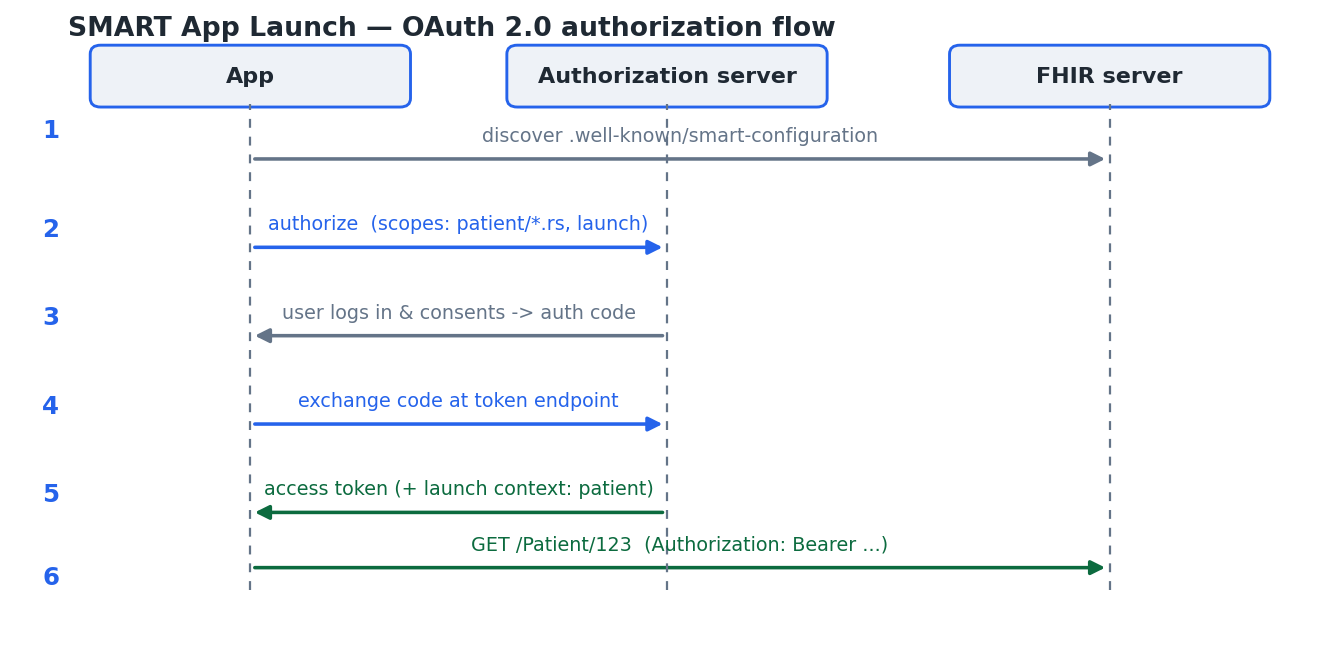
Whichever mode, the app follows an OAuth 2.0 authorization-code flow, shown in the figure 1:
- Discovery. The app fetches the server’s SMART configuration from a
well-known URL — the FHIR base URL plus
/.well-known/smart-configuration— which advertises theauthorization_endpointandtoken_endpoint1. - Authorization request. The app redirects the user to the authorization
endpoint, listing the scopes it wants (and, for an EHR launch, the
launchscope and id). - User authentication and consent. The authorization server logs the user in and asks them to approve the requested access, then returns an authorization code to the app.
- Token exchange. The app exchanges that code at the token endpoint for an access token.
- Launch context. Along with the token, the server may return context such as
the in-scope
patientid, so the app knows whose chart it was launched for. - API calls. The app calls the FHIR API, presenting the access token as a
bearer token (
Authorization: Bearer …). The server enforces that every request stays within the granted scopes 2.
Scopes: least privilege, expressed in FHIR terms
The power of SMART is that its OAuth scopes are written in terms of FHIR itself 1. A scope names who the access is on behalf of, which resource type, and what operations:
patient/Observation.rs    read + search Observations for the in-context patient
user/Encounter.rs         read + search Encounters the user may see
system/Patient.rs         backend service: read + search Patients in its dataset
The patient/, user/, and system/ prefixes distinguish a patient-scoped app,
a user-scoped app, and a backend service; the suffix (here .rs) grants specific
interactions — create, read, update, delete, search — rather than blanket access.
This is least privilege in practice: an app that only needs to read observations
asks for exactly that, the user sees exactly that on the consent screen, and the
server enforces exactly that on every call. The next lesson turns from
single-patient apps to moving data for whole populations with Bulk Data.
Lesson complete
Nice work.
Sources for this lesson
- 1HL7 SMART App Launch Implementation Guide. HL7 International. verifiedOAuth 2.0-based authorization framework for launching apps against a FHIR server; defines launch sequence, .well-known/smart-configuration, and scopes. Cited at: app-launch.html; scopes-and-launch-context.html.
- 2HL7 FHIR Release 4 (R4), v4.0.1. HL7 International. 2019. verifiedThe normative base release of FHIR (published 2019-10-30). Cite with page locators (e.g., http.html, search.html, bundle.html). R5 (v5.0.0, 2023) is the latest release; R4 remains the most widely deployed. Cited at: http.html.