Floating-Point and Error
Why 0.1 + 0.2 isn't 0.3: IEEE 754 doubles, absolute and relative error, machine epsilon and the spacing of floating-point numbers, accumulation and catastrophic cancellation, and habits that keep error under control.
- 5 min
- 7 steps
- 3 questions
- Lesson 27 of 36
In this lesson
- How Computers Store Real Numbers
- The Canonical Demonstration
- Measuring Error
- Machine Epsilon
- When Small Errors Grow
- Practical Guidance
Picking up where you left off.
Every numerical method you are about to learn — root finding, integration, solving differential equations — produces an approximate answer. Some of that error comes from the method itself, but a more fundamental source is already present before any algorithm runs: the computer cannot store most real numbers exactly. Understanding this limitation is the foundation of numerical computing, because it changes how you write, test, and trust your code.
How Computers Store Real Numbers
A real number can have infinitely many digits, but a computer has only a finite number of bits. The near-universal compromise is the IEEE 754 double-precision floating-point format, which Python uses for its float type. Each number is stored in 64 bits as a sign, an exponent, and a fraction — essentially scientific notation in base 2. This buys a wide range of magnitudes and roughly 15 to 17 significant decimal digits of precision.
The catch is the same one you meet with decimal fractions. Just as \(\tfrac{1}{3}\) has no finite decimal expansion, most “nice” decimals have no finite binary expansion. The value \(0.1\) is one of them: in binary it repeats forever, so the stored value is the nearest representable double, not \(0.1\) exactly. The number you typed is silently rounded to the closest value the format can hold 1.
The Canonical Demonstration
Because the stored values are slightly off, arithmetic on them inherits small errors. The classic example surprises nearly everyone the first time:
a = 0.1 + 0.2
print(a)            # 0.30000000000000004
print(a == 0.3)     # False

import math
print(math.isclose(a, 0.3))        # True
print(abs(a - 0.3) < 1e-9)         # True
Neither 0.1, 0.2, nor 0.3 is stored exactly, and the rounding errors do not cancel, so the sum lands just past 0.3. The lesson is concrete and important: never compare floating-point results with ==. Instead, test whether two values are close enough, either with an explicit tolerance such as abs(a - b) < 1e-9 or with math.isclose, which handles both absolute and relative tolerances sensibly.
Quick check
Compare with math.isclose or a tolerance instead of ==.
Measuring Error
To reason about “close enough,” we need to quantify error. If \(x\) is the true value and \(\tilde{x}\) is the computed approximation, the absolute error is
and the relative error is
Absolute error is in the same units as the quantity; relative error is dimensionless and usually more meaningful. An absolute error of \(1\) is negligible when measuring the distance to the moon but catastrophic when counting heartbeats. Relative error captures “how many significant digits are correct,” which is why it dominates discussions of floating-point accuracy.
Machine Epsilon
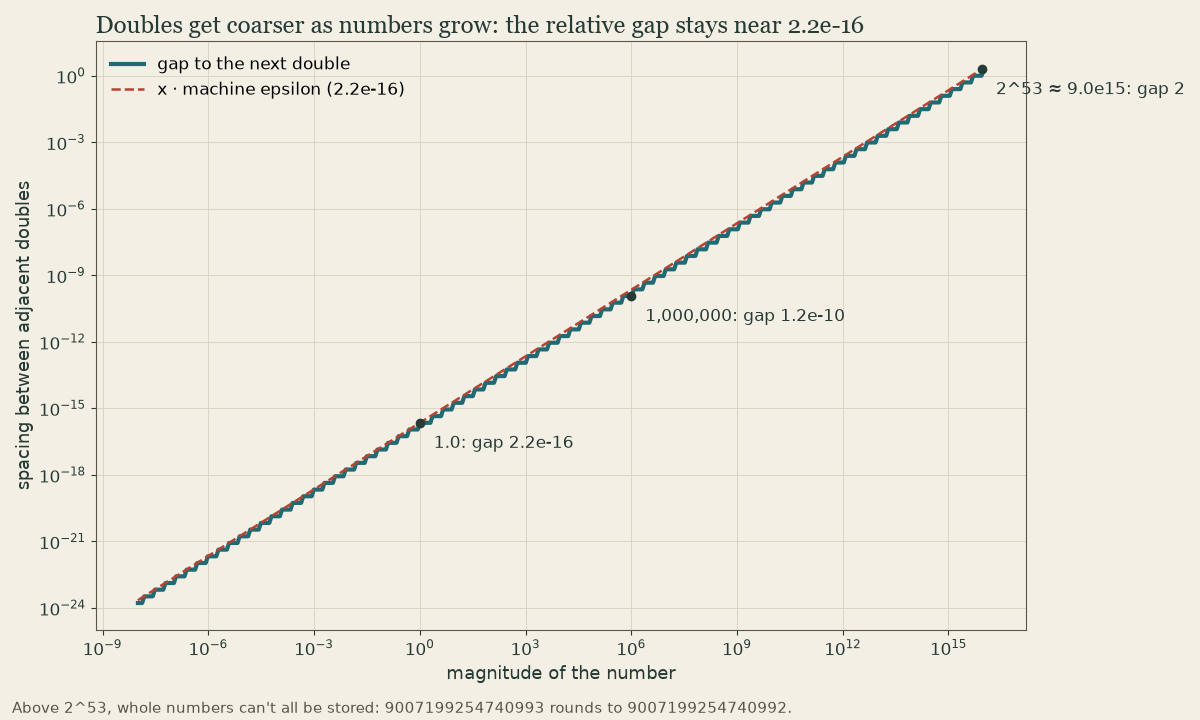
The precision of the format is summarized by machine epsilon, the gap between \(1.0\) and the next larger representable number — equivalently, the smallest relative spacing between adjacent floating-point values. For IEEE 754 doubles it is about \(2.2 \times 10^{-16}\) (available in Python as sys.float_info.epsilon). You can read this as the relative error floor of a single stored value: any real number is represented with a relative error no larger than roughly machine epsilon. This is consistent with the “15–17 significant digits” rule of thumb, since \(2.2 \times 10^{-16}\) corresponds to about 16 decimal digits.
Quick check
It’s the relative gap between adjacent doubles, so the absolute gap grows with magnitude.
When Small Errors Grow
A single rounding error is tiny, but numerical methods perform millions of operations, and errors can accumulate. Summing many numbers, for instance, lets round-off build up step by step, so a long sum computed naively can drift noticeably from the true total.
A sharper danger is catastrophic cancellation: subtracting two nearly equal numbers destroys significant digits. Suppose two values agree to 15 digits and differ only in the 16th. Each is known to about 16 digits, but their difference keeps only the digits where they disagree — perhaps a single significant digit, now dominated by the round-off in the inputs. A familiar trap is the quadratic formula \(\frac{-b + \sqrt{b^2 - 4ac}}{2a}\) when \(b^2 \gg 4ac\): the numerator subtracts two close quantities and loses precision, even though an algebraically equivalent rearrangement avoids the cancellation entirely.
Quick check
Look for an algebraically equivalent formula that avoids the subtraction.
Practical Guidance
A few habits will keep error under control throughout this module:
- Compare with tolerances, not
==. Usemath.iscloseor an explicit threshold sized to your problem. - Distrust subtraction of close quantities. Look for an equivalent formula that avoids the cancellation.
- Prefer numerically stable formulas and library routines, which are written to minimize accumulated error.
- Expect error in every result. No numerical method returns the exact answer; it returns a good approximation with a knowable error.
Keep this last point in mind as the module continues. When we find roots, approximate integrals, and march through differential equations, “how accurate is this, and can I trust it?” will be the recurring question — and it begins here, with the finite arithmetic underneath every computation.
Lesson complete
Nice work.
Sources for this lesson
- 1The Python Tutorial and Language Reference (Python 3). Python Software Foundation. verified Cited at: Floating-Point Arithmetic.
Previous: Working with Arrays and Plotting (NumPy and Matplotlib)