Variables, Types, and Control Flow
Python as an engineering calculator: variables and dynamic typing, int, float, bool, and str, the division operators, comparisons and boolean logic, if/elif/else, for and while loops, indentation, and a worked moisture-content log.
- 6 min
- 7 steps
- 3 questions
- Lesson 24 of 78
In this lesson
- Why Python for Engineering Computation
- Variables and Dynamic Typing
- Core Built-in Types and Arithmetic
- Comparisons and Boolean Logic
- Control Flow
- Worked example: a moisture-content log
- Where This Goes Next
Picking up where you left off.
Why Python for Engineering Computation
Engineering work increasingly means turning equations into running code: solving systems numerically, processing measurement data, and automating repetitive calculations. Python is the dominant language for this kind of scientific and engineering computing, and for good reasons. Its syntax is unusually readable, so a script tends to look much like the procedure you would write by hand. It is “batteries-included,” shipping with a large standard library, and it anchors a vast ecosystem of numerical and engineering packages built on top of it. You can express an idea quickly, check it against intuition, and refine it — which matches how engineers actually iterate on a calculation.
This lesson assumes comfort with engineering mathematics but no prior programming. It covers how Python stores values, the core built-in types and operators, and the control-flow constructs that let a program make decisions and repeat work.
Variables and Dynamic Typing
A variable in Python is a name bound to a value. You create the binding with =, and you never declare a type in advance — Python infers it from the value. This is called dynamic typing.
mass = 12.5        # a float
count = 3          # an int
label = "beam_A"   # a str
is_valid = True    # a bool
The same name can later be rebound to a value of a different type; the name is just a label, and the type travels with the value, not with the name. You can inspect a value’s type with the built-in type(...) function.
Core Built-in Types and Arithmetic
Four built-in types cover most early work:
int— whole numbers of arbitrary size, e.g.42.float— double-precision real numbers, e.g.9.81.bool— the truth valuesTrueandFalse.str— text, written in single or double quotes, e.g."N/m^2".
The arithmetic operators behave as an engineer expects, with a few worth highlighting:
**raises to a power:2 ** 10is1024./is true division and always yields afloat:7 / 2is3.5.//is floor division, discarding the remainder:7 // 2is3.%is the modulo (remainder) operator:7 % 2is1.
True division returning a float even for evenly dividing integers (4 / 2 is 2.0) is a deliberate design choice you should expect 1.
Quick check
// is floor division; / always returns a float (3.5); % gives the remainder (1).
Comparisons and Boolean Logic
Comparison operators (==, !=, <, <=, >, >=) compare two values and produce a bool. Note that equality is ==; a single = is assignment, not comparison. The boolean operators and, or, and not combine or negate truth values:
temperature = 85
in_range = (temperature > 0) and (temperature < 100)   # True
out_of_range = not in_range                            # False
and and or evaluate left to right and stop as soon as the result is determined, which is convenient when a later test only makes sense if an earlier one passed.
Quick check
if x = 5: fail in Python?Python raises a syntax error rather than silently assigning.
Control Flow
Control flow decides which statements run and how often.
Conditionals use if, optional elif branches, and an optional else:
def water_state(celsius):
    if celsius <= 0:
        return "solid"
    elif celsius < 100:
        return "liquid"
    else:
        return "gas"
for loops iterate over a sequence. range(...) produces a span of integers, and you can also loop directly over any iterable such as a list:
# Sum the series 1^2 + 2^2 + ... + 10^2
total = 0
for n in range(1, 11):   # 1, 2, ..., 10 (the upper bound is excluded)
    total = total + n ** 2
print(total)             # 385

for reading in [10.2, 11.0, 9.8]:
    print(reading)
while loops repeat as long as a condition holds. break exits a loop immediately, and continue skips to the next iteration:
balance = 1.0
years = 0
while balance < 2.0:        # how long to double at 7% per year?
    balance = balance * 1.07
    years = years + 1
print(years)                # 11
Indentation Defines Blocks
Python has no curly braces. Instead, indentation marks which statements belong to a block — the body of an if, a loop, or a function. A consistent indent (four spaces is the convention) opens a block, and returning to the previous indent level closes it. This is enforced by the language, not merely a style preference, so misaligned lines are an error rather than a silent bug.
Quick check
Four spaces per level is the convention; the language enforces consistent indentation.
Worked example: a moisture-content log
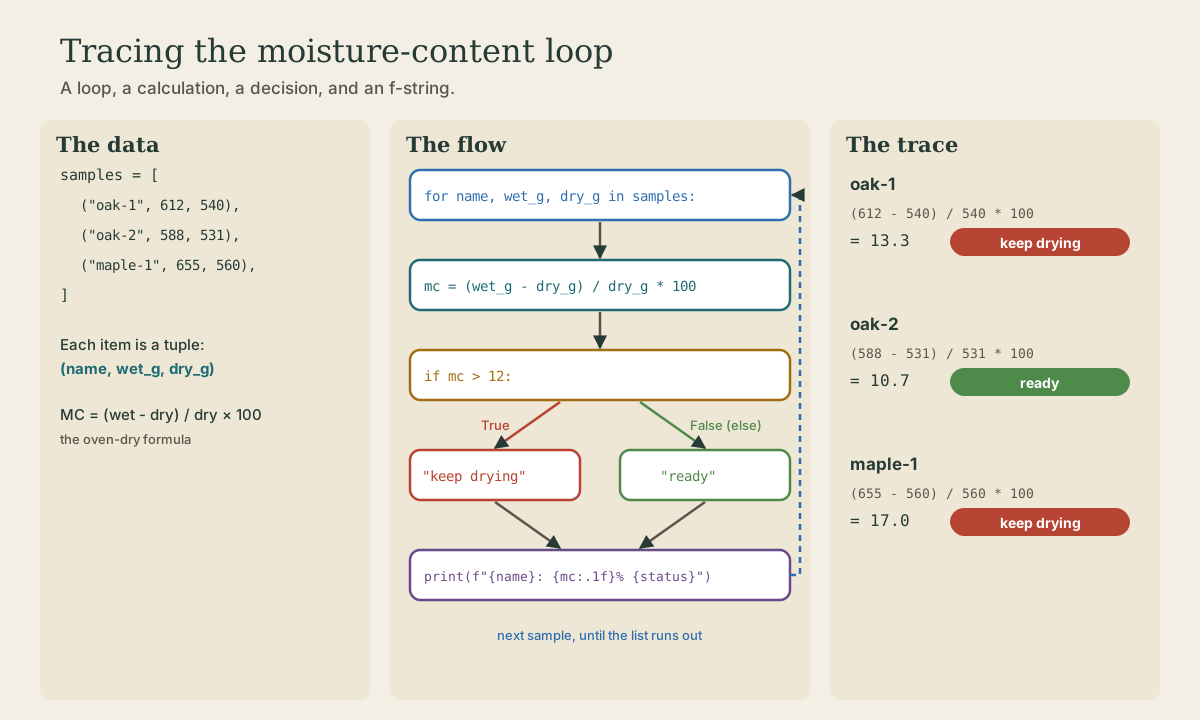
The oven-dry method (see The Oven-Dry Method in Wood Drying) gives moisture content as \(MC = \frac{\text{wet} - \text{dry}}{\text{dry}} \times 100\). A few lines of Python check a stack of samples and flag any too wet for furniture:
samples = [("oak-1", 612, 540), ("oak-2", 588, 531), ("maple-1", 655, 560)]
for name, wet_g, dry_g in samples:
    mc = (wet_g - dry_g) / dry_g * 100
    if mc > 12:
        status = "keep drying"
    else:
        status = "ready"
    print(f"{name}: {mc:.1f}% {status}")
# oak-1: 13.3% keep drying
# oak-2: 10.7% ready
# maple-1: 17.0% keep drying
Every piece of this lesson is there: tuples unpacked in a for loop, float arithmetic with /, a comparison feeding if/else, and an f-string formatting the result to one decimal place.
Where This Goes Next
You now have the vocabulary of values, types, operators, and control flow — enough to express many engineering calculations. The next lessons build on this foundation with functions, which package a computation behind a name so it can be reused and tested, and with data structures such as lists and dictionaries, which organize the collections of values that real engineering problems produce.
Lesson complete
Nice work.
Sources for this lesson
- 1The Python Tutorial and Language Reference (Python 3). Python Software Foundation. verified Cited at: The Python Tutorial.