What a Branch Is
A branch is a lightweight, movable pointer to a commit, and HEAD points to the branch you're on; committing moves the current branch forward. Create and switch with git switch -c, move between branches with git switch, list them with git branch, see them all with git log --oneline --graph --all, and delete merged ones with git branch -d. What happens to uncommitted changes when you switch, and what a detached HEAD is.
- 5 min
- 8 steps
- 2 questions
- Lesson 31 of 80
In this lesson
- Why branches
- A pointer that moves
- Making and switching branches
- Switching with uncommitted changes
- Deleting branches
- Detached HEAD
- Your turn
- So
Picking up where you left off.
Why branches
A branch lets you work on something without disturbing what’s on your main line: try an idea, build a feature, or fix one thing while another is half done. If it works out you merge it in; if not, you delete it 1.
Git’s branches are famously cheap. To see why, you need to know what one actually is.
A pointer that moves
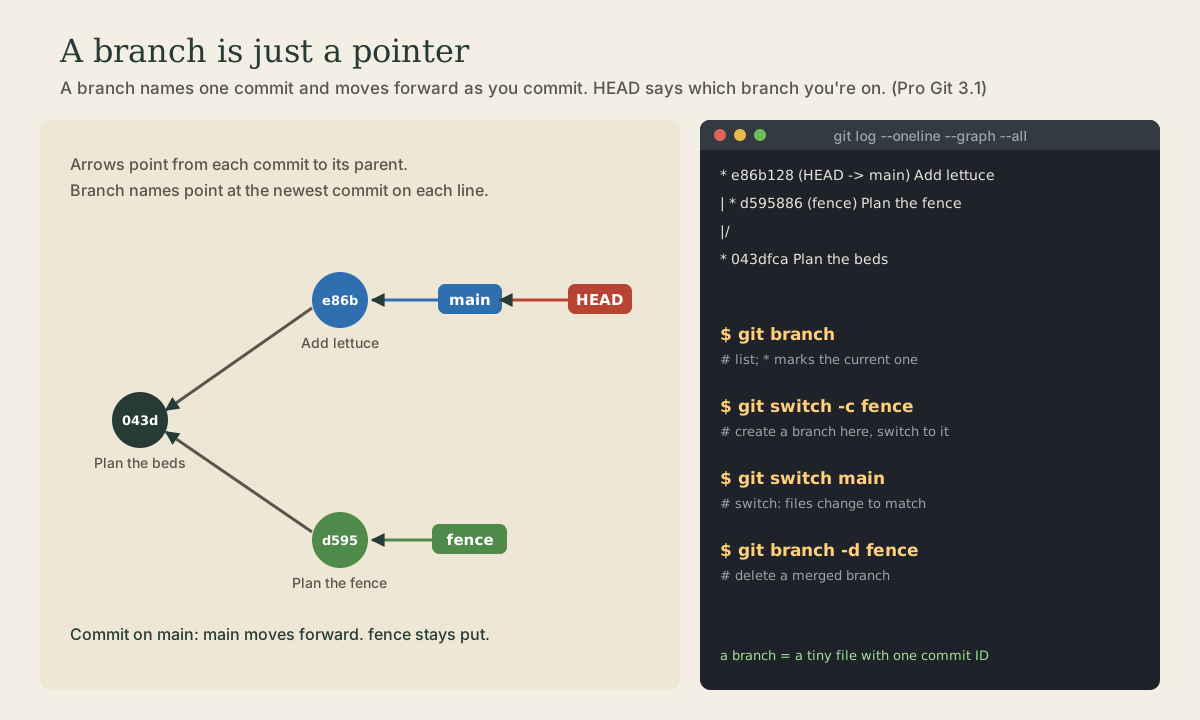
Every commit points back to its parent. A branch is just a lightweight, movable pointer to one of those commits: a name like main attached to a commit ID 1. On disk, a branch is a tiny file holding that one ID, which is why creating one is instant 1.
Git keeps one more special pointer, HEAD, that says which branch you’re on 1. When you commit, the new commit’s parent is the commit HEAD’s branch points to, and that branch moves forward to the new commit. Other branches stay where they are.
Quick check
That’s why creating a branch is instant, no matter how big the project is.
Making and switching branches
me@linuxbox:~/garden$ git branch
* main
me@linuxbox:~/garden$ git switch -c fence
Switched to a new branch 'fence'
git switch -c fence creates a branch named fence at the current commit and switches to it 2. Commit on it as usual:
me@linuxbox:~/garden$ echo "cedar posts, 8 ft apart" > fence.txt
me@linuxbox:~/garden$ git add fence.txt && git commit -m "Plan the fence"
me@linuxbox:~/garden$ git switch main
Switched to branch 'main'
me@linuxbox:~/garden$ ls
beds.txt
Switching back to main changes the files in your folder to match that branch: fence.txt disappears, because it doesn’t exist on main yet 1. It isn’t lost; it’s in the fence branch’s commits.
Commit something on main too, and the history diverges. git log --oneline --graph --all draws it 1:
me@linuxbox:~/garden$ echo lettuce >> beds.txt && git commit -am "Add lettuce"
me@linuxbox:~/garden$ git log --oneline --graph --all
* e86b128 (HEAD -> main) Add lettuce
| * d595886 (fence) Plan the fence
|/
* 043dfca Plan the beds
The names in parentheses show where each branch points, and HEAD -> main shows which one you’re on. (This is the git lg alias from module 1.)
Quick check
git switch -c fence, then commit twice. Where is main?Only the branch HEAD points to moves when you commit.
Switching with uncommitted changes
If you have uncommitted changes when you switch, git carries them along when it safely can. If they’d collide with differences between the two branches, git refuses to switch rather than lose your work 1 2. Commit first, or put the changes aside with git stash (module 5). The habit: commit or stash before switching.
Deleting branches
When a branch has been merged (next lesson) you don’t need its name anymore:
me@linuxbox:~/garden$ git branch -d fence
Deleted branch fence (was d595886).
-d refuses to delete a branch whose commits aren’t merged anywhere; -D forces it, for experiments you’re abandoning 1. Deleting a branch only deletes the name; merged commits stay in history.
Detached HEAD
You can also switch to a specific commit rather than a branch, to look at the project as it was then: git switch --detach 043dfca 2. HEAD then points straight at a commit, with no branch name; git calls this a detached HEAD. Look around all you like. If you make commits there and want to keep them, give them a branch name before you leave: git switch -c rescue.
Your turn
Exercises
- In your
gardenrepository, create a branchfence, commit afence.txton it, and switch back tomain. Isfence.txtthere? - Make a commit on
maintoo, then draw the history withgit log --oneline --graph --all. - Run
cat .git/HEADandcat .git/refs/heads/main(if it exists). What’s in them? - Edit
beds.txtwithout committing and try to switch tofence. Does git let you? Why or why not? - Switch to your first commit with
--detach, look atls, and come back withgit switch main.
Answers
- No: on
main,fence.txtdoesn’t exist.git switch fencebrings it back. - Two lines diverging from the shared commit, like the example above.
.git/HEADcontainsref: refs/heads/main, a pointer to a branch..git/refs/heads/maincontains one 40-character commit ID. (Git sometimes packs refs into.git/packed-refsinstead; module 6 explains.) That really is all a branch is.-
It depends on whether
beds.txtdiffers between the branches. If your exercise 2 commit onmainchangedbeds.txt, it does, and git refuses:error: Your local changes to the following files would be overwritten by checkout: beds.txt Please commit your changes or stash them before you switch branches. AbortingIf
beds.txtis the same on both branches, git simply carries your edit along tofence. 5. Only the files from that first commit;git statussaysHEAD detached at ....
So
A branch is a movable pointer to a commit, and HEAD points to the branch you’re on; committing moves that branch forward. git switch -c creates and switches, git switch changes branches (and your files), git log --oneline --graph --all shows the picture, and git branch -d removes merged branches. Commit or stash before switching.
Lesson complete
Nice work.
Sources for this lesson
- 1Scott Chacon, Ben Straub. Pro Git, 2nd edition. Apress; free online at git-scm.com. 2014. verifiedFree CC BY-NC-SA 3.0 book, maintained online. Ch. 1: version control; Git's 2005 origin when the Linux kernel lost free use of BitKeeper; snapshots, not differences (unchanged files stored once); nearly every operation local; integrity through 40-character SHA-1 checksums; the three states (modified, staged, committed) and three areas (working tree, staging area or index, .git directory); first-time setup with system/global/local config levels, user.name and user.email baked into commits, core.editor, git config --list --show-origin. Ch. 2: git init, status (and -s), add, diff and diff --staged, commit (-m, -a), .gitignore, log options, amending, undoing, remotes, tags, aliases. Ch. 3: branches as movable pointers, HEAD, merging and conflicts, remote branches, rebasing and its rule. Ch. 7: reset demystified, stashing, revision selection. Ch. 8: core.autocrlf true on Windows, input on Linux and macOS. Ch. 10: objects (blob, tree, commit) and references.
- 2git-switch documentation. Git project (git-scm.com). verifiedSwitch to a specified branch; the working tree and index are updated to match. -c creates a new branch at the start point first; --detach switches to a commit without a branch (detached HEAD). The operation is aborted if it would lose local changes, unless --discard-changes or --merge is given.