Virtual Memory
Every process gets its own private address space, code, heap, and stack, as if it had the machine's memory to itself, and every address a program ever sees is virtual. How the kernel and the CPU's memory management unit make that work with pages: 4 KB pieces, mapped through a per-process page table to frames anywhere in RAM; splitting an address into page number and offset by hand and in a short Python program; the TLB that keeps translation fast; page faults, swap, thrashing, and segmentation faults; and how to see it all with ps, free, and getconf.
- 10 min
- 9 steps
- 3 questions
- Lesson 73 of 80
In this lesson
- Sharing one memory
- Address spaces
- Pages and frames
- Translating an address
- Making it fast
- More memory than RAM
- Seeing it on Linux
- Your turn
- So
Picking up where you left off.
Sharing one memory
Last lesson, many processes took turns on the CPU. They also share one RAM, all loaded at once, and that raises two problems 1:
- Protection. A buggy or hostile program mustn’t be able to read or overwrite another program’s memory, or the kernel’s.
- Convenience. A program shouldn’t need to know where in RAM it was put, or what else is there.
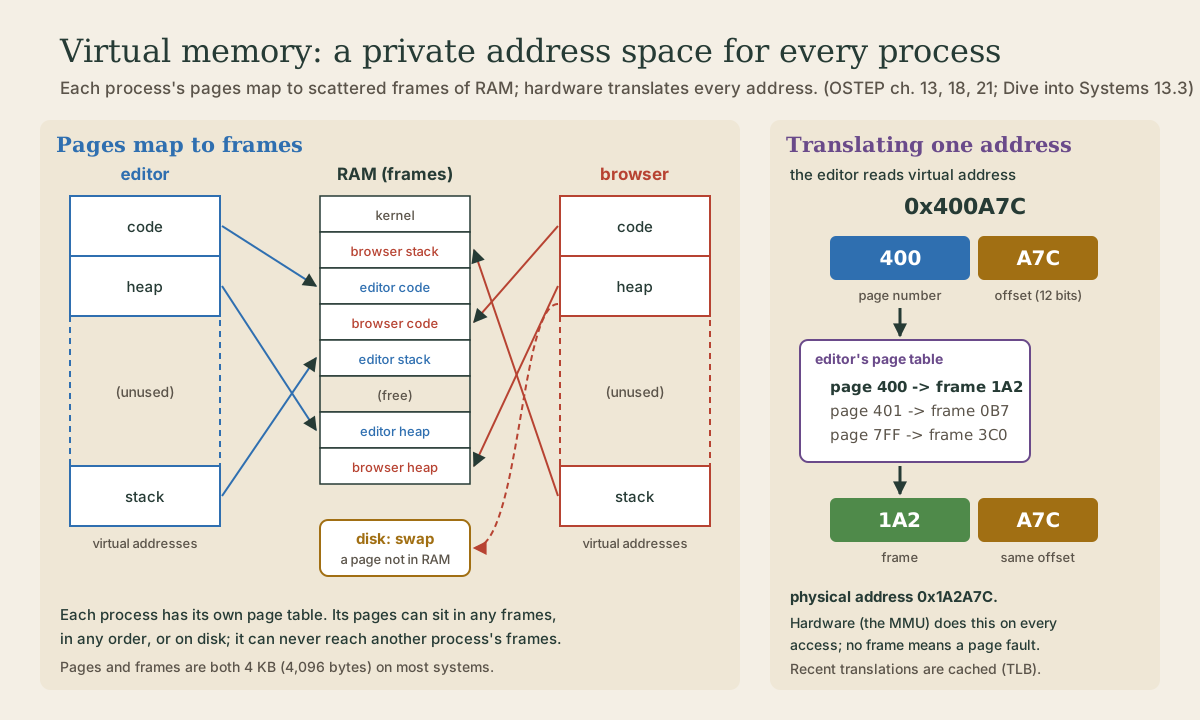
The answer is virtual memory: each process gets its own private address space, a range of addresses from 0 up to some maximum, that it uses as if it had the whole memory to itself. The kernel, with help from the CPU, maps those addresses to wherever the data really is 1 2.
Address spaces
A process’s address space holds everything it uses, in a few regions 1 2:
- code: the program’s instructions, loaded from its file;
- data: its global variables;
- the heap: memory requested while running, such as every object a Python program creates, which grows as the program asks for more;
- the stack: each function call’s local variables and return address, which grows and shrinks as functions are called and return.
The heap and stack sit far apart, with a huge unused gap between, so each has room to grow 2. The gap costs nothing: as you’ll see, only the parts actually used get real memory.
Every address a program ever sees is one of these virtual addresses 1. In Python, id(x) on the standard interpreter gives the memory address of the object x 3: a virtual address. Run the same program twice, at the same time, and each process has its own copy of each variable, even at the same virtual address; changing one doesn’t touch the other 2. Where they really sit in RAM, only the kernel and the hardware know 1.
Pages and frames
Mapping each byte separately would take more memory than the data itself, so memory is mapped in fixed-size blocks. The kernel divides each address space into pages and divides physical RAM into frames of the same size; 4 KB (4,096 bytes) is the usual size 2. Any page can go in any frame, a process’s pages needn’t be next to each other in RAM, and not every page needs to be in RAM at all 2.
An address then has two parts 1 2:
- the page number, which page it’s in, from the high bits;
- the offset, which byte within that page, from the low bits.
A 4 KB page is 2^12 bytes, so the low 12 bits are the offset, and since each hex digit is 4 bits (module 1), that’s simply the last three hex digits. In 0x400A7C, the page is 0x400 and the offset 0xA7C.
Each process has a page table, kept by the kernel in RAM, listing which frame holds each of its pages 2. On every memory access, a part of the CPU called the memory management unit (MMU) looks up the page number in the current process’s page table, swaps in the frame number, and keeps the offset as it was 2. On each context switch, the kernel points the MMU at the next process’s page table 2. That’s the protection: a process can only name its own virtual addresses, and its page table leads only to its own frames.
Quick check
4 KB is 2^12 bytes, so the low 12 bits, the last three hex digits, are the offset.
Quick check
The kernel switches the MMU to the next process’s page table on every context switch.
Translating an address
This program does what the MMU does, with two made-up page tables. Save it as translate.py:
# translate.py: turn virtual addresses into physical ones, with 4 KB pages.
PAGE_SIZE = 4096        # 2**12 bytes, so the low 12 bits (3 hex digits) are the offset

# Each process has its own page table: virtual page number -> physical frame number.
page_tables = {
    "editor":  {0x400: 0x1A2, 0x401: 0x0B7, 0x7FF: 0x3C0},
    "browser": {0x400: 0x2E9, 0x7FF: 0x015},
}

def translate(process, address):
    page, offset = divmod(address, PAGE_SIZE)
    frame = page_tables[process].get(page)
    if frame is None:
        return f"page {page:#x}: no frame, page fault"
    return f"page {page:#x} -> frame {frame:#x} -> {frame * PAGE_SIZE + offset:#x}"

for process, address in [("editor", 0x400A7C), ("editor", 0x401004),
                         ("browser", 0x400A7C), ("browser", 0x401004)]:
    print(f"{process:<8} {address:#x}   {translate(process, address)}")
divmod(address, 4096) gives the page number and the offset in one step: dividing by 2^12 is the same as cutting off the last three hex digits.
me@linuxbox:~$ python3 translate.py
editor   0x400a7c   page 0x400 -> frame 0x1a2 -> 0x1a2a7c
editor   0x401004   page 0x401 -> frame 0xb7 -> 0xb7004
browser  0x400a7c   page 0x400 -> frame 0x2e9 -> 0x2e9a7c
browser  0x401004   page 0x401: no frame, page fault
The same virtual address, 0x400a7c, leads to two different places in RAM, one per process. The offset a7c comes through unchanged. And the browser has nothing at page 0x401, so that access can’t be translated: a page fault.
Making it fast
A page table lives in RAM, so every memory access would need a second access first, to read the table: twice the work 2. So the MMU keeps a small, very fast cache of recent translations, the translation lookaside buffer or TLB. Thanks to locality, the same few pages get used over and over, so nearly every lookup hits the TLB and costs almost nothing 2. Real page tables, on x86 for example, are also built in several levels, like a tree, so that the unused gap in an address space takes no page-table space at all 1.
More memory than RAM
Since not every page has to be in RAM, the kernel can keep some on disk, in swap space, and run programs whose memory adds up to more than the RAM installed 1. Each page-table entry has a valid bit saying whether the page is in a frame 2. When a program touches a page that isn’t, the MMU raises a page fault, and the kernel 2:
- finds a free frame, or makes one by evicting some other page, writing it out to disk first if it has been changed;
- reads the needed page from disk into that frame;
- updates the page table;
- restarts the instruction, which now succeeds.
The program never knows, except for the time: reading from disk takes thousands of times longer than a memory access, or more (last module). If the running programs actively need more memory than there is, the system spends its time moving pages in and out and gets almost nothing done, which is called thrashing 1. Linux’s last resort when memory is exhausted is the out-of-memory killer, which picks a memory-hungry process and kills it 1.
A different case: an address that isn’t part of the process’s address space at all, such as following a null pointer. Then there’s nothing to load, and the kernel stops the program with a segmentation fault, the signal SIGSEGV 2. Python programs almost never hit these; programs written in C can.
Quick check
The program never notices, except that the access took milliseconds instead of nanoseconds.
Seeing it on Linux
getconf PAGESIZEprints the page size in bytes.ps -o pid,vsz,rss,comm:VSZis a process’s virtual memory size, everything in its address space, andRSS, the resident set size, is how much of it is actually in RAM, both in KiB 4.VSZis usually far bigger: much of an address space is mapped but never touched, or shared, or out in swap.free -hshows physical memory and swap, on itsMem:andSwap:lines 5. If swap use keeps climbing and everything slows to a crawl, the system is probably thrashing.
Your turn
Exercises
- With 4 KB pages, split into page number and offset:
0x400A7C,0x7FF010,0x1000. - Using the editor’s page table, translate
0x7FF010by hand. Then add it to the list intranslate.pyand check. What does the browser get for the same address? - Run
getconf PAGESIZE. Thenps -o pid,vsz,rss,comm -p $$for your own bash. How doVSZandRSScompare? - How many 4 KB frames are there in 16 GiB of RAM? (Use powers of 2: 16 GiB is 2^34 bytes.)
- On a 32-bit system with 4 KB pages, how many bits are left for the page number? How many pages can an address space have?
- Run
python3 -c 'x = [1, 2]; print(hex(id(x)))'twice. Is the address the same each time? Does that mean the two runs shared memory?
Answers
- Page
0x400, offset0xA7C; page0x7FF, offset0x010; page0x1, offset0x000(the first byte of the second page). - Page
0x7FFmaps to frame0x3C0, so0x3C0010. The program printspage 0x7ff -> frame 0x3c0 -> 0x3c0010for the editor andpage 0x7ff -> frame 0x15 -> 0x15010for the browser. getconfprints4096on a typical x86-64 system.VSZis larger thanRSS, often several times larger.- 2^34 / 2^12 = 2^22 = 4,194,304 frames.
- 32 − 12 = 20 bits, so 2^20, about a million pages 1.
- It may or may not be the same; either way they’re virtual addresses in two separate address spaces, so they never refer to the same memory.
So
Virtual memory gives each process a private address space of code, data, heap, and stack, and every address a program uses is virtual. Memory is handled in 4 KB pages: an address is a page number plus an offset (with 4 KB pages, the last three hex digits), and each process’s page table maps its pages to frames anywhere in RAM. The CPU’s MMU translates every access, the TLB caches recent translations, and switching page tables on each context switch keeps processes apart. Pages can also live on disk in swap, loaded on demand by page faults; too much of that is thrashing, and an address outside the address space is a segmentation fault.
Lesson complete
Nice work.
Sources for this lesson
- 1Remzi H. Arpaci-Dusseau, Andrea C. Arpaci-Dusseau. Operating Systems: Three Easy Pieces, version 1.10. University of Wisconsin-Madison, ostep.org (free PDFs; print editions via Lulu and Amazon). 2023. verifiedFree online textbook (chapter PDFs), organized around virtualization, concurrency, and persistence. Used: ch. 4, the process (time sharing, mechanism vs. policy, machine state, the Running/Ready/Blocked states); ch. 5, the process API (fork, wait, exec with the p1.c and p3.c examples and real output, how the shell uses them, redirection by closing standard output and opening a file before exec, descriptors kept open across exec, pipes); ch. 6, limited direct execution (user and kernel mode, the trap instruction, trap table, return-from-trap, system calls wrapped by the C library, a few hundred calls today versus about twenty in early Unix, the timer interrupt, context switches); ch. 7, scheduling (turnaround and response time, FIFO and the convoy effect with jobs of 100, 10, and 10 seconds averaging 110 seconds, SJF averaging 50, round robin with a 1-second slice giving response time 1 versus 5 and turnaround 14, the amortized cost of context switches, overlapping I/O); ch. 13, address spaces (code, heap, stack, isolation, every address a program sees is virtual); ch. 18, paging (pages, page frames, virtual page number and offset, page tables, 4 KB pages giving a 12-bit offset); ch. 20, multi-level page tables, used on x86, which allocate page-table space only for the parts of an address space in use; ch. 21-22, swap space, page faults, thrashing, and Linux's out-of-memory killer; ch. 39, files and directories (file descriptors as per-process integers, 0, 1, and 2, strace cat foo, read, write, close, offsets and lseek).
- 2Suzanne J. Matthews, Tia Newhall, Kevin C. Webb. Dive into Systems. No Starch Press (free online edition). 2022. verifiedCh. 4 Binary and Data Representation: bits as two voltage states, bytes (8 bits, 256 values, smallest addressable unit), words of 32 or 64 bits, n bits give 2^n values; decimal and binary place value with 0b and 0x prefixes; hexadecimal as four bits per digit; fixed storage sizes and unsigned ranges; two's complement with a negative-weighted top bit, one zero, range -2^(n-1) to 2^(n-1)-1, all ones is -1, negation by flipping bits and adding one; subtraction as adding the negation, reusing negation and addition circuits; overflow and the odometer analogy.
- 3Built-in Functions (Python documentation). Python Software Foundation. verifiedbin(), hex(), oct() convert an integer to a prefixed string; int(text, base) parses one; ord() gives a character's Unicode code point and chr() the reverse (chr(97) is 'a', chr(8364) is the euro sign). sum(): since 3.12, summation of floats uses an algorithm with higher accuracy. id() is, in CPython, the address of the object in memory. open() buffers binary files in fixed-size chunks by default; print()'s output buffering is set by the file, and flush=True forces it out.
- 4ps(1) manual page. man7.org (Linux man-pages, procps-ng). verifiedProcess state codes: D uninterruptible sleep (usually I/O), R running or runnable (on run queue), S interruptible sleep (waiting for an event to complete), T stopped, Z defunct (zombie) process, terminated but not reaped by its parent. VSZ is the virtual memory size of the process in KiB; RSS, the resident set size, is the non-swapped physical memory a task has used, in kibibytes.
- 5free(1) manual page. man7.org (Linux man-pages). verifiedDisplays free and used memory; buff/cache is the sum of buffers and page cache; available estimates memory available for starting new applications without swapping, taking page cache into account.