Instructions and the Fetch-Execute Cycle
Almost every computer follows the von Neumann design: a CPU, made of a control unit and a processing unit, and a memory that holds the program's instructions and its data side by side. Instructions are bits in a format the processor's instruction set defines; machine code and assembly, from a real disassembly; the four stages of executing one instruction, fetch, decode, execute, write back, driven by the program counter; jumps for loops and if; and Python's bytecode as a similar instruction list for a virtual machine.
- 6 min
- 7 steps
- 2 questions
- Lesson 69 of 80
In this lesson
- A stored program
- Instructions are bits
- The cycle
- Jumps: loops and if
- Python’s version
- Your turn
- So
Picking up where you left off.
A stored program
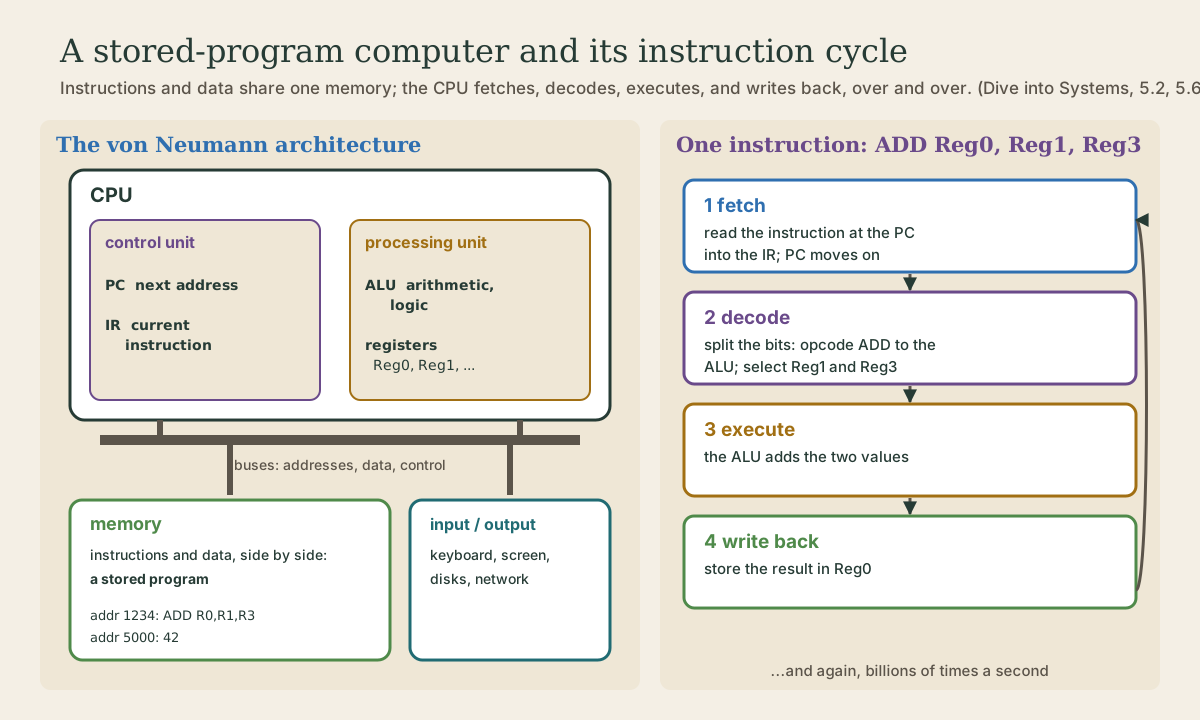
Nearly every computer today, from a phone to a server, follows the von Neumann architecture. It has five parts 1:
- a processing unit that does the work: the ALU (arithmetic logic unit, last module) and a set of registers, small fast storage for the values being worked on;
- a control unit that runs the show, holding the program counter (PC), the address of the next instruction, and the instruction register (IR), the instruction being carried out;
- memory;
- input and output devices;
- buses, sets of wires carrying addresses, data, and control signals between them.
The control and processing units together are the CPU 1. The key idea is in the memory: it holds the program’s instructions and its data side by side. Instructions are just data, bits in memory 1. That’s what makes a computer general-purpose: running a different program means putting different bytes in memory, not rewiring anything.
Quick check
That’s why loading a different program is just copying different bytes into memory.
Instructions are bits
Each kind of processor understands a fixed set of instructions, its instruction set architecture or ISA: “add these two registers,” “load this value from memory,” “jump to this address.” Intel and AMD processors use the x86-64 instruction set; phones, Raspberry Pis, and Apple’s recent Macs use ARM. A program compiled for one won’t run on the other, which is why Ubuntu’s download page offers separate images for each (Linux course, module 1).
me@linuxbox:~$ uname -m
x86_64
An instruction is a string of bits in a format the ISA defines: some bits say which operation (the opcode, such as ADD), others say which registers or memory locations to use 1. That’s machine code. People read it as assembly, a text form with one line per instruction. Here’s a tiny C function, return a + 2;, compiled for x86-64 and disassembled with objdump -d 1:
0000000000400526 <adder2>:
  400526:       55                      push   %rbp
  400527:       48 89 e5                mov    %rsp,%rbp
  40052a:       89 7d fc                mov    %edi,-0x4(%rbp)
  40052d:       8b 45 fc                mov    -0x4(%rbp),%eax
  400530:       83 c0 02                add    $0x2,%eax
  400533:       5d                      pop    %rbp
  400534:       c3                      retq
Each line is an address in memory, the instruction’s bytes in hex, and the assembly it stands for. 55 is the whole of push %rbp; 83 c0 02 is “add 2 to register %eax.” One line of C became seven instructions, and the actual addition is just one of them 1.
The cycle
The CPU runs a program by repeating four stages for each instruction 1:
- Fetch. Read the instruction at the address in the PC from memory into the IR, and move the PC on to the next instruction. (With 4-byte instructions, PC goes up by 4.)
- Decode. Split the instruction’s bits: the opcode goes to the ALU to choose the operation, and the register numbers select which registers to read.
- Execute. The ALU does the operation, say adding Reg1 and Reg3.
- Write back. Store the result, in Reg0 for example.
Then fetch the next one. That’s all a CPU does, billions of times a second.
Quick check
Fetch reads the instruction at that address and moves the PC on; a jump replaces it with another address.
Jumps: loops and if
Programs don’t just run straight down. A jump (or branch) instruction changes the PC to a different address, so the next fetch comes from somewhere else 1. A conditional jump only does it if a condition holds, like a comparison’s result. Every if, every loop, every function call is built from jumps.
Python’s version
Python doesn’t compile to machine code. It compiles to bytecode, instructions for a virtual machine, the Python interpreter, itself a program running on the real CPU. But it’s the same idea, and you can look at it with the dis module 2:
me@linuxbox:~$ python3 -c 'import dis; dis.dis("total = price + tax")'
  0           0 RESUME                   0

  1           2 LOAD_NAME                0 (price)
              4 LOAD_NAME                1 (tax)
              6 BINARY_OP                0 (+)
             10 STORE_NAME               2 (total)
             12 RETURN_CONST             0 (None)
Load the two values, add them, store the result: fetch, decode, execute, write back, in miniature. And an if becomes a conditional jump:
me@linuxbox:~$ python3 -c 'import dis; dis.dis("if n > 0:\n    n = n - 1")'
  ...
  1           2 LOAD_NAME                0 (n)
              4 LOAD_CONST               0 (0)
              6 COMPARE_OP              68 (>)
             10 POP_JUMP_IF_FALSE        6 (to 24)

  2          12 LOAD_NAME                0 (n)
             14 LOAD_CONST               1 (1)
             16 BINARY_OP               10 (-)
             20 STORE_NAME               0 (n)
  ...
POP_JUMP_IF_FALSE skips ahead to offset 24 when n > 0 is false. (This is from Python 3.12; bytecode changes a little between versions 2.)
Your turn
Exercises
uname -mon your Linux machine. Which instruction set does it run?- In the
objdumplisting, how many bytes long is each instruction? Do x86-64 instructions all have the same length? - Run
python3 -c 'import dis; dis.dis("a = b * c - d")'. Which instruction does each step? - Try a loop:
python3 -c 'import dis; dis.dis("while n:\n n = n - 1")'. Find the jump that goes backward. - In your own words: what happens to the PC during a jump?
Answers
x86_64on Intel and AMD;aarch64on 64-bit ARM.- 1, 3, 3, 3, 3, 1, and 1 bytes: x86-64 instructions vary in length. Some other instruction sets use a single fixed length.
- Two
LOAD_NAMEs, aBINARY_OPfor*, anotherLOAD_NAME, aBINARY_OPfor-, andSTORE_NAME. JUMP_BACKWARD 8 (to 6)sends execution back to offset 6, the start of the loop body, after the test at offset 18 findsnstill non-zero.- Instead of moving on to the next instruction, it’s set to the jump’s target address, so the next fetch comes from there.
So
A von Neumann computer has a CPU (control unit and processing unit) and a memory that holds instructions and data alike: a stored program. Instructions are bits in a format the instruction set (x86-64, ARM) defines; machine code is those bits, assembly their text form. The CPU loops through fetch (instruction at the PC into the IR, PC moves on), decode, execute (in the ALU), and write back. Jumps change the PC, making loops and ifs. Python compiles to bytecode for its own virtual machine, which works the same way and which dis shows.
Lesson complete
Nice work.
Sources for this lesson
- 1Suzanne J. Matthews, Tia Newhall, Kevin C. Webb. Dive into Systems. No Starch Press (free online edition). 2022. verifiedCh. 4 Binary and Data Representation: bits as two voltage states, bytes (8 bits, 256 values, smallest addressable unit), words of 32 or 64 bits, n bits give 2^n values; decimal and binary place value with 0b and 0x prefixes; hexadecimal as four bits per digit; fixed storage sizes and unsigned ranges; two's complement with a negative-weighted top bit, one zero, range -2^(n-1) to 2^(n-1)-1, all ones is -1, negation by flipping bits and adding one; subtraction as adding the negation, reusing negation and addition circuits; overflow and the odometer analogy.
- 2dis: Disassembler for Python bytecode (Python documentation). Python Software Foundation. verifiedThe dis module disassembles CPython bytecode, the instructions the interpreter executes; bytecode is a CPython implementation detail and may be added, removed, or changed between Python versions.