Processes and Scheduling
The kernel turns programs on disk into processes and shares a few CPU cores among hundreds of them, switching every few milliseconds. What a process is; context switches; the Running, Ready, and Blocked states and how ps shows them; wall time versus CPU time with bash's time; how every process is made with fork, exec, and wait, seen through bash's own PIDs and a twenty-line Python shell; and how a scheduler chooses who runs next, with FIFO, shortest job first, and round robin simulated side by side.
- 14 min
- 10 steps
- 3 questions
- Lesson 72 of 80
In this lesson
- What the operating system does
- A process
- Taking turns
- States
- Wall time and CPU time
- Making a process
- A shell in twenty lines
- Choosing who runs next
- Your turn
- So
Picking up where you left off.
What the operating system does
The operating system is the software layer between the hardware and every program you run. It manages the hardware so programs can share it efficiently, and it hides the messy details behind simpler ideas, abstractions, that programs use instead 1. Its core, always in memory and running from power-on to power-off, is the kernel; on your machine that’s Linux, and everything else, from bash to the desktop, is a program running on top of it 1.
This module covers its three biggest abstractions: the process (this lesson), virtual memory (next), and files reached through system calls (last). One design idea runs through all of them: the kernel separates mechanisms, how to do something, such as switching between programs, from policies, which to do, such as which program runs next 2.
A process
A program on disk is just bytes: instructions and some data, doing nothing. A process is a running program, and turning one into the other is the kernel’s job 2. Each process has 2 1:
- its memory, the address space holding its instructions and data;
- its registers, including the program counter (the next instruction, last module) and a stack pointer;
- its open files;
- a process ID (PID) and a state.
The shell course’s ps aux lists them. A desktop runs hundreds of processes at once on a handful of cores, so they must take turns.
Taking turns
The kernel runs one process on a core for a short time slice, stops it, runs another, and so on, a technique called time sharing 2. Time slices are a few milliseconds: millions of instructions, but far too short for a person to notice, so every program seems to have the computer to itself 1.
Switching is a context switch: the kernel saves the current process’s registers, including its program counter, to memory, then loads another process’s saved registers onto the CPU, which carries on from exactly where that process left off 1. A running program won’t hand over the CPU voluntarily, so a hardware timer interrupts every few milliseconds and gives control back to the kernel, which can then decide to switch 2. (How control passes between programs and the kernel is lesson 3.)
Switching isn’t free. Besides saving and loading registers, the new process finds the caches full of the old process’s data, and has to fill them again 2, the memory hierarchy from last module at work.
States
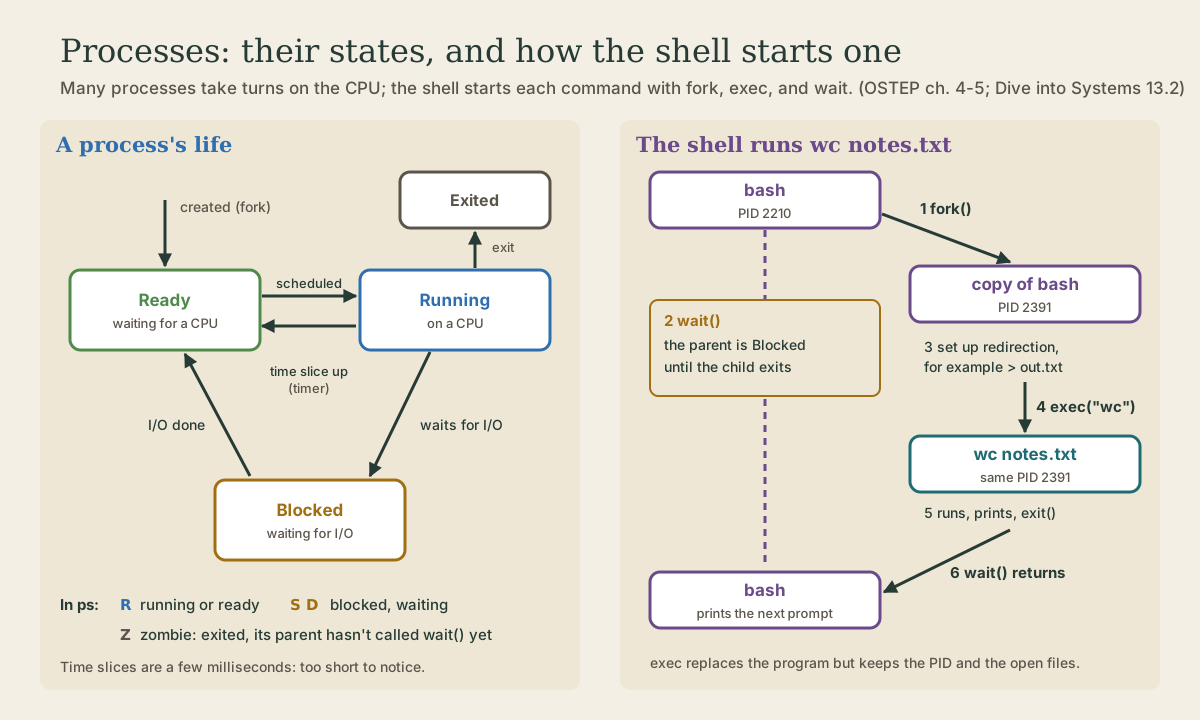
At any moment a process is in one of three main states 2 1:
- Running: on a CPU, executing instructions.
- Ready: could run, but is waiting its turn.
- Blocked: waiting for something else, typically input or output such as a disk read, a network reply, or a keypress. A blocked process isn’t a candidate for the CPU at all.
When a process asks for a disk read, it becomes Blocked, and the kernel runs someone else in the meantime; when the data arrives, the process moves back to Ready 2. That’s why a computer stays busy while programs wait: one process’s wait is another’s chance to run. When a process exits, a little information remains until its parent collects it 1.
ps shows these as the STAT column 3:
| ps code | Meaning | State |
|---|---|---|
R |
running or runnable (on the run queue) | Running or Ready |
S |
interruptible sleep, waiting for an event | Blocked |
D |
uninterruptible sleep, usually I/O | Blocked |
Z |
defunct (“zombie”): exited, not yet collected by its parent | Exited |
Most processes on a desktop show S most of the time: waiting for you.
Quick check
Blocked processes aren’t candidates for the CPU; finishing the I/O makes it a candidate again.
Wall time and CPU time
Two different times describe how long a program took. Wall time is elapsed time, as a clock on the wall would show it, including time spent Ready and Blocked. CPU time counts only the time actually Running 1. Bash’s time shows both: real is the wall time, user the CPU time spent in the program’s own code, and sys the CPU time the kernel spent working for it 4. On a desktop PC:
me@linuxbox:~$ time sleep 1

real    0m1.021s
user    0m0.000s
sys 0m0.000s
me@linuxbox:~$ time (for ((i=0; i<2000000; i++)); do :; done)

real    0m3.684s
user    0m3.671s
sys 0m0.015s
sleep spent the whole second Blocked, waiting for a timer, and used no CPU at all. The loop (: is a command that does nothing) kept the CPU busy the whole time, so its real and user are nearly equal. When a command is slow, this tells you which kind of slow: computing, or waiting.
Making a process
Every process is created by another. On Linux a process calls fork(), a system call that makes a near-exact copy of it: same memory contents, same registers, same open files, but a new PID 1. Both copies then carry on from the same spot, just after the fork(). The only difference is fork’s return value: 0 in the child, and the child’s PID in the parent 1 5. The very first user process, started by the kernel at boot, is the ancestor of all the rest 1: on Ubuntu, that’s systemd, PID 1.
Bash forks every time it runs a subshell, ( ... ), and its $BASHPID variable shows the PID of the bash process doing the expanding 4:
me@linuxbox:~$ echo "my PID: $BASHPID"
my PID: 1421
me@linuxbox:~$ ( echo "in a subshell: $BASHPID" )
in a subshell: 1422
me@linuxbox:~$ ( echo "in a subshell: $BASHPID" )
in a subshell: 1423
Each subshell is a fresh child with its own PID.
A copy of bash isn’t much use for running wc. The second system call, exec(), replaces the program a process is running with a new one, loaded from a file: new code, fresh memory, starting from the first instruction. It doesn’t create a process, so the PID stays the same, and a successful exec() never returns, because the code that called it is gone 2 5. Bash’s exec command does exactly this to the shell itself 4:
me@linuxbox:~$ bash -c 'echo "PID $$ is bash"; exec sh -c "echo PID \$\$ is now sh"'
PID 1424 is bash
PID 1424 is now sh
Same process, different program.
The third call, wait(), makes a parent sleep until a child exits, and collects its exit status 2. A child that has exited but hasn’t been waited for is the zombie, Z, in ps 3.
So when you type wc notes.txt, the shell does: fork (now two bashes), the child execs wc, and the parent waits; when wc exits, wait returns and bash prints the next prompt 2. Splitting “make a process” from “run a program” looks odd, but it’s what makes redirection easy: between the fork and the exec, the child can rearrange its own open files, and the new program inherits them 2. That’s lesson 3.
Quick check
fork(), how does the code know whether it’s running in the parent or the child?Both processes continue from the same spot with copies of the same memory; only fork’s return value differs.
A shell in twenty lines
Python’s os module has the same three calls, so you can write the core of a shell yourself (Linux only; Windows has no fork) 5. Save it as minish.py:
# minish.py: a tiny shell. Ctrl-D quits.
import os
import shlex
import sys

while True:
    try:
        line = input("minish> ")
    except EOFError:
        print()
        break
    args = shlex.split(line)
    if not args:
        continue
    pid = os.fork()                     # from here on, two processes run this code
    if pid == 0:                        # the child: become the command
        try:
            os.execvp(args[0], args)    # doesn't return if it works
        except OSError as err:          # no such program, or not allowed
            print(f"minish: {args[0]}: {err.strerror}", file=sys.stderr)
            os._exit(127)
    else:                               # the parent: wait for the child to finish
        _, status = os.waitpid(pid, 0)
        print(f"[process {pid} exited with status {os.waitstatus_to_exitcode(status)}]")
shlex.split breaks the line into words the way a shell would, quotes included. execvp searches PATH for the program, just as bash does. If it fails, the child must end right away with os._exit, which is meant for exactly this, a child after a fork 5; otherwise there’d be two minishes reading your typing. Run it with python3 minish.py and try ls -l, date, and sleep 2. Each command runs, then minish prints the child’s PID and its exit status. It has no pipes, no cd, no variables, but every real shell is this loop with more on top.
Choosing who runs next
The scheduler is the policy that picks which Ready process runs next. Two measures pull against each other 2:
- Turnaround time: from when a job arrives to when it finishes. Matters for batch work.
- Response time: from when a job arrives to when it first runs. Matters when someone is waiting at the keyboard.
Three classic policies 2:
- FIFO (first in, first out): run each job to completion, in order of arrival.
- SJF (shortest job first): run the shortest job to completion first.
- Round robin: run each job for one time slice, then move on to the next, around and around.
This program runs each one on the same jobs, all arriving at time 0, with a one-second slice for round robin. Save it as sched.py:
# sched.py: three scheduling policies on the same jobs.

def fifo(jobs):
    """Run each job to completion, in arrival order."""
    t, done, first = 0, {}, {}
    for name, length in jobs:
        first[name] = t
        t += length
        done[name] = t
    return done, first

def sjf(jobs):
    """Run each job to completion, shortest first."""
    return fifo(sorted(jobs, key=lambda job: job[1]))

def round_robin(jobs, slice_=1):
    """Run each job for one time slice, then move to the next, until all finish."""
    left = dict(jobs)
    t, done, first = 0, {}, {}
    while left:
        for name in list(left):
            first.setdefault(name, t)
            run = min(slice_, left[name])
            t += run
            left[name] -= run
            if left[name] == 0:
                done[name] = t
                del left[name]
    return done, first

def report(title, policy, jobs):
    done, first = policy(jobs)
    turnaround = sum(done.values()) / len(jobs)     # all jobs arrive at time 0
    response = sum(first.values()) / len(jobs)
    print(f"{title:<14} turnaround {turnaround:6.1f}   response {response:5.1f}")

for jobs in ([("A", 100), ("B", 10), ("C", 10)], [("A", 5), ("B", 5), ("C", 5)]):
    print("jobs:", ", ".join(f"{n}={t}s" for n, t in jobs))
    report("FIFO", fifo, jobs)
    report("SJF", sjf, jobs)
    report("round robin", round_robin, jobs)
    print()
me@linuxbox:~$ python3 sched.py
jobs: A=100s, B=10s, C=10s
FIFO           turnaround  110.0   response  70.0
SJF            turnaround   50.0   response  10.0
round robin    turnaround   59.7   response   1.0

jobs: A=5s, B=5s, C=5s
FIFO           turnaround   10.0   response   5.0
SJF            turnaround   10.0   response   5.0
round robin    turnaround   14.0   response   1.0
What it shows, matching the textbook’s worked examples 2:
- FIFO suffers the convoy effect. With the 100-second job first, the two short ones wait behind it, like one person with three full carts at the only checkout: average turnaround 110 seconds.
- SJF fixes that: 50 seconds. But it needs to know how long each job will take, which a real system almost never does.
- Round robin starts everything at once: response 1 second in both cases. But it stretches every job out, so with three equal jobs nobody finishes until near the end: turnaround 14, against 10.
You can’t have both: being fair on a short time scale costs turnaround, and finishing short jobs first costs response 2. The time slice is a trade-off too: shorter slices respond faster but spend more time switching 2.
Real schedulers mix these ideas. Linux began moving to a scheduler called EEVDF in kernel 6.6. It aims to share CPU time equally among runnable processes of the same priority, and lets tasks with shorter time slices run sooner, which helps interactive programs respond 6. The shell course’s nice adjusts that priority.
Quick check
In the simulation, round robin’s response time was 1 second for both job sets, but its turnaround for three equal jobs was 14 seconds, against 10 for running each to the end.
Your turn
Exercises
- Run
ps -eo pid,stat,comm | head -20. Which states appear most? Why does almost everything sleep? timethree commands:sleep 2,ls -R /usr > /dev/null, and the bash loop above. Which are computing and which are waiting?- In
sched.py, add a fourth job("D", 1)to the first job set. How do the three policies change? - Change round robin’s slice from
slice_=1toslice_=10. What happens to its turnaround and response in the second job set? Why? - Run
minish.pyon your Linux machine. Type a command that doesn’t exist. What status does minish report? What does bash’secho $?report for the same mistake?
Answers
S, by far: most processes are waiting for input, a timer, or a network message. Only a few, often justpsitself, areR.sleepis all waiting (usernear 0); the loop is all computing (realabout equal touser);ls -Ris usually a mix, includingsystime for the kernel reading directories, andrealdrops if you run it a second time, once the directories are cached in memory.- FIFO gets worse, 112.8 turnaround and 82.5 response, since D waits behind everything. SJF runs D first and drops to 38.5 and 8.2. Round robin finishes D in its first round: 46.5 and 1.5.
- With a 10-second slice, longer than each 5-second job, round robin becomes FIFO: turnaround 10, response 5.
- 127 in both: minish uses the same exit status that bash uses for “command not found.”
So
The kernel turns programs into processes, each with its own memory, registers, open files, and PID, and shares the CPU among them by time slicing, with context switches every few milliseconds, triggered by a timer. Processes move between Running, Ready, and Blocked; ps shows them as R, S, and D, and time separates waiting (real) from computing (user and sys). New processes come from fork (a copy, which gets 0 back) and exec (replace the program, keep the PID), and parents collect them with wait: the loop at the heart of every shell. A scheduler decides who runs next, trading turnaround against response time.
Lesson complete
Nice work.
Sources for this lesson
- 1Suzanne J. Matthews, Tia Newhall, Kevin C. Webb. Dive into Systems. No Starch Press (free online edition). 2022. verifiedCh. 4 Binary and Data Representation: bits as two voltage states, bytes (8 bits, 256 values, smallest addressable unit), words of 32 or 64 bits, n bits give 2^n values; decimal and binary place value with 0b and 0x prefixes; hexadecimal as four bits per digit; fixed storage sizes and unsigned ranges; two's complement with a negative-weighted top bit, one zero, range -2^(n-1) to 2^(n-1)-1, all ones is -1, negation by flipping bits and adding one; subtraction as adding the negation, reusing negation and addition circuits; overflow and the odometer analogy.
- 2Remzi H. Arpaci-Dusseau, Andrea C. Arpaci-Dusseau. Operating Systems: Three Easy Pieces, version 1.10. University of Wisconsin-Madison, ostep.org (free PDFs; print editions via Lulu and Amazon). 2023. verifiedFree online textbook (chapter PDFs), organized around virtualization, concurrency, and persistence. Used: ch. 4, the process (time sharing, mechanism vs. policy, machine state, the Running/Ready/Blocked states); ch. 5, the process API (fork, wait, exec with the p1.c and p3.c examples and real output, how the shell uses them, redirection by closing standard output and opening a file before exec, descriptors kept open across exec, pipes); ch. 6, limited direct execution (user and kernel mode, the trap instruction, trap table, return-from-trap, system calls wrapped by the C library, a few hundred calls today versus about twenty in early Unix, the timer interrupt, context switches); ch. 7, scheduling (turnaround and response time, FIFO and the convoy effect with jobs of 100, 10, and 10 seconds averaging 110 seconds, SJF averaging 50, round robin with a 1-second slice giving response time 1 versus 5 and turnaround 14, the amortized cost of context switches, overlapping I/O); ch. 13, address spaces (code, heap, stack, isolation, every address a program sees is virtual); ch. 18, paging (pages, page frames, virtual page number and offset, page tables, 4 KB pages giving a 12-bit offset); ch. 20, multi-level page tables, used on x86, which allocate page-table space only for the parts of an address space in use; ch. 21-22, swap space, page faults, thrashing, and Linux's out-of-memory killer; ch. 39, files and directories (file descriptors as per-process integers, 0, 1, and 2, strace cat foo, read, write, close, offsets and lseek).
- 3ps(1) manual page. man7.org (Linux man-pages, procps-ng). verifiedProcess state codes: D uninterruptible sleep (usually I/O), R running or runnable (on run queue), S interruptible sleep (waiting for an event to complete), T stopped, Z defunct (zombie) process, terminated but not reaped by its parent. VSZ is the virtual memory size of the process in KiB; RSS, the resident set size, is the non-swapped physical memory a task has used, in kibibytes.
- 4Chet Ramey, Brian Fox. Bash Reference Manual, Edition 5.3. GNU Project, Free Software Foundation. 2025. verifiedThe reference for Bash 5.3 (May 18, 2025). Redirections (3.6) are processed left to right and order matters: ls > dirlist 2>&1 sends both streams to dirlist, while ls 2>&1 > dirlist sends only standard output there. With set -o noclobber, > fails on an existing regular file and >| overrides it. &> word is equivalent to > word 2>&1 and &>> word to >> word 2>&1. Here documents (<<word, with <<- stripping leading tabs; quoting word disables expansion) and here strings (<<<). Expansions (3.5) happen in a fixed order: brace; tilde, parameter, arithmetic, and command substitution left to right; word splitting; filename expansion; quote removal last. Startup files (6.2): an interactive login shell reads /etc/profile then the first of ~/.bash_profile, ~/.bash_login, ~/.profile; an interactive non-login shell reads ~/.bashrc. HISTCONTROL (ignorespace, ignoredups, ignoreboth), HISTSIZE, HISTFILESIZE; set -x traces expanded commands; shell functions and variables, export.
- 5os: Miscellaneous operating system interfaces (Python documentation). Python Software Foundation. verifiedos.open, os.read, os.write, and os.close work on file descriptors and are intended for low-level I/O; for normal use the built-in open() returns a file object. os.fork forks a child process, returning 0 in the child and the child's process ID in the parent (Unix only).
- 6EEVDF Scheduler (The Linux Kernel documentation). The Linux Kernel documentation. verifiedLinux began moving from the Completely Fair Scheduler (CFS) to Earliest Eligible Virtual Deadline First (EEVDF) in kernel 6.6. Like CFS, it aims to share CPU time equally among runnable tasks of the same priority, tracking each task's virtual run time and running the eligible task with the earliest virtual deadline, which lets latency-sensitive tasks with shorter time slices run sooner.