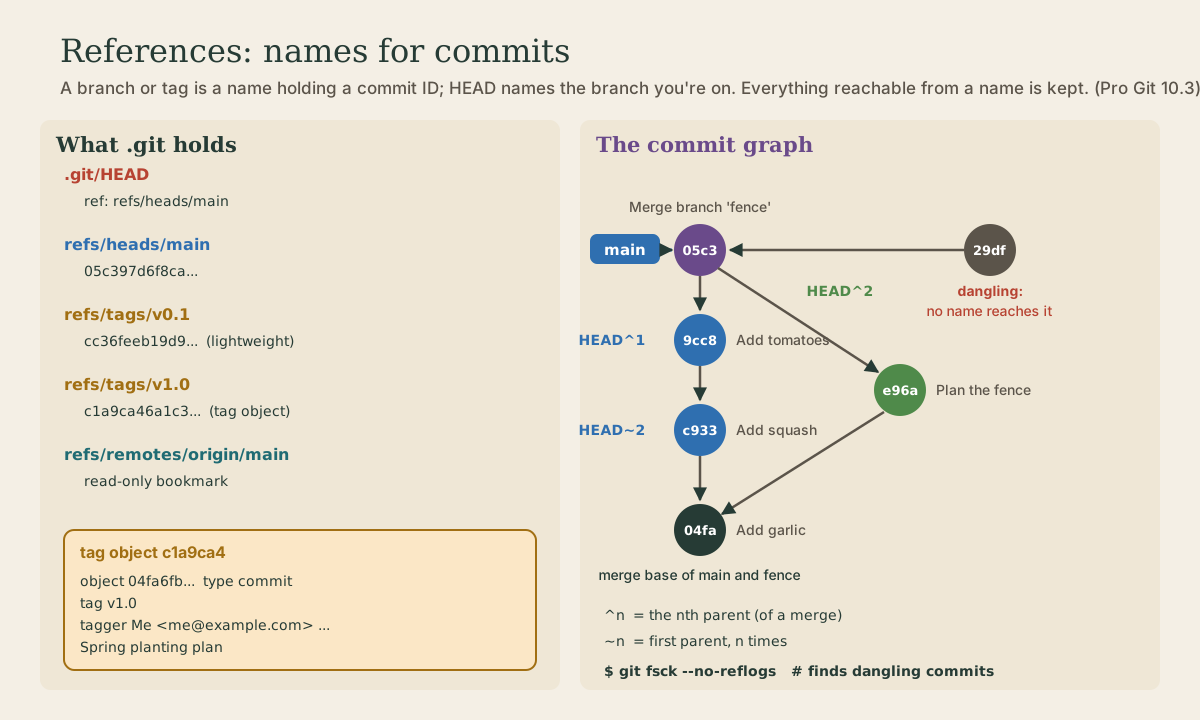
References and the Commit Graph
A reference is a name that holds a commit ID: branches in refs/heads, tags in refs/tags, remote-tracking branches in refs/remotes, and HEAD, which usually names a branch. Lightweight and annotated tags, pushing tags, and git describe. Packed refs. The commit graph that parents form, with ^ and ~ for walking it and merge-base for where branches split; reachability, which decides what git keeps; dangling commits, git fsck, and when git gc finally deletes them.
- 10 min
- 9 steps
- 3 questions
- Lesson 41 of 80
In this lesson
- Refs are names for commits
- HEAD
- Tags
- Packed refs
- The commit graph
- Walking the graph
- What git keeps
- Your turn
- So
Picking up where you left off.
Refs are names for commits
Commit IDs are unwieldy, so git lets you store one under a name. These names are references, or refs, and in the usual layout each is a small file under .git/refs holding one ID 1:
me@linuxbox:~/garden$ cat .git/refs/heads/main
04fa6fb7dda18fbd9d43b95f1aaa6ed4ed5a8d99
me@linuxbox:~/garden$ git rev-parse main
04fa6fb7dda18fbd9d43b95f1aaa6ed4ed5a8d99
That’s all a branch is, as module 3 said: a file with a commit ID in it 1. Making a branch writes one more file; committing rewrites the file for your current branch. There are three kinds of refs, by folder:
refs/heads/: your branches.refs/tags/: tags.refs/remotes/: remote-tracking branches likeorigin/main(module 4). They’re read-only: git moves them when you fetch or push, never when you commit 1.
git rev-parse turns any name, branch, tag, or HEAD~2, into the full ID.
Pro Git warns against editing ref files directly; the plumbing command git update-ref does it safely, and records the move in the reflog 1.
HEAD
HEAD is one more ref, in .git/HEAD. Usually it’s a symbolic reference: instead of an ID, it holds the name of another ref 1:
me@linuxbox:~/garden$ cat .git/HEAD
ref: refs/heads/main
me@linuxbox:~/garden$ git symbolic-ref HEAD
refs/heads/main
me@linuxbox:~/garden$ git switch -c fence
Switched to a new branch 'fence'
me@linuxbox:~/garden$ cat .git/HEAD
ref: refs/heads/fence
That’s how git knows which branch to move when you commit: it makes the new commit with HEAD’s commit as the parent, then updates whatever branch HEAD names 1. Switching branches just rewrites this one line (and your files).
In detached HEAD (module 3), .git/HEAD holds a commit ID instead of a branch name 1:
me@linuxbox:~/garden$ git switch --detach HEAD~1
HEAD is now at cc36fee Add beans
me@linuxbox:~/garden$ cat .git/HEAD
cc36feeb19d92e3a7d49b1db9bffe3c78a4a8959
Commits made now have no branch to move, which is why they’re easy to lose.
Quick check
HEAD names a branch, and the branch holds the commit ID. In detached HEAD, it holds a commit ID directly.
Tags
A tag names a commit that never moves, such as a release or “the version that worked.” There are two kinds 1:
A lightweight tag is just a ref in refs/tags with a commit ID in it, a branch that doesn’t move:
me@linuxbox:~/garden$ git tag v0.1 HEAD~1
me@linuxbox:~/garden$ cat .git/refs/tags/v0.1
cc36feeb19d92e3a7d49b1db9bffe3c78a4a8959
An annotated tag, made with -a and a message, is a full object, a fourth type alongside blobs, trees, and commits. The ref points to the tag object, which points to the commit and records who tagged it, when, and why 1:
me@linuxbox:~/garden$ git tag -a v1.0 -m "Spring planting plan"
me@linuxbox:~/garden$ cat .git/refs/tags/v1.0
c1a9ca46a1c3581e92a2adcfd39ffe27cd0b4944
me@linuxbox:~/garden$ git cat-file -t v1.0
tag
me@linuxbox:~/garden$ git cat-file -p v1.0
object 04fa6fb7dda18fbd9d43b95f1aaa6ed4ed5a8d99
type commit
tag v1.0
tagger Me <me@example.com> 1791216240 -0500

Spring planting plan
Pro Git recommends annotated tags for anything you’ll share 1; lightweight ones suit private, temporary labels. git tag lists tags, and you can use a tag anywhere you’d use a commit ID: git switch --detach v1.0, git diff v1.0 main. git show-ref lists every ref with its ID:
me@linuxbox:~/garden$ git show-ref
04fa6fb7dda18fbd9d43b95f1aaa6ed4ed5a8d99 refs/heads/fence
04fa6fb7dda18fbd9d43b95f1aaa6ed4ed5a8d99 refs/heads/main
cc36feeb19d92e3a7d49b1db9bffe3c78a4a8959 refs/tags/v0.1
c1a9ca46a1c3581e92a2adcfd39ffe27cd0b4944 refs/tags/v1.0
Two things to know about tags in practice:
git pushdoesn’t send tags. Push one withgit push origin v1.0, or all of them withgit push origin --tags1.-
git describenames the current commit relative to the newest annotated tag before it 2:me@linuxbox:~/garden$ git describe v1.0-2-g9cc8b1bThat reads: two commits after
v1.0, at commit9cc8b1b(thegstands for git) 2. Scripts use it to stamp a version on a build.
Packed refs
One file per ref gets slow with thousands of tags, so git gc (or git pack-refs) moves them into a single file, .git/packed-refs 1:
me@linuxbox:~/garden$ git pack-refs --all
me@linuxbox:~/garden$ ls .git/refs/heads .git/refs/tags
.git/refs/heads:

.git/refs/tags:
me@linuxbox:~/garden$ cat .git/packed-refs
# pack-refs with: peeled fully-peeled sorted
e96af3cfd72c5017c6495d7f45f4a3066cbd3a12 refs/heads/fence
05c397d6f8cad48fa356c67233c2c244d0c6e918 refs/heads/main
cc36feeb19d92e3a7d49b1db9bffe3c78a4a8959 refs/tags/v0.1
c1a9ca46a1c3581e92a2adcfd39ffe27cd0b4944 refs/tags/v1.0
^04fa6fb7dda18fbd9d43b95f1aaa6ed4ed5a8d99
The ^ line under v1.0 is the commit that annotated tag points to 1. When a ref changes later, git writes a fresh file under refs/ again, and it checks there first, then in packed-refs 1. That’s another reason to use git commands rather than reading .git/refs yourself: a branch can exist without a file there.
Git 3.0 plans a bigger change: a storage format called reftable, which doesn’t keep each ref as its own file, becomes the default for new repositories 3. The commands don’t change; only what’s in .git does.
The commit graph
Each commit names its parents, so commits link into a graph, running from each commit back to the first. A normal commit has one parent; a merge commit has two (or more) 1:
me@linuxbox:~/garden$ git log --oneline --graph
*   05c397d Merge branch 'fence'
|\
| * e96af3c Plan the fence
* | 9cc8b1b Add tomatoes
* | c93309a Add squash
|/
* 04fa6fb Add garlic
* cc36fee Add beans
* fc026ad Plan the beds
me@linuxbox:~/garden$ git cat-file -p HEAD
tree ac1941be7fbfb846b2f5220b16ee809da8d36d82
parent 9cc8b1b2e72adde0d0145a0b9e403d3fec3ca7ad
parent e96af3cfd72c5017c6495d7f45f4a3066cbd3a12
author Me <me@example.com> 1791216480 -0500
committer Me <me@example.com> 1791216480 -0500

Merge branch 'fence'
The first parent is the branch you were on (main), the second the branch you merged in (fence) 1. Arrows only point backward: a commit knows its parents, never its children. That’s why git log starts from a ref and walks back.
Walking the graph
Two suffixes walk it 4:
^nmeans the nth parent.HEAD^(same asHEAD^1) is the first parent;HEAD^2is a merge’s second parent.~nmeans go back n generations, following first parents.HEAD~2is the same asHEAD^^.
me@linuxbox:~/garden$ git log --oneline -1 HEAD^1
9cc8b1b Add tomatoes
me@linuxbox:~/garden$ git log --oneline -1 HEAD^2
e96af3c Plan the fence
me@linuxbox:~/garden$ git log --oneline -1 HEAD~2
c93309a Add squash
HEAD^ and HEAD~ both mean the first parent. The numbers differ: ^2 picks a second parent, which only merges have, while ~2 goes back two generations. Don’t confuse either with HEAD@{2} (module 5), which is where HEAD was two moves ago, from the reflog.
git merge-base finds where two branches split, their newest common ancestor. It’s the base a three-way merge compares against (module 3):
me@linuxbox:~/garden$ git merge-base main~1 fence
04fa6fb7dda18fbd9d43b95f1aaa6ed4ed5a8d99
The double-dot range from module 5, main..fence, is defined by the graph too: commits reachable from fence but not from main 1.
Quick check
^2 is the second parent. ~2 goes back two commits along first parents, and @{2} is where HEAD was two moves ago.
What git keeps
A commit is reachable if you can get to it by starting at some ref and following parents. git log shows what’s reachable from HEAD; git log --all from every ref. Reachability is also what git uses to decide what to keep.
Delete a branch whose commits aren’t anywhere else, and they become unreachable. git branch -D prints the ID on its way out, which is the quickest way back:
me@linuxbox:~/garden$ git branch -D idea
Deleted branch idea (was 29df69d).
git branch idea 29df69d would restore it. If you’ve lost that line, the reflog (module 5) still has the commit, and git fsck, which checks the repository’s integrity, can list commits that nothing points to 1. Its --no-reflogs option doesn’t count reflog entries as a reason to keep a commit, so it finds commits that used to be on a branch 5:
me@linuxbox:~/garden$ git fsck --no-reflogs
dangling commit 29df69daf037e8a2a5ad25bdeec66990b0de8270
A dangling commit is one that’s in the database but that nothing uses 5. It isn’t deleted right away. Only git gc removes objects, and it tries hard not to remove anything still referenced by a branch, tag, remote-tracking branch, the index, or a reflog entry; unreferenced objects also get a grace period, two weeks by default 6. Reflog entries for unreachable commits last 30 days (module 5). Together, that gives you weeks to notice a mistake.
The flip side: anything reachable is kept forever. A large file or a password committed once stays in every clone’s history even after you delete it in a later commit 1. That’s why module 2 said to change a leaked secret rather than just delete the file.
Quick check
That gives you weeks to recover them, and git branch -D even prints the ID.
Your turn
Exercises
- In a practice repository,
cat .git/HEAD, then switch branches and look again. Then trygit switch --detach HEAD~1. - Make a lightweight tag and an annotated tag. Compare
git cat-file -ton each, andgit cat-file -pon the annotated one. - Make two more commits and run
git describe. What do the parts mean? - Run
git pack-refs --all, then look at.git/refs/headsand.git/packed-refs. Doesgit branchstill list your branches? - Make a merge commit, then use
git log --oneline -1withHEAD^1,HEAD^2, andHEAD~2. - Make a commit on a throwaway branch, delete it with
git branch -D, find the commit withgit fsck --no-reflogs, and bring the branch back.
Answers
ref: refs/heads/<branch>, changing as you switch. Detached, it’s a bare 40-character ID.- The lightweight tag’s type is
commit, since it points straight at one; the annotated tag’s istag, and-pshowsobject,type,tag,tagger, and the message. - Like
v1.0-2-g9cc8b1b: the newest annotated tag, the number of commits since, andgplus the current commit’s short ID. - The folders are empty and the refs are in
packed-refs, butgit branchlists them all as before. HEAD^1is the last commit on your branch before the merge,HEAD^2the merged branch’s tip, andHEAD~2two commits back along your own branch.dangling commit <id>; thengit branch <name> <id>.
So
A ref is a name holding a commit ID: branches in refs/heads, tags in refs/tags, remote-tracking branches in refs/remotes, sometimes packed into .git/packed-refs. HEAD usually names a branch (ref: refs/heads/main) and holds a bare ID when detached. Lightweight tags are plain refs; annotated tags are objects with a tagger and message, pushed explicitly with git push origin <tag>. Parents link commits into a graph: ^n picks a parent, ~n walks back first parents, and git merge-base finds where branches split. Git keeps everything reachable from a ref or the reflog; dangling commits linger for weeks before git gc removes them.
Lesson complete
Nice work.
Sources for this lesson
- 1Scott Chacon, Ben Straub. Pro Git, 2nd edition. Apress; free online at git-scm.com. 2014. verifiedFree CC BY-NC-SA 3.0 book, maintained online. Ch. 1: version control; Git's 2005 origin when the Linux kernel lost free use of BitKeeper; snapshots, not differences (unchanged files stored once); nearly every operation local; integrity through 40-character SHA-1 checksums; the three states (modified, staged, committed) and three areas (working tree, staging area or index, .git directory); first-time setup with system/global/local config levels, user.name and user.email baked into commits, core.editor, git config --list --show-origin. Ch. 2: git init, status (and -s), add, diff and diff --staged, commit (-m, -a), .gitignore, log options, amending, undoing, remotes, tags, aliases. Ch. 3: branches as movable pointers, HEAD, merging and conflicts, remote branches, rebasing and its rule. Ch. 7: reset demystified, stashing, revision selection. Ch. 8: core.autocrlf true on Windows, input on Linux and macOS. Ch. 10: objects (blob, tree, commit) and references.
- 2git-describe documentation. Git project (git-scm.com). verifiedFinds the most recent tag reachable from a commit and suffixes the number of additional commits and the abbreviated object name; the 'g' prefix stands for git. Without --all or --tags, only annotated tags are used.
- 3Upcoming breaking changes (BreakingChanges). Git project (git-scm.com). verifiedPlanned for Git 3.0, which has no release date yet: the default hash function for new repositories changes from sha1 to sha256 (SHA-1 deprecated by NIST in 2011; SHAttered 2017 produced two PDFs with the same hash), and the default reference storage format changes from 'files' to 'reftable', which does not use filesystem paths to encode reference names. No plan to deprecate sha1 repositories.
- 4gitrevisions: specifying revisions and ranges. Git project (git-scm.com). verified<rev>^<n> is the nth parent (^ alone is ^1); <rev>~<n> is the nth-generation ancestor following first parents, so rev~3 = rev^^^ = rev^1^1^1; ^0 is the commit itself.
- 5git-fsck documentation. Git project (git-scm.com). verifiedVerifies connectivity and validity of objects. --no-reflogs doesn't count commits referenced only by a reflog entry as reachable, to find commits that used to be in a ref; 'dangling' means present but never directly used; --lost-found writes dangling objects to .git/lost-found.
- 6git-gc documentation. Git project (git-scm.com). verifiedHousekeeping: packs objects and refs and prunes unreachable loose objects older than gc.pruneExpire (default 2 weeks ago). Keeps objects referenced by branches, tags, the index, remote-tracking branches, reflogs, and anything else under refs/.