Reading Permissions
Every file has an owner, a group, and nine permission bits: read, write, and execute for the owner, the group, and everyone else. Find out who you are with id, see where users and groups are defined (/etc/passwd, /etc/group, /etc/shadow), and learn what r, w, and x mean on a file versus a directory, including why deleting a file depends on the folder.
- 5 min
- 6 steps
- 2 questions
- Lesson 7 of 80
In this lesson
- Who you are
- Where users and groups live
- Owner, group, and everyone else
- What r, w, and x mean
- Your turn
- So
Picking up where you left off.
Who you are
Linux was built for many people sharing one computer, so every file belongs to someone. A user can own files and directories and controls who else may use them. Users belong to groups, and an owner can give a group access. Everyone else is called others, or “the world” 1.
id shows who you are 1:
me@linuxbox:~$ id
uid=1000(me) gid=1000(me) groups=1000(me),4(adm),24(cdrom),27(sudo),46(plugdev)
Where users and groups live
Like most things on Linux, accounts are defined in text files 1 2:
/etc/passwd: one line per account: name, user ID, group ID, real name, home directory, and login shell. Despite the name, no passwords./etc/group: groups and their members./etc/shadow: the password hashes, readable only by root.
me@linuxbox:~$ grep me /etc/passwd
me:x:1000:1000:Me,,,:/home/me:/bin/bash
me@linuxbox:~$ less /etc/shadow
/etc/shadow: Permission denied
/etc/passwd lists many accounts that aren’t people. root is always user ID 0. IDs below 1000 are system accounts that run services; people start at 1000 on Ubuntu 1 2.
Owner, group, and everyone else
Back to ls -l 1:
me@linuxbox:~$ ls -l budget.ods
-rw-r----- 1 me family 18734 Oct  5 07:40 budget.ods
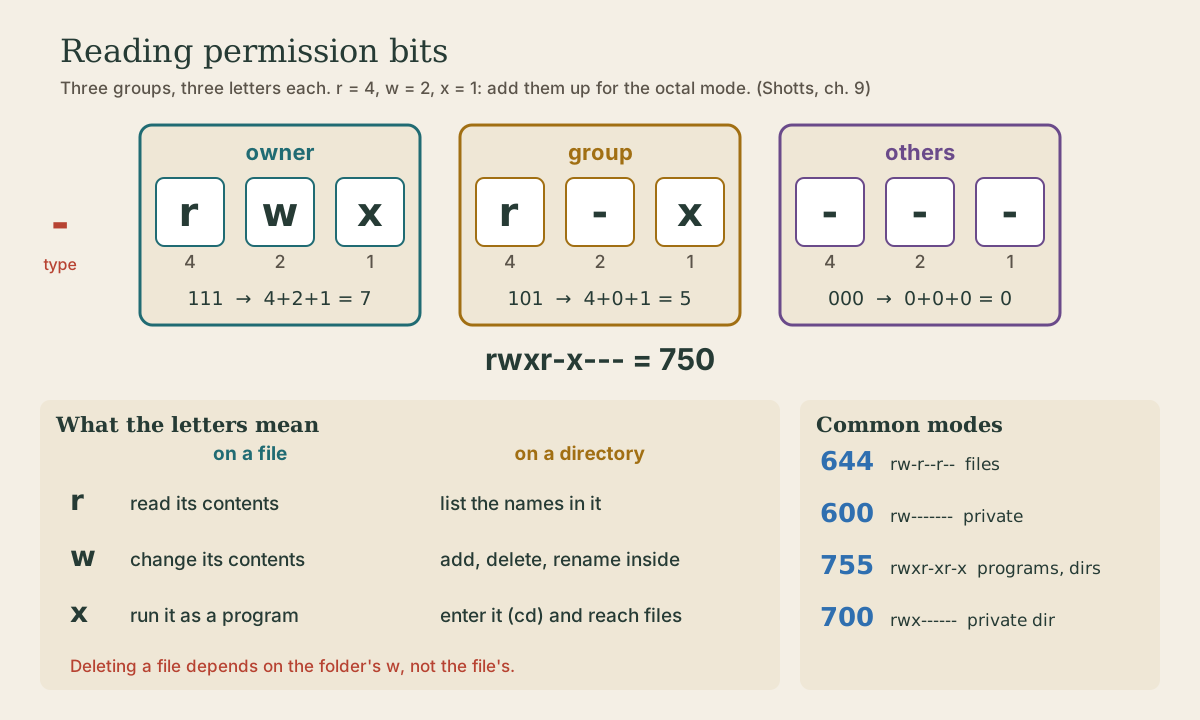
After the type character come nine permission letters in three groups of three 1:
 -   rw-     r--     ---
type owner   group   others
Each group says, in order, whether that class of people may read (r), write (w), and execute (x); a dash means no. So budget.ods can be read and changed by me, read by members of family, and not touched by anyone else.
Linux checks only one group of three: if you’re the owner, the owner bits apply; otherwise, if you’re in the file’s group, the group bits; otherwise the others bits. Root skips the checks entirely.
Quick check
Owner rw-, group r–, others —. (Root can read anything, too.)
What r, w, and x mean
They mean slightly different things for files and directories, and the directory column is where people get surprised 1:
| On a file | On a directory | |
|---|---|---|
| r | Open and read it | List the names inside (ls) |
| w | Change its contents | Create, delete, and rename files inside (with x) |
| x | Run it as a program | Enter it (cd) and reach the files inside |
Two consequences 1:
- Deleting or renaming a file is controlled by the directory, not the file. A file you can’t write can still be deleted by someone who can write to its folder; a file you own can’t be deleted from a folder you can’t write to.
- A directory needs x to be usable at all.
rwithoutxlets you see the names but not open anything; that’s why folders are almost always givenrandxtogether.
Some typical strings 1:
| String | Meaning |
|---|---|
-rw-r--r-- |
Ordinary file: you edit, everyone reads |
-rw------- |
Private file: only you |
-rwxr-xr-x |
Program: you edit, everyone runs |
drwxr-xr-x |
Normal folder: you change it, others can look |
drwx------ |
Private folder |
lrwxrwxrwx |
Symbolic link: the bits are dummies; the target’s permissions are the real ones |
Quick check
Removing a file changes the folder’s list of names, so it’s the folder’s w (with x) that matters.
Your turn
Exercises
- Run
id. Which groups are you in? Are you insudo? - Find your own line in
/etc/passwdwithgrep $USER /etc/passwd. What’s your login shell? - Run
ls -l /etc/shadow /etc/passwd /usr/bin/passwd. Who can read each one? - Run
ls -ld /tmp ~. Who can enter and list your home directory? Who can create files in/tmp? - Make a folder
locked, then remove your own execute permission withchmod u-x locked. Tryls lockedandcd locked. What happens? Put it back withchmod u+x locked.
Answers
- Typically your own group plus
adm,cdrom,sudo,dip,plugdev, and a few others. On a first Ubuntu account, yes,sudois there. - The last field:
/bin/bash. /etc/passwdis-rw-r--r--, readable by all./etc/shadowis-rw-r-----owned by root with groupshadow: no access for you./usr/bin/passwdis-rwsr-xr-x: everyone can run it. Thesis a special bit you’ll meet next lesson; it’s how an ordinary user can change their own password in a file only root can write.- Ubuntu’s home directories are usually
drwxr-x---: you, plus your private group./tmpisdrwxrwxrwt: everyone can create files there. Thet(sticky bit) stops people from deleting each other’s files. ls lockedstill works, since you keptr(in a folder with files in it,ls -lwould show the names but question marks for everything else);cd lockedsays “Permission denied.” Without x on a directory, even its owner can’t go in.
So
Every file has an owner, a group, and nine bits: read, write, and execute for the owner, the group, and others. On files they mean read, change, and run; on directories, list, change the contents, and enter. Deleting is controlled by the directory, and id, /etc/passwd, and /etc/group tell you who’s who.
Lesson complete
Nice work.
Sources for this lesson
- 1William Shotts. The Linux Command Line, Seventh Internet Edition (25.12A). LinuxCommand.org (print edition by No Starch Press). 2026. verifiedFree CC BY-NC-ND 3.0 book, release 25.12A of July 18, 2026. Part 1, Learning the Shell: the shell and terminal emulators, prompts ($ vs. # for the superuser), command history (most distributions keep the last 1,000 commands), Shift-Ctrl-C/V for copy and paste; navigation and the directory tree; exploring the system (ls options and the long listing, file, less, the guided tour of /, symbolic links); manipulating files (wildcards and character classes, mkdir, cp, mv, rm, ln; no undelete, test wildcards with ls first); working with commands (four kinds of commands, type, which, help, --help, man and its sections, apropos, whatis, info, alias); redirection; expansion and quoting; Readline keyboard tricks, completion, history search; permissions; processes. Later parts cover the environment, vi, packages, storage, networking, find, archiving, regular expressions, text processing, and shell scripting.
- 2User management (Ubuntu Server documentation). Canonical. verifiedUbuntu disables the root account by giving it a password hash that matches nothing; sudo lets an authorized user elevate privileges with their own password, providing accountability. From Ubuntu 25.10 sudo is provided by sudo-rs (Rust), with the original sudo kept as sudo.ws through 26.04 LTS; most use is unchanged. sudo passwd enables root, sudo passwd -l root disables it. The installer's first user is in group sudo, which /etc/sudoers authorizes; add others to that group for full sudo. Local users in /etc/passwd and groups in /etc/group; UID 0-99 preinstalled system users, 100-999 dynamic system users, 1000 and up regular users. adduser, deluser (home folder kept), passwd -l/-u, addgroup, adduser user group.