System Calls and Files
Programs run in a restricted user mode and must ask the kernel, through a system call, for anything outside their own memory: a trap into kernel mode, a handler chosen from a table set up at boot, and a return. How the C library and Python wrap those calls; files as small numbers, file descriptors 0, 1, and 2 and the 3 that open returns, shown with Python's os module; watching a program's system calls with strace; how the shell's > and 2>&1 work, and why their order matters; and a measured experiment where a million one-byte writes take thirty times longer than buffered ones.
- 12 min
- 8 steps
- 3 questions
- Lesson 74 of 80
In this lesson
- Two modes
- System calls
- File descriptors
- Watching with strace
- Redirection, explained
- What each call costs
- Your turn
- So
Picking up where you left off.
Two modes
Programs run directly on the CPU, at full speed; the kernel doesn’t interpret them instruction by instruction. So what stops a program from reading the whole disk, ignoring file permissions, or never giving up the CPU? The hardware does. The CPU has two modes 1:
- User mode, where ordinary programs run. Privileged instructions, such as talking to a disk or a network card, are refused: trying one raises an exception, and the kernel will likely end the program.
- Kernel mode, where the kernel runs, with full access to the machine.
The machine starts up in kernel mode, so the kernel can set everything up before it starts any program in user mode 1.
Quick check
Going through the kernel is what lets it check permissions before every file access.
System calls
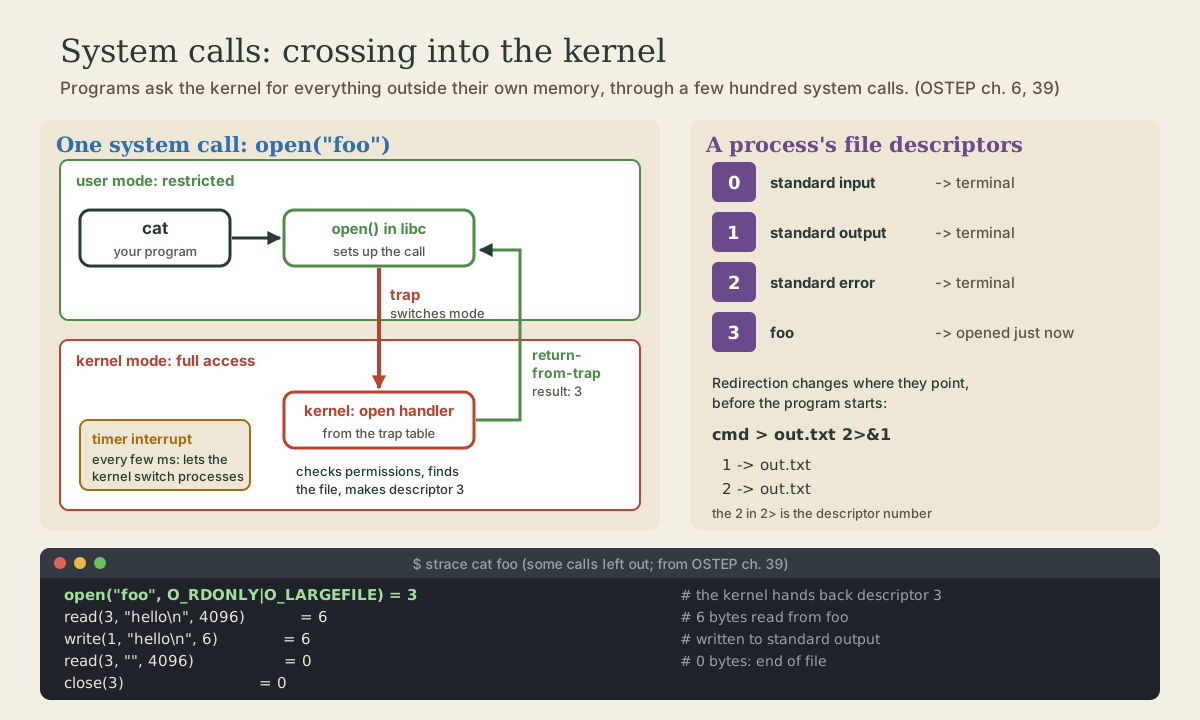
So a program does nothing outside its own memory by itself. To open a file, start a process, send data over the network, or even ask the time of day, it makes a system call, a request to the kernel 1 2. Linux has a few hundred; early Unix had about twenty 1.
A system call works through a special trap instruction 1:
- The program puts the call’s number and its arguments in agreed places, such as particular registers, and runs the trap.
- The trap switches the CPU to kernel mode and jumps into the kernel, saving the program’s registers so it can resume later.
- The kernel looks up the call’s number in a trap table that it set up at boot. A program can’t jump to an address of its choosing inside the kernel; it only gets the handlers the kernel chose.
- The kernel checks the request, for example the file’s permissions, and does the work.
- A return-from-trap instruction switches back to user mode and resumes the program, with the result.
You never write the trap yourself. In C, open() looks like an ordinary function, and it is: a function in the C library containing the few instructions that set up and make the trap 1. Python’s os.open, os.read, and os.write are thin wrappers around the same calls 3, and everything else, Python’s open() and print() included, ends up making them.
The kernel also gets control a second way: interrupts from hardware. The timer from lesson 1 is one, and a disk raises another when a read it was given has finished, so the kernel can move the waiting process from Blocked to Ready 1.
Bash’s time (lesson 1) separates the two worlds: user is CPU time in the program’s own code, and sys is CPU time spent in the kernel working for it, mostly inside its system calls 4.
File descriptors
open() returns a file descriptor: a small, non-negative integer that refers to an entry in the process’s own table of open files. Later calls, read, write, close, take that number rather than the file’s name. A new descriptor is always the lowest number not already in use 5.
Every process starts with three already open 1:
| Descriptor | Name | Usually |
|---|---|---|
| 0 | standard input | the keyboard, through the terminal |
| 1 | standard output | the terminal |
| 2 | standard error | the terminal |
So the first file a program opens gets descriptor 3. For each open file the kernel also tracks an offset, where the next read or write will happen; each read or write moves it forward 1.
This program uses the low-level calls directly. Save it as fds.py:
# fds.py: read and write through file descriptors, as the kernel sees files.
import os

with open("foo", "w") as f:
    f.write("hello\n")

fd = os.open("foo", os.O_RDONLY)
print("open returned", fd, flush=True)
print("read:", os.read(fd, 4096), flush=True)
print("read again:", os.read(fd, 4096), flush=True)
os.close(fd)

os.write(1, b"written to fd 1, standard output\n")
os.write(2, b"written to fd 2, standard error\n")
me@linuxbox:~$ python3 fds.py
open returned 3
read: b'hello\n'
read again: b''
written to fd 1, standard output
written to fd 2, standard error
me@linuxbox:~$ python3 fds.py 2> errors.txt
open returned 3
read: b'hello\n'
read again: b''
written to fd 1, standard output
me@linuxbox:~$ cat errors.txt
written to fd 2, standard error
open returned 3, as promised. The first read asked for up to 4,096 bytes and got the 6 in the file; the offset then sat at the end, so the second returned nothing, b'', which is how a program learns it has reached the end of a file 1. Writing to descriptor 1 or 2 needs no open at all. (flush=True makes print hand its text to the kernel immediately, so the lines appear in the order written.)
Quick check
open() return?That’s why OSTEP’s strace of cat and Python’s os.open both show 3.
Watching with strace
strace runs a program and prints every system call it makes, with the arguments and the return value 4. (If it’s missing, sudo apt install strace.) Here is the trace of cat foo from the OSTEP textbook, with many calls removed for readability 1:
prompt> strace cat foo
...
open("foo", O_RDONLY|O_LARGEFILE) = 3
read(3, "hello\n", 4096) = 6
write(1, "hello\n", 6) = 6
hello
read(3, "", 4096) = 0
close(3) = 0
...
The whole of cat: open the file (descriptor 3), read up to 4 KB (6 bytes), write them to descriptor 1, read again (0 bytes, the end), close. The hello in the middle is cat’s actual output, mixed in with strace’s own, which goes to standard error 4.
On a current system you’ll see openat instead of open; since glibc 2.26, the C library’s open() uses the openat system call 5. A failed call returns -1 with the error’s name and message 4:
open("/foo/bar", O_RDONLY) = -1 ENOENT (No such file or directory)
Some useful options 4:
-e trace=openatshows only those calls.strace -e trace=openat some-programanswers “which config files is it reading?” faster than any documentation.-ffollows child processes too. Trace a shell running a command and you’ll see lesson 1’s calls:clone, which the C library’sfork()uses on Linux 6, thenexecveandwait4.-ccounts the calls and prints a summary table at the end.
Redirection, explained
The shell course’s redirections are about these numbers: the 2 in 2> is descriptor 2. To run wc notes.txt > out.txt, the shell forks, and in the child, before the exec, closes descriptor 1 and opens out.txt. The lowest free number is now 1, so the file becomes standard output. Open descriptors survive exec, so wc writes to descriptor 1 as always, never knowing it’s a file 1.
2>&1 makes descriptor 2 a copy of descriptor 1 7. Redirections are carried out in order, left to right, which is why order matters 7:
me@linuxbox:~$ ls notes.txt nosuchfile > out.txt 2>&1
me@linuxbox:~$ cat out.txt
ls: cannot access 'nosuchfile': No such file or directory
notes.txt
me@linuxbox:~$ ls notes.txt nosuchfile 2>&1 > out.txt
ls: cannot access 'nosuchfile': No such file or directory
me@linuxbox:~$ cat out.txt
notes.txt
In the first, 1 goes to the file, then 2 copies 1: both in the file. In the second, 2 copies 1 while 1 is still the terminal, and only afterward does 1 move to the file.
A pipe works the same way. The pipe() system call creates a queue inside the kernel and returns two descriptors, one to read from and one to write into 1 3; for ls | wc -l, the shell connects ls’s descriptor 1 to the writing end and wc’s descriptor 0 to the reading end, then execs both 1.
Quick check
ls nosuchfile 2>&1 > out.txt still print the error on the screen?Redirections happen in order, left to right, before the program starts. Write > out.txt 2>&1 to send both to the file.
What each call costs
Every system call is a round trip: trap, save registers, switch to kernel mode, check, work, switch back. That’s fast, but not free. This program writes a million bytes twice: once with a separate write() for each byte, once through Python’s normal file object. Save it as syscalls.py:
# syscalls.py: write a million bytes, one system call each, then buffered.
import os
import time

N = 1_000_000

start = time.perf_counter()
fd = os.open("test.bin", os.O_WRONLY | os.O_CREAT | os.O_TRUNC)
for _ in range(N):
    os.write(fd, b"x")                  # one write() system call per byte
os.close(fd)
print(f"os.write, 1 byte each:  {time.perf_counter() - start:.2f} s")

start = time.perf_counter()
with open("test.bin", "wb") as f:       # Python buffers, then writes big chunks
    for _ in range(N):
        f.write(b"x")
print(f"buffered file.write:    {time.perf_counter() - start:.2f} s")

os.remove("test.bin")
On a desktop PC:
me@linuxbox:~$ python3 syscalls.py
os.write, 1 byte each:  1.58 s
buffered file.write:    0.05 s
About thirty times slower, for the same million bytes in the same file. The file object from open() collects what you write in a buffer in your own memory and hands it to the kernel in large chunks 8, so a million f.write calls become a handful of system calls. That’s why the Python docs point ordinary programs at open() and keep os.write for low-level work 3; it’s also why print output sometimes shows up later than you expect, and why flush=True exists 8. Your numbers will differ, but the gap won’t close: crossing into the kernel costs far more than a function call.
Your turn
Exercises
- Run
fds.py. Then run it with> out.txt. Which lines reach the screen, and which the file? - Run
strace -e trace=openat,read,write,close cat /etc/hostname. Find theopenatthat returns your file’s descriptor. Which number is it, and why? - Run
strace -c ls > /dev/null. Which system calls doeslsmake most often? - Run
strace -f -e trace=%process bash -c 'ls; date'and find theclone,execve, andwait4calls. - In
syscalls.py, change the first loop to write 100 bytes at a time, 10,000 times. How much does the time drop? - Add
>tominish.pyfrom lesson 1, sols -l > out.txtworks. Hint: between the fork and the exec, open the file and useos.dup2(fd, 1), which makes descriptor 1 a copy offd3.
Answers
- Everything printed to descriptor 1 goes to the file, including
open returned 3; onlywritten to fd 2, standard errorstays on the screen. - Usually 3, the lowest free descriptor after 0, 1, and 2. Earlier
openatcalls, for libraries and locale files, are closed again beforecatopens yours. - The table lists each call with its count; expect many small calls for loading libraries and reading the directory.
- For
ls: aclonein bash, anexecveof/usr/bin/lsin the new child, and await4in bash. Bash may run the last command,date, without forking at all: with nothing left to do afterward, it can simply exec it. - On the same PC it fell from 1.58 s to 0.02 s: a hundred times fewer system calls, and almost a hundred times faster.
- In the child, before
os.execvp:if ">" in args: # minish> ls -l > out.txt i = args.index(">") fd = os.open(args[i + 1], os.O_WRONLY | os.O_CREAT | os.O_TRUNC, 0o644) os.dup2(fd, 1) # descriptor 1 now points at the file os.close(fd) args = args[:i]
So
Programs run in user mode and can’t touch the hardware; for anything beyond their own memory they make system calls, trapping into kernel mode through a table the kernel controls, and returning with the result. Libraries, from C’s to Python’s, wrap those calls. Open files are file descriptors, small numbers indexing a per-process table: 0, 1, and 2 are standard input, output, and error, and the next open gets the lowest free number. strace shows every call a program makes. Redirection and pipes are the shell rearranging descriptors between fork and exec, in order, left to right. And each system call costs a trip into the kernel, which is why buffered I/O is so much faster.
Lesson complete
Nice work.
Sources for this lesson
- 1Remzi H. Arpaci-Dusseau, Andrea C. Arpaci-Dusseau. Operating Systems: Three Easy Pieces, version 1.10. University of Wisconsin-Madison, ostep.org (free PDFs; print editions via Lulu and Amazon). 2023. verifiedFree online textbook (chapter PDFs), organized around virtualization, concurrency, and persistence. Used: ch. 4, the process (time sharing, mechanism vs. policy, machine state, the Running/Ready/Blocked states); ch. 5, the process API (fork, wait, exec with the p1.c and p3.c examples and real output, how the shell uses them, redirection by closing standard output and opening a file before exec, descriptors kept open across exec, pipes); ch. 6, limited direct execution (user and kernel mode, the trap instruction, trap table, return-from-trap, system calls wrapped by the C library, a few hundred calls today versus about twenty in early Unix, the timer interrupt, context switches); ch. 7, scheduling (turnaround and response time, FIFO and the convoy effect with jobs of 100, 10, and 10 seconds averaging 110 seconds, SJF averaging 50, round robin with a 1-second slice giving response time 1 versus 5 and turnaround 14, the amortized cost of context switches, overlapping I/O); ch. 13, address spaces (code, heap, stack, isolation, every address a program sees is virtual); ch. 18, paging (pages, page frames, virtual page number and offset, page tables, 4 KB pages giving a 12-bit offset); ch. 20, multi-level page tables, used on x86, which allocate page-table space only for the parts of an address space in use; ch. 21-22, swap space, page faults, thrashing, and Linux's out-of-memory killer; ch. 39, files and directories (file descriptors as per-process integers, 0, 1, and 2, strace cat foo, read, write, close, offsets and lseek).
- 2Suzanne J. Matthews, Tia Newhall, Kevin C. Webb. Dive into Systems. No Starch Press (free online edition). 2022. verifiedCh. 4 Binary and Data Representation: bits as two voltage states, bytes (8 bits, 256 values, smallest addressable unit), words of 32 or 64 bits, n bits give 2^n values; decimal and binary place value with 0b and 0x prefixes; hexadecimal as four bits per digit; fixed storage sizes and unsigned ranges; two's complement with a negative-weighted top bit, one zero, range -2^(n-1) to 2^(n-1)-1, all ones is -1, negation by flipping bits and adding one; subtraction as adding the negation, reusing negation and addition circuits; overflow and the odometer analogy.
- 3os: Miscellaneous operating system interfaces (Python documentation). Python Software Foundation. verifiedos.open, os.read, os.write, and os.close work on file descriptors and are intended for low-level I/O; for normal use the built-in open() returns a file object. os.fork forks a child process, returning 0 in the child and the child's process ID in the parent (Unix only).
- 4strace(1) manual page. man7.org (Linux man-pages). verifiedTraces system calls and signals. Each line shows the call's name, its arguments in parentheses, and its return value, for example open("/dev/null", O_RDONLY) = 3; errors return -1 with the errno symbol and message appended, as in -1 ENOENT (No such file or directory). -e trace= limits tracing to a set of calls; -f follows child processes created by fork, vfork, and clone; -c counts time, calls, and errors per system call and prints a summary on exit.
- 5open(2) manual page. man7.org (Linux man-pages). verifiedopen() returns a file descriptor, a small, nonnegative integer that indexes the process's table of open file descriptors and is used in later calls such as read, write, and lseek; it is the lowest-numbered descriptor not currently open. Since glibc 2.26 the glibc open() wrapper uses the openat() system call rather than the kernel's open().
- 6fork(2) manual page. man7.org (Linux man-pages). verifiedfork() creates a new process by duplicating the calling process; the child gets its own PID. Since glibc 2.3.3, the glibc fork() wrapper invokes clone(2) with flags that give the same effect as the traditional fork system call, rather than calling the kernel's fork().
- 7Chet Ramey, Brian Fox. Bash Reference Manual, Edition 5.3. GNU Project, Free Software Foundation. 2025. verifiedThe reference for Bash 5.3 (May 18, 2025). Redirections (3.6) are processed left to right and order matters: ls > dirlist 2>&1 sends both streams to dirlist, while ls 2>&1 > dirlist sends only standard output there. With set -o noclobber, > fails on an existing regular file and >| overrides it. &> word is equivalent to > word 2>&1 and &>> word to >> word 2>&1. Here documents (<<word, with <<- stripping leading tabs; quoting word disables expansion) and here strings (<<<). Expansions (3.5) happen in a fixed order: brace; tilde, parameter, arithmetic, and command substitution left to right; word splitting; filename expansion; quote removal last. Startup files (6.2): an interactive login shell reads /etc/profile then the first of ~/.bash_profile, ~/.bash_login, ~/.profile; an interactive non-login shell reads ~/.bashrc. HISTCONTROL (ignorespace, ignoredups, ignoreboth), HISTSIZE, HISTFILESIZE; set -x traces expanded commands; shell functions and variables, export.
- 8Built-in Functions (Python documentation). Python Software Foundation. verifiedbin(), hex(), oct() convert an integer to a prefixed string; int(text, base) parses one; ord() gives a character's Unicode code point and chr() the reverse (chr(97) is 'a', chr(8364) is the euro sign). sum(): since 3.12, summation of floats uses an algorithm with higher accuracy. id() is, in CPython, the address of the object in memory. open() buffers binary files in fixed-size chunks by default; print()'s output buffering is set by the file, and flush=True forces it out.