Finding a Bug with Bisect
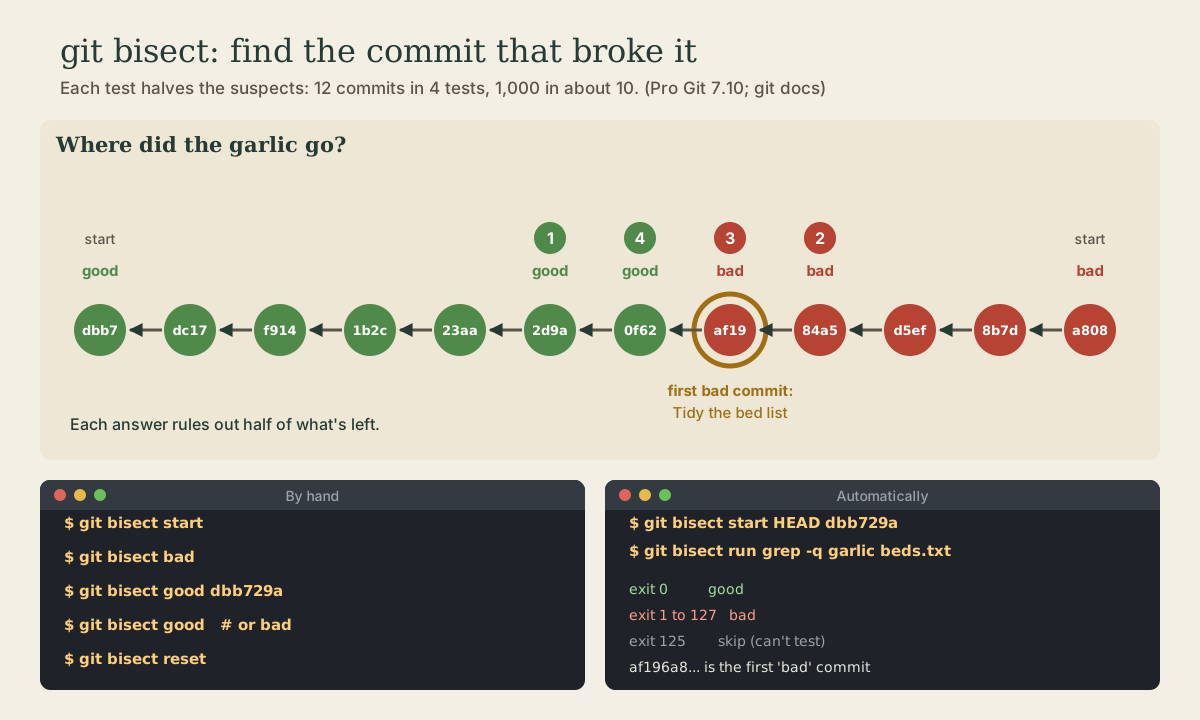
When something worked once and doesn't now, git bisect finds the commit that broke it by binary search: mark a bad commit and a good one, test the commit git checks out halfway between, answer good or bad, and repeat. Each answer halves the suspects, so a thousand commits take about ten tests. Automating it with git bisect run and a command whose exit code says good, bad, or skip, and finishing with git bisect reset.
- 7 min
- 6 steps
- 2 questions
- Lesson 39 of 80
In this lesson
- Binary search through history
- Bisecting by hand
- Letting a command decide
- Making bisect work for you
- Your turn
- So
Picking up where you left off.
Binary search through history
Something worked before and doesn’t now. If you know where to look, git log -p and git blame (module 2) will find it. If you don’t, and there are dozens of commits between “worked” and “broken,” git bisect finds the guilty commit for you 1.
It does a binary search. You tell it one commit that’s bad and one older commit that was good. Git checks out the commit halfway between, and you test it: if it’s good, the problem came later, and if it’s bad, it came earlier or right there. Either way, half the suspects are ruled out 1. Twelve commits take about four tests; a thousand take about ten, because 2 to the 10th is 1,024.
Quick check
Each answer halves what’s left: 1,000, 500, 250 and so on down to 1 takes about ten halvings.
Bisecting by hand
The garden repository’s beds.txt has lost its garlic somewhere in the last twelve commits:
me@linuxbox:~/garden$ git log --oneline
a808cbe Add a second bean row
8b7d6df Add carrots
d5efca9 Add lettuce
84a5c2a Add peppers
af196a8 Tidy the bed list
0f62044 Add basil
2d9ae6c Add marigolds
23aad32 Add tomatoes
1b2c175 Add squash
f9144a6 Add garlic
dc1726b Add beans
dbb729a Plan the beds
me@linuxbox:~/garden$ grep garlic beds.txt
me@linuxbox:~/garden$
Start, mark the current commit bad, and mark a commit you know was good; here, the first one 2:
me@linuxbox:~/garden$ git bisect start
status: waiting for both 'good' and 'bad' commits
me@linuxbox:~/garden$ git bisect bad
status: waiting for 'good' commit(s), 'bad' commit known
me@linuxbox:~/garden$ git bisect good dbb729a
Bisecting: 5 revisions left to test after this (roughly 3 steps)
[2d9ae6c0b9fe3ef4fb5969b44bc25bc4e9a9697c] Add marigolds
Git has checked out Add marigolds, halfway along. Test it, and say what you found:
me@linuxbox:~/garden$ grep garlic beds.txt
garlic
me@linuxbox:~/garden$ git bisect good
Bisecting: 2 revisions left to test after this (roughly 2 steps)
[84a5c2a5184ca8a9c7bedddea0a4a948dc9d4eca] Add peppers
me@linuxbox:~/garden$ grep garlic beds.txt
me@linuxbox:~/garden$ git bisect bad
Bisecting: 0 revisions left to test after this (roughly 1 step)
[af196a8ff4e3443477e402a39eb4c0811fafec49] Tidy the bed list
me@linuxbox:~/garden$ grep garlic beds.txt
me@linuxbox:~/garden$ git bisect bad
Bisecting: 0 revisions left to test after this (roughly 0 steps)
[0f620447a072b53a10a541ec2f32707d80ee6988] Add basil
me@linuxbox:~/garden$ grep garlic beds.txt
garlic
me@linuxbox:~/garden$ git bisect good
af196a8ff4e3443477e402a39eb4c0811fafec49 is the first 'bad' commit
commit af196a8ff4e3443477e402a39eb4c0811fafec49
Author: Me <me@example.com>
Date:   Mon Oct 5 09:16:00 2026 -0500

    Tidy the bed list

 beds.txt | 5 ++---
 1 file changed, 2 insertions(+), 3 deletions(-)
Four tests, and git names the commit: Tidy the bed list, which removed garlic while sorting the list. git show af196a8 shows exactly what it changed.
While bisecting, you’re on old commits in detached HEAD (module 3), so don’t do new work there. When you’re done, git bisect reset puts you back on the branch you started from 1:
me@linuxbox:~/garden$ git bisect reset
Previous HEAD position was 0f62044 Add basil
Switched to branch 'main'
If a commit can’t be tested, say it’s half-finished and doesn’t run, git bisect skip asks git to pick a nearby one instead. Skip next to the culprit, though, and git can only say it’s one of a few commits 2.
Letting a command decide
If a command can tell good from bad, git can run the whole search itself. Give the bad and good commits to start, then hand the test to git bisect run 1 2:
me@linuxbox:~/garden$ git bisect start HEAD dbb729a
Bisecting: 5 revisions left to test after this (roughly 3 steps)
[2d9ae6c0b9fe3ef4fb5969b44bc25bc4e9a9697c] Add marigolds
me@linuxbox:~/garden$ git bisect run grep -q garlic beds.txt
running 'grep' '-q' 'garlic' 'beds.txt'
Bisecting: 2 revisions left to test after this (roughly 2 steps)
[84a5c2a5184ca8a9c7bedddea0a4a948dc9d4eca] Add peppers
running 'grep' '-q' 'garlic' 'beds.txt'
Bisecting: 0 revisions left to test after this (roughly 1 step)
[af196a8ff4e3443477e402a39eb4c0811fafec49] Tidy the bed list
running 'grep' '-q' 'garlic' 'beds.txt'
Bisecting: 0 revisions left to test after this (roughly 0 steps)
[0f620447a072b53a10a541ec2f32707d80ee6988] Add basil
running 'grep' '-q' 'garlic' 'beds.txt'
af196a8ff4e3443477e402a39eb4c0811fafec49 is the first 'bad' commit
...
bisect found first 'bad' commit
me@linuxbox:~/garden$ git bisect reset
Git reads the command’s exit status (Shell course, module 6) 2:
| Exit status | Means |
|---|---|
| 0 | good |
| 1 to 127, except 125 | bad |
| 125 | can’t test this one; skip it |
| anything else | stop bisecting |
grep -q exits 0 when it finds a match and 1 when it doesn’t, so it works as a test with nothing extra. For real projects the command is usually your test suite, such as make test, or a small script. The git docs’ example skips commits that don’t build 2:
#!/bin/sh
make || exit 125         # can't build: skip this commit
./check_test_case.sh     # exits 0 if the test passes, 1 if not
Keep the test script outside the repository, or untracked, so it doesn’t change as git checks out older commits.
Quick check
0 means good and 1 to 127 (except 125) means bad. 125 tells git to skip that commit.
Making bisect work for you
Bisect can only point to a commit, so it’s as precise as your commits are. A small commit that does one thing (module 2) tells you exactly what broke; a giant “lots of changes” commit leaves you searching inside it. That’s one more reason to commit small and often.
Two more commands help with long sessions 2: git bisect log prints the good and bad answers so far, and git bisect visualize (or view) shows the commits still in the running.
Your turn
Exercises
- Make a practice repository with a dozen commits, each adding a line to a file, and have one commit in the middle delete an earlier line.
- Find that commit by hand with
git bisect start,bad,good, testing each step withgrep. How many tests did it take? - Run
git bisect resetand check you’re back onmain. - Do it again with
git bisect runand the samegrep -qtest. - Write a tiny script that exits 125 if a file doesn’t exist and otherwise runs your
greptest. Why might a script like that be useful?
Answers
- For about a dozen commits, three or four tests. Git prints the first bad commit with its message and changed files.
Switched to branch 'main', andgit statusshows you onmainagain.- Git prints a
running ...line for each test and finishes withbisect found first 'bad' commit. - A sketch:
[ -f beds.txt ] || exit 125thengrep -q garlic beds.txt. On commits from before the file existed, the test can’t say anything useful, so skipping them is more honest than calling them bad.
So
git bisect finds the commit that broke something by binary search: git bisect start, git bisect bad on a broken commit, git bisect good on one that worked, then test and answer good or bad until git names the first bad commit. Each answer halves the suspects, so about ten tests cover a thousand commits. git bisect run <command> automates it, reading exit status 0 as good, 1 to 127 as bad, and 125 as skip. Always finish with git bisect reset.
Lesson complete
Nice work.
Sources for this lesson
- 1Scott Chacon, Ben Straub. Pro Git, 2nd edition. Apress; free online at git-scm.com. 2014. verifiedFree CC BY-NC-SA 3.0 book, maintained online. Ch. 1: version control; Git's 2005 origin when the Linux kernel lost free use of BitKeeper; snapshots, not differences (unchanged files stored once); nearly every operation local; integrity through 40-character SHA-1 checksums; the three states (modified, staged, committed) and three areas (working tree, staging area or index, .git directory); first-time setup with system/global/local config levels, user.name and user.email baked into commits, core.editor, git config --list --show-origin. Ch. 2: git init, status (and -s), add, diff and diff --staged, commit (-m, -a), .gitignore, log options, amending, undoing, remotes, tags, aliases. Ch. 3: branches as movable pointers, HEAD, merging and conflicts, remote branches, rebasing and its rule. Ch. 7: reset demystified, stashing, revision selection. Ch. 8: core.autocrlf true on Windows, input on Linux and macOS. Ch. 10: objects (blob, tree, commit) and references.
- 2git-bisect documentation. Git project (git-scm.com). verifiedBinary search for the commit that introduced a bug: start, bad, good, then good/bad on each checked-out commit; skip for untestable commits (ambiguous if adjacent to the culprit); reset to finish; log and visualize/view. bisect run <cmd>: exit 0 good, 1-127 except 125 bad, 125 skip, anything else aborts. Example script uses 'make || exit 125'.