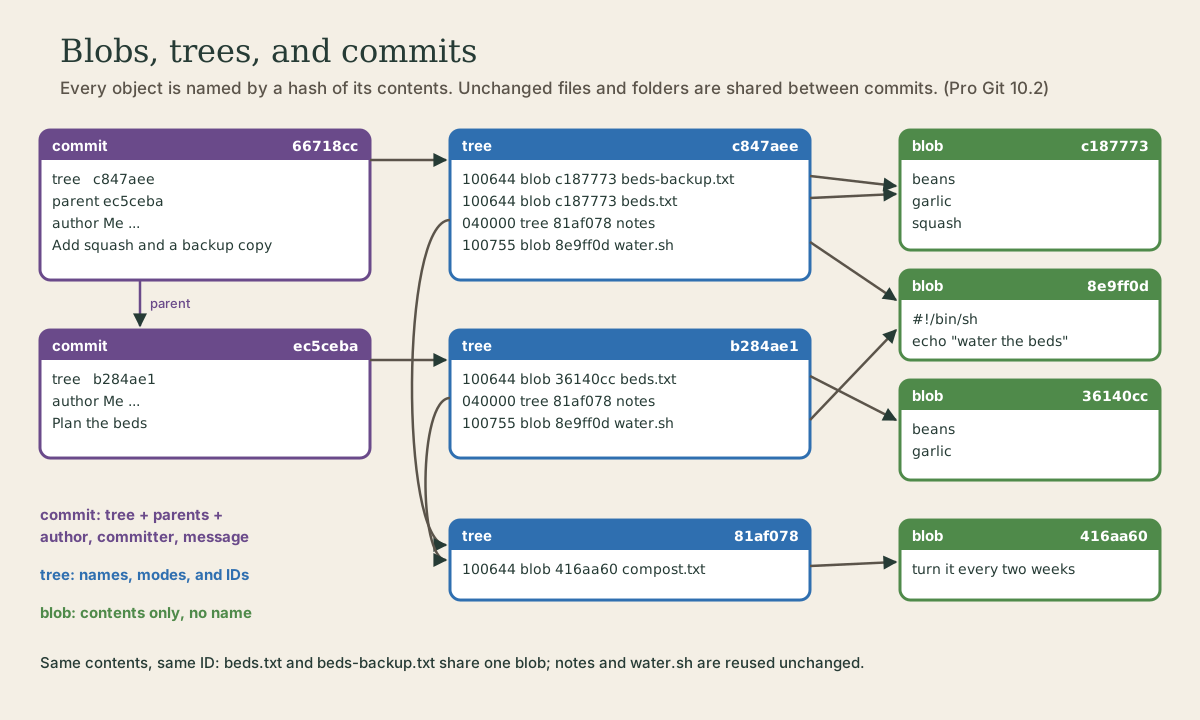
Objects: Blobs, Trees, and Commits
Underneath, git is a key-value store: each object is saved under a hash of its contents. Three kinds of object hold a whole project's history: blobs for file contents, trees for folders (names, modes, and IDs), and commits (a tree, parents, author, committer, message). Looking inside them with git cat-file and git ls-tree, why identical files are stored once and any change ripples up into new IDs, how git gc packs objects and stores small deltas, building a commit by hand from plumbing commands, and the coming move from SHA-1 to SHA-256.
- 9 min
- 9 steps
- 2 questions
- Lesson 40 of 80
In this lesson
- Git is a key-value store
- Looking inside a commit
- Trees and blobs
- Why the design works
- Packfiles
- A commit by hand
- SHA-1 and SHA-256
- Your turn
- So
Picking up where you left off.
Git is a key-value store
Module 1 said git stores snapshots, each with an ID that’s a checksum of its contents. Here’s what that means on disk. Pro Git describes git’s core as a content-addressable filesystem: a key-value store where you put in some content and get back a key, a hash of that content, that you can use to get it out again 1.
The plumbing command git hash-object computes that key 1:
me@linuxbox:~/garden$ echo 'test content' | git hash-object --stdin
d670460b4b4aece5915caf5c68d12f560a9fe3e4
That’s the same ID Pro Git prints for the same text, and the same one you’ll get: the key depends only on the content. (Git hashes a short header, the object type and size, plus the content 1.)
Stored objects live in .git/objects, one file each, compressed with zlib, in a folder named after the first two characters of the ID with the other 38 as the file name 1. A new repository has none. Watch them appear, starting from a fresh garden with three files:
me@linuxbox:~/garden$ find .git/objects -type f
me@linuxbox:~/garden$ git add beds.txt notes water.sh
me@linuxbox:~/garden$ find .git/objects -type f
.git/objects/36/140cc2450a865ada72626cf91decfbfd4a3462
.git/objects/41/6aa60878019e3aa91dc5554cd6887dcb093b2d
.git/objects/8e/9ff0d0ab30e114d7cf21fa300fc075f639a0a7
git add already wrote three objects, one per file’s contents, before any commit. Committing adds three more:
me@linuxbox:~/garden$ git commit -m "Plan the beds"
[main (root-commit) ec5ceba] Plan the beds
 3 files changed, 5 insertions(+)
 create mode 100644 beds.txt
 create mode 100644 notes/compost.txt
 create mode 100755 water.sh
me@linuxbox:~/garden$ find .git/objects -type f
.git/objects/36/140cc2450a865ada72626cf91decfbfd4a3462
.git/objects/41/6aa60878019e3aa91dc5554cd6887dcb093b2d
.git/objects/81/af0786a9e422f0594aabf1621607201e6c5b3d
.git/objects/8e/9ff0d0ab30e114d7cf21fa300fc075f639a0a7
.git/objects/b2/84ae1839a49226a4b652971c86c90dc728c4c4
.git/objects/ec/5ceba9e518a4eda6fb2375ad45d820a950c64c
Six objects of three kinds: blobs, trees, and a commit.
Looking inside a commit
git cat-file is the tool for looking at objects: -t prints an object’s type and -p prints its contents readably 1:
me@linuxbox:~/garden$ git cat-file -t HEAD
commit
me@linuxbox:~/garden$ git cat-file -p HEAD
tree b284ae1839a49226a4b652971c86c90dc728c4c4
author Me <me@example.com> 1791212460 -0500
committer Me <me@example.com> 1791212460 -0500

Plan the beds
That’s the whole commit. A commit object holds 1:
tree: the ID of the top-level tree, the snapshot of the whole project.parent: the ID of the commit before it. This is the first commit, so there’s none; a merge commit has two.authorandcommitter: youruser.nameanduser.email(module 1), and the time as seconds since 1 January 1970 plus your time zone. The author wrote the change; the committer applied it. After a rebase or cherry-pick, the author line keeps its original time and the committer line gets a new one.- A blank line, then the message.
Trees and blobs
A tree is a folder listing. Each entry has a mode, a type, an ID, and a name 1. git ls-tree lists the tree a commit points to:
me@linuxbox:~/garden$ git ls-tree HEAD
100644 blob 36140cc2450a865ada72626cf91decfbfd4a3462    beds.txt
040000 tree 81af0786a9e422f0594aabf1621607201e6c5b3d    notes
100755 blob 8e9ff0d0ab30e114d7cf21fa300fc075f639a0a7    water.sh
me@linuxbox:~/garden$ git cat-file -p 81af078
100644 blob 416aa60878019e3aa91dc5554cd6887dcb093b2d    compost.txt
The folder notes is another tree. The modes are borrowed from Unix (Shell course, module 3) but git only uses a few for files: 100644 for a normal file, 100755 for an executable one, and 120000 for a symbolic link 1. That’s why chmod +x on a script shows up as a change in git, but other permission changes don’t.
A blob is a file’s contents and nothing else 1:
me@linuxbox:~/garden$ git cat-file -t 36140cc
blob
me@linuxbox:~/garden$ git cat-file -p 36140cc
beans
garlic
me@linuxbox:~/garden$ git hash-object beds.txt
36140cc2450a865ada72626cf91decfbfd4a3462
No name, no date, no permissions: those belong to the tree. And git hash-object beds.txt gives the blob’s ID without storing anything, showing the ID comes straight from the contents.
So a commit is a chain of pointers: commit to tree, tree to blobs and smaller trees.
Quick check
A blob is contents only, so two files with identical contents share one blob under different names.
Why the design works
The second commit changes beds.txt and adds beds-backup.txt, an exact copy of it:
me@linuxbox:~/garden$ git cat-file -p HEAD
tree c847aeebefcb6e0017df69a26ee9b73a1bafb49c
parent ec5ceba9e518a4eda6fb2375ad45d820a950c64c
author Me <me@example.com> 1791212520 -0500
committer Me <me@example.com> 1791212520 -0500

Add squash and a backup copy
me@linuxbox:~/garden$ git ls-tree HEAD
100644 blob c187773935b5b068110e8be2045f64b09ecb9db9    beds-backup.txt
100644 blob c187773935b5b068110e8be2045f64b09ecb9db9    beds.txt
040000 tree 81af0786a9e422f0594aabf1621607201e6c5b3d    notes
100755 blob 8e9ff0d0ab30e114d7cf21fa300fc075f639a0a7    water.sh
me@linuxbox:~/garden$ git ls-tree HEAD~1
100644 blob 36140cc2450a865ada72626cf91decfbfd4a3462    beds.txt
040000 tree 81af0786a9e422f0594aabf1621607201e6c5b3d    notes
100755 blob 8e9ff0d0ab30e114d7cf21fa300fc075f639a0a7    water.sh
Three things to notice:
- Identical contents are stored once.
beds.txtandbeds-backup.txtpoint to the same blob,c187773. - Unchanged things are reused. The
notestree and thewater.shblob have the same IDs in both commits. A “snapshot” of a project with a thousand files, one of them changed, adds just a few new objects: the changed blob, a new tree for each folder above it, and the commit. - Any change ripples upward. A new blob means a new entry in its tree, so a new tree ID, so a new commit ID. That’s why a commit’s ID vouches for every file in it, and why rebased commits get new IDs (module 3): a new parent line means a new commit object.
This is what module 1 meant by “git stores snapshots, not differences.” Each commit names a complete tree, but the trees share nearly everything.
Quick check
A changed blob means a changed entry in its tree, which changes that tree’s ID, and so on up. Everything else is reused.
Packfiles
One compressed file per object is called the loose format. When there are too many loose objects, when you push, or when you run git gc, git packs them into a single packfile 1:
me@linuxbox:~/garden$ git count-objects -v
count: 9
size: 0
in-pack: 0
packs: 0
size-pack: 0
prune-packable: 0
garbage: 0
size-garbage: 0
me@linuxbox:~/garden$ git gc -q
me@linuxbox:~/garden$ git count-objects -v
count: 0
size: 0
in-pack: 9
packs: 1
size-pack: 2
prune-packable: 0
garbage: 0
size-garbage: 0
All nine objects are now in one pack (.git/objects/pack/pack-*.pack, with an index file beside it to find things fast). Inside a pack, git looks for similar objects, such as two versions of the same file, and stores one whole and the other as a delta, just the differences. It keeps the newest version whole, since that’s the one you’re most likely to need 1. So git’s model is snapshots, and its storage is compact anyway.
You rarely run git gc yourself: git runs git gc --auto now and then, which does nothing until there are about 7,000 loose objects or more than 50 packs 1.
A commit by hand
The everyday commands, which Pro Git calls porcelain, are built on lower-level plumbing commands 1. Here’s git add and git commit done with plumbing, in a new empty repository:
me@linuxbox:~/garden$ echo 'hello, garden' | git hash-object -w --stdin
ebc21855722686f4a0456d90d1afced9a67849d3
me@linuxbox:~/garden$ git update-index --add --cacheinfo 100644,ebc21855722686f4a0456d90d1afced9a67849d3,hello.txt
me@linuxbox:~/garden$ git write-tree
30987f6fcf08f8d2ca3b29059401db7e259d263d
me@linuxbox:~/garden$ echo 'First commit, by hand' | git commit-tree 30987f6
2e753227d77a8fc76cac778ba188768232fe8125
me@linuxbox:~/garden$ git update-ref refs/heads/main 2e75322
me@linuxbox:~/garden$ git log --oneline
2e75322 First commit, by hand
Step by step 1:
hash-object -wstores a blob (-wmeans write it, not just compute the ID).update-index --add --cacheinfoputs it in the index (the staging area) ashello.txt, mode100644.write-treeturns the index into a tree object.commit-treemakes a commit object pointing at that tree, with the message from standard input. Add-p <parent>for later commits.update-refpoints themainbranch at the new commit (next lesson).
That’s a real commit. The file was never in the working directory, though, so git sees it as deleted until you check it out:
me@linuxbox:~/garden$ git status -s
 D hello.txt
me@linuxbox:~/garden$ git restore hello.txt
me@linuxbox:~/garden$ cat hello.txt
hello, garden
git add is hash-object -w plus update-index; git commit is write-tree, commit-tree, and update-ref. You’ll never need to do this by hand, but it’s all there is.
SHA-1 and SHA-256
Git’s IDs are SHA-1 hashes, 40 hex characters. SHA-1 is now considered weak: researchers have produced two different files with the same SHA-1 hash 2. Git already supports SHA-256, with 64-character IDs 3:
me@linuxbox:~/garden$ git init -q --object-format=sha256
me@linuxbox:~/garden$ git log --format=%H
1f73b0635f2e8cc0e9f3c4b0d040d26028818d6576ede0a4df30a20b0571dc50
The git project plans to make SHA-256 the default for new repositories in Git 3.0, which has no release date yet 2. For now, SHA-1 is the default, and SHA-1 and SHA-256 repositories can’t exchange history with each other 3, so a SHA-256 repository needs a host that supports it. Stay with the default unless you have a reason not to; the ideas in this lesson are the same either way.
Your turn
Exercises
- Run
echo 'test content' | git hash-object --stdinand compare with the ID above. - In a new repository, add two files and a folder, run
find .git/objects -type fbefore and aftergit add, and aftergit commit. Which object is which? - Use
git cat-file -pto walk fromHEADto its tree to one blob. - Copy a file under a new name and commit. Show with
git ls-tree HEADthat both names point to the same blob. - Change one file in a subfolder and commit. Compare
git ls-tree HEADandgit ls-tree HEAD~1: which IDs changed and which didn’t? - Build a commit by hand with the five plumbing commands above.
Answers
d670460b4b4aece5915caf5c68d12f560a9fe3e4, the same on every computer.- After
git add: one blob per file with distinct contents. Aftergit commit: one tree per folder, the top-level tree, and the commit.git cat-file -t <id>names each one. git cat-file -p HEADshowstree <id>;git cat-file -p <tree-id>lists blobs;git cat-file -p <blob-id>prints a file.- Both lines show the same blob ID.
- The changed file’s blob, the subfolder’s tree, and the top-level tree are new; every other blob and tree keeps its ID.
git log --onelineshows your commit;git status -sshows the file as deleted until yougit restoreit.
So
Git stores everything as objects named by a hash of their contents, in .git/objects. A blob is a file’s contents; a tree lists names, modes, and the IDs of blobs and smaller trees; a commit points to one tree and its parents, with author, committer, and message. Identical contents are stored once, unchanged files and folders are shared between commits, and any change gives new IDs all the way up, which is how a commit ID vouches for everything in it. git gc packs objects and stores similar ones as deltas. git cat-file -p and git ls-tree let you look at any of it.
Lesson complete
Nice work.
Sources for this lesson
- 1Scott Chacon, Ben Straub. Pro Git, 2nd edition. Apress; free online at git-scm.com. 2014. verifiedFree CC BY-NC-SA 3.0 book, maintained online. Ch. 1: version control; Git's 2005 origin when the Linux kernel lost free use of BitKeeper; snapshots, not differences (unchanged files stored once); nearly every operation local; integrity through 40-character SHA-1 checksums; the three states (modified, staged, committed) and three areas (working tree, staging area or index, .git directory); first-time setup with system/global/local config levels, user.name and user.email baked into commits, core.editor, git config --list --show-origin. Ch. 2: git init, status (and -s), add, diff and diff --staged, commit (-m, -a), .gitignore, log options, amending, undoing, remotes, tags, aliases. Ch. 3: branches as movable pointers, HEAD, merging and conflicts, remote branches, rebasing and its rule. Ch. 7: reset demystified, stashing, revision selection. Ch. 8: core.autocrlf true on Windows, input on Linux and macOS. Ch. 10: objects (blob, tree, commit) and references.
- 2Upcoming breaking changes (BreakingChanges). Git project (git-scm.com). verifiedPlanned for Git 3.0, which has no release date yet: the default hash function for new repositories changes from sha1 to sha256 (SHA-1 deprecated by NIST in 2011; SHAttered 2017 produced two PDFs with the same hash), and the default reference storage format changes from 'files' to 'reftable', which does not use filesystem paths to encode reference names. No plan to deprecate sha1 repositories.
- 3git-init documentation. Git project (git-scm.com). verifiedgit init creates an empty repository, a .git directory with objects, refs/heads, refs/tags, and template files. The initial branch name falls back to master, but this will change to main when Git 3.0 is released; init.defaultBranch customizes it, and --initial-branch sets it for one repository.