Binary and Hexadecimal
Computers store everything as bits, signals with two states. Place value in decimal and binary, counting in binary, bytes and words, and how n bits give 2^n values. Hexadecimal as shorthand for bits, four to a digit, and octal, which you've met in chmod 755. Converting between bases at the command line with bash arithmetic, printf, and Python, and why a 1 TB drive shows as 931 GiB.
- 6 min
- 10 steps
- 3 questions
- Lesson 63 of 80
In this lesson
- Two states
- Place value in decimal
- Place value in binary
- Bits, bytes, and words
- Hexadecimal
- Octal, and chmod
- Python for conversions
- Kilobytes and kibibytes
- Your turn
- So
Picking up where you left off.
Two states
Inside a computer, everything is stored and moved as electrical signals, and to keep the circuits simple each signal has just two states: no voltage, read as 0, or voltage, read as 1 1. One such 0-or-1 is a bit, short for binary digit 1. Numbers, text, pictures, programs: all of it is long sequences of bits, given meaning by how they’re read. This module is about the first and most basic readings, numbers and text.
Place value in decimal
You already know a positional number system. In decimal, base 10, each digit is worth ten times the one to its right 1:
8425 = 8×1000 + 4×100 + 2×10 + 5×1
     = 8×10³  + 4×10² + 2×10¹ + 5×10⁰
Each digit holds one of ten values, 0 to 9; past 9, you carry to the next place.
Place value in binary
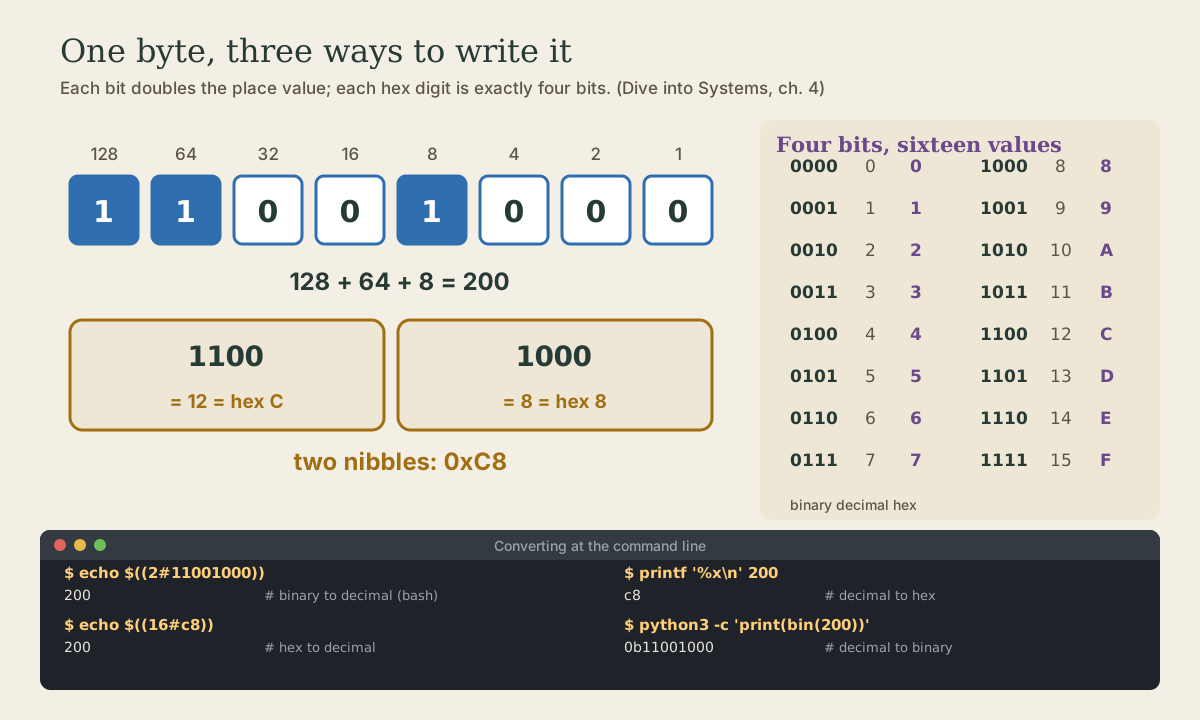
Binary, base 2, works the same way with powers of two, and each digit holds 0 or 1 1. Reading right to left, the places are worth 1, 2, 4, 8, 16, 32, 64, 128:
So 11001000 is 128 + 64 + 8 = 200. Programmers write 0b in front of a binary number, as in 0b11001000, so it isn’t mistaken for decimal 1.
Counting in binary is the same carrying game with only two digits: 0, 1, 10, 11, 100, 101, 110, 111, 1000. Each time a column fills, it rolls over and carries left.
bash does conversions to decimal for you, with base#digits inside $(( )) 2:
me@linuxbox:~$ echo $((2#1011))
11
me@linuxbox:~$ echo $((2#11111111))
255
Quick check
0b1011 in decimal?8 + 0 + 2 + 1. Check it with echo $((2#1011)).
Bits, bytes, and words
A single bit doesn’t say much, so bits are grouped 1:
- A byte is 8 bits, and holds 2⁸ = 256 different values, 0 to 255. It’s the smallest piece of memory a program can address.
- A word is the size the processor works with naturally, 32 or 64 bits on current computers.
Each extra bit doubles the number of values: n bits give 2ⁿ 1. Sixteen bits give 65,536; 32 bits about 4.3 billion; 64 bits about 18 quintillion.
Quick check
Eight bits, each doubling the count: 2^8 = 256, from 0 to 255.
Hexadecimal
Long strings of 0s and 1s are hard to read, and decimal doesn’t line up with bits. Hexadecimal, base 16, does both jobs: it’s compact, and since 16 = 2⁴, each hex digit is exactly four bits 1. The digits past 9 are letters: A is 10, B 11, up to F for 15 1.
A byte is two hex digits. 11001000 splits into 1100 (12, C) and 1000 (8), so it’s 0xC8; 0x marks hex the way 0b marks binary 1. You’ll see hex everywhere bytes show through: memory addresses, colors like #FF8800, MAC addresses, git’s commit IDs, and the xxd dumps in the next lesson.
me@linuxbox:~$ printf '%x\n' 255
ff
me@linuxbox:~$ printf '%X\n' 48879
BEEF
me@linuxbox:~$ echo $((16#ff))
255
printf with %x (or %X for capitals) writes a number in hex; 16# reads it back 2.
Quick check
Hex is purely for people: compact like decimal, but lines up with the bits like binary.
Octal, and chmod
Octal, base 8, groups bits in threes, and survives mainly in one place you know: file permissions (Shell course, module 3). Each permission triple, rwx, is three bits, so one octal digit:
me@linuxbox:~$ printf '%o\n' 493
755
me@linuxbox:~$ echo $((8#755))
493
755 is 111 101 101: rwx for the owner, r-x for group and others.
Python for conversions
bash’s printf has no binary format, so for decimal to binary, Python, which is on every Ubuntu system, is handy 3:
me@linuxbox:~$ python3 -c 'print(bin(200))'
0b11001000
me@linuxbox:~$ python3 -c 'print(hex(255), oct(493))'
0xff 0o755
me@linuxbox:~$ python3 -c 'print(int("11001000", 2), int("ff", 16))'
200 255
bin, hex, and oct write a number in base 2, 16, or 8; int(text, base) reads one back 3.
Kilobytes and kibibytes
Sizes use two different scales, which is why a “1 TB” drive shows up as about 931 “GB”:
- Decimal (SI) prefixes: kilobyte, kB = 1,000 bytes; megabyte = 1,000,000; and so on. Drive makers use these.
- Binary (IEC) prefixes: kibibyte, KiB = 1,024 bytes (2¹⁰); mebibyte, MiB = 2²⁰; gibibyte, GiB = 2³⁰ 4. Memory and much software count this way.
1 TB is 10¹² bytes; divided by 2³⁰ that’s about 931 GiB. Same bytes, different units. df -h (Linux course, module 4) uses powers of 1,024, and df -H powers of 1,000 5.
Your turn
Exercises
- Count from 0 to 16 in binary on paper. When does a new digit appear?
- Convert by hand, then check with bash:
0b101010,0b10000000,0b11110000. - Write 100, 127, and 255 in hex with
printf '%x\n'. Then convert0x2Aand0xDEADback withecho $((16#...)). - What’s the largest number in 16 bits? In 32 bits? Check with
echo $((2**16 - 1))andecho $((2**32 - 1)). python3 -c 'print(bin(0xC8))'. Does it match the diagram?stat -c '%a %A' ~/.bashrc: what’s the octal mode, and what bits does it stand for?- On your Linux system, compare
df -h /anddf -H /. Why do the sizes differ?
Answers
- A new digit appears at 2 (
10), 4 (100), 8 (1000), and 16 (10000): every power of two. - 42, 128, 240.
64,7f,ff; 42 and 57005.- 65535 and 4294967295.
0b11001000, yes.- Usually
644 -rw-r--r--:110 100 100, read and write for you, read for everyone else. -hdivides by 1,024 at each step,-Hby 1,000, so-Hshows bigger numbers for the same bytes.
So
Bits have two states, and binary is place value with powers of two: 11001000 is 128 + 64 + 8 = 200. A byte is 8 bits, 256 values; n bits give 2ⁿ values. Hexadecimal packs four bits per digit, so a byte is two hex digits (0xC8), and octal packs three (chmod’s 755). bash converts with $((2#...)), $((16#...)), and printf '%x'; Python with bin, hex, and int(text, base). And a kibibyte is 1,024 bytes, a kilobyte 1,000.
Lesson complete
Nice work.
Sources for this lesson
- 1Suzanne J. Matthews, Tia Newhall, Kevin C. Webb. Dive into Systems. No Starch Press (free online edition). 2022. verifiedCh. 4 Binary and Data Representation: bits as two voltage states, bytes (8 bits, 256 values, smallest addressable unit), words of 32 or 64 bits, n bits give 2^n values; decimal and binary place value with 0b and 0x prefixes; hexadecimal as four bits per digit; fixed storage sizes and unsigned ranges; two's complement with a negative-weighted top bit, one zero, range -2^(n-1) to 2^(n-1)-1, all ones is -1, negation by flipping bits and adding one; subtraction as adding the negation, reusing negation and addition circuits; overflow and the odometer analogy.
- 2Chet Ramey, Brian Fox. Bash Reference Manual, Edition 5.3. GNU Project, Free Software Foundation. 2025. verifiedThe reference for Bash 5.3 (May 18, 2025). Redirections (3.6) are processed left to right and order matters: ls > dirlist 2>&1 sends both streams to dirlist, while ls 2>&1 > dirlist sends only standard output there. With set -o noclobber, > fails on an existing regular file and >| overrides it. &> word is equivalent to > word 2>&1 and &>> word to >> word 2>&1. Here documents (<<word, with <<- stripping leading tabs; quoting word disables expansion) and here strings (<<<). Expansions (3.5) happen in a fixed order: brace; tilde, parameter, arithmetic, and command substitution left to right; word splitting; filename expansion; quote removal last. Startup files (6.2): an interactive login shell reads /etc/profile then the first of ~/.bash_profile, ~/.bash_login, ~/.profile; an interactive non-login shell reads ~/.bashrc. HISTCONTROL (ignorespace, ignoredups, ignoreboth), HISTSIZE, HISTFILESIZE; set -x traces expanded commands; shell functions and variables, export.
- 3Built-in Functions (Python documentation). Python Software Foundation. verifiedbin(), hex(), oct() convert an integer to a prefixed string; int(text, base) parses one; ord() gives a character's Unicode code point and chr() the reverse (chr(97) is 'a', chr(8364) is the euro sign). sum(): since 3.12, summation of floats uses an algorithm with higher accuracy. id() is, in CPython, the address of the object in memory. open() buffers binary files in fixed-size chunks by default; print()'s output buffering is set by the file, and flush=True forces it out.
- 4Binary prefix. Wikipedia. verifiedIEC prefixes kibi (Ki, 2^10), mebi (Mi, 2^20), gibi (Gi, 2^30), tebi, pebi, exbi; 1 KiB = 1024 B; SI prefixes refer strictly to powers of 10.
- 5df(1) manual page. man7.org (Linux man-pages). verifiedReports file system disk space usage; -h prints sizes in powers of 1024 (e.g. 1023M), -H in powers of 1000.