Integers, Overflow, and Floating Point
Real hardware stores numbers in a fixed number of bits, and that has consequences. Unsigned ranges for 8, 16, 32, and 64 bits; two's complement, how negative numbers are stored and negated; overflow, when a result doesn't fit and wraps around, seen in bash's 64-bit arithmetic; Python's unlimited integers. Then floating point: why 0.1 can't be stored exactly, why 0.1 + 0.2 prints 0.30000000000000004, how to compare floats, why large floats lose whole numbers, and what to use for money.
- 6 min
- 6 steps
- 2 questions
- Lesson 65 of 80
In this lesson
- Fixed sizes
- Negative numbers
- Overflow
- Floating point
- Your turn
- So
Picking up where you left off.
Fixed sizes
On paper, numbers go on forever. In a computer, each number is stored in a fixed number of bits, chosen in advance: registers in the processor are a fixed width, usually 64 bits, and every value takes space 1. With n bits, an unsigned number (never negative) can be anything from 0 to 2ⁿ − 1 1:
| Bits | Largest unsigned value |
|---|---|
| 8 | 255 |
| 16 | 65,535 |
| 32 | 4,294,967,295 |
| 64 | 18,446,744,073,709,551,615 |
That’s the whole story for unsigned numbers. Negative numbers need a trick.
Negative numbers
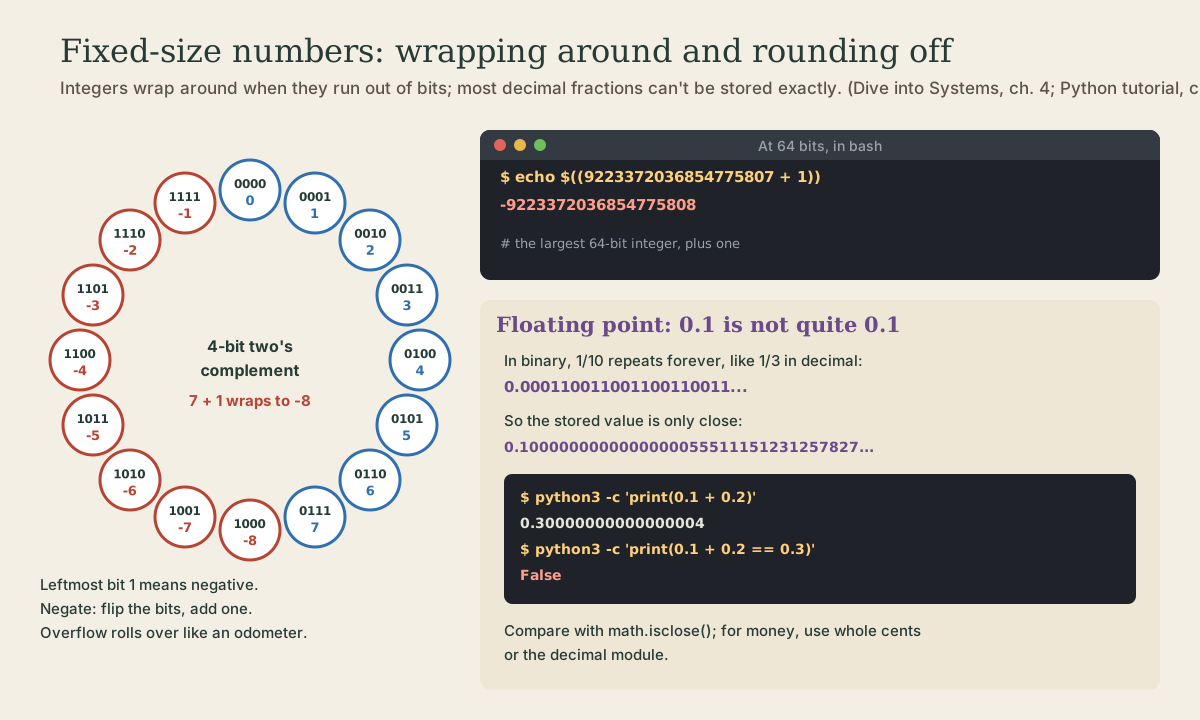
Nearly every computer stores signed integers in two’s complement 1. The leftmost bit still counts as a place value, but a negative one: in 4 bits, the places are −8, 4, 2, 1 1. So:
0111is 4 + 2 + 1 = 7, the largest positive value;1000is −8, the smallest;1111is −8 + 4 + 2 + 1 = −1.
A leftmost 1 means negative, and there’s exactly one zero, all bits 0 1. With n bits the range is −2ⁿ⁻¹ to 2ⁿ⁻¹ − 1: 4 bits give −8 to 7, 8 bits −128 to 127 1.
To negate a number: flip every bit and add one 1. For 13 in 8 bits, 00001101, flipping gives 11110010, and adding one gives 11110011, which is −13. The design pays off in hardware: subtracting 3 is adding −3, so a processor can reuse its negation and addition circuits instead of building a separate subtractor, and −1 + 1 rolls over to exactly zero 1.
Quick check
1111 mean?All ones is -1 at any width, which is why adding 1 to it rolls over to zero.
Overflow
When a result needs more bits than there are, it overflows. The leftover carry is lost, and the value wraps around, like a car’s odometer rolling from 999999 to 000000 1. In 4 bits, 7 + 1 gives 1000, which is −8.
bash does its arithmetic in the largest fixed-width integers available, 64 bits on current computers, with no check for overflow 2, so you can watch it happen:
me@linuxbox:~$ echo $((2**63 - 1))
9223372036854775807
me@linuxbox:~$ echo $((9223372036854775807 + 1))
-9223372036854775808
The largest 64-bit signed integer, plus one, wraps to the most negative. No error, no warning: a program that doesn’t expect it just carries on with a wrong number. Real bugs have come from exactly this, and it’s why careful code checks ranges.
Python’s integers don’t overflow: they grow to as many bits as they need.
me@linuxbox:~$ python3 -c 'print(2**64)'
18446744073709551616
Floating point
Fractions are a different problem. A floating-point number stores a binary fraction, with about 53 significant bits 3. Just as 1/3 has no exact decimal form (0.333…), most decimal fractions have no exact binary form. In binary, 1/10 is a repeating fraction, 0.000110011001100110011…, so 0.1 is stored as the nearest value that fits 3:
me@linuxbox:~$ python3 -c 'print(f"{0.1:.20f}")'
0.10000000000000000555
The stored value is actually 0.1000000000000000055511151231257827021181583404541015625 3. Python normally prints a short version that reads back to the same value, so you rarely see it, until the tiny errors add up:
me@linuxbox:~$ python3 -c 'print(0.1 + 0.2)'
0.30000000000000004
me@linuxbox:~$ python3 -c 'print(0.1 + 0.2 == 0.3)'
False
This isn’t a Python quirk: it’s how binary floating point behaves in every language 3.
Three practical rules follow:
-
Don’t compare floats with
==. Ask whether they’re close 3:me@linuxbox:~$ python3 -c 'import math; print(math.isclose(0.1 + 0.2, 0.3))' True -
For money, don’t use floats. Count whole cents as integers, or use Python’s
decimalmodule, which does decimal arithmetic exactly 3:me@linuxbox:~$ python3 -c 'from decimal import Decimal; print(Decimal("0.1") + Decimal("0.2"))' 0.3 -
Huge floats lose whole numbers. With 53 significant bits, past 2⁵³ a float can’t even hold every integer:
me@linuxbox:~$ python3 -c 'print(2**53, 2**53 + 1.0)'
9007199254740992 9007199254740992.0
Adding 1.0 to 2⁵³ changes nothing; the 1 falls off the end.
Quick check
python3 -c 'print(0.1 + 0.2 == 0.3)' prints False. Why?The same is true in nearly every language. Compare floats with math.isclose(), not ==.
Your turn
Exercises
- In 8-bit two’s complement, write 5 and −5. Check −5 by flipping and adding one.
- What’s the range of a signed 16-bit integer? Check the top with
echo $((2**15 - 1)). echo $((2**63)). Why is it negative?python3 -c 'print(0.1 + 0.1 + 0.1)'. Is it 0.3?- Add 0.1 ten times:
python3 -c 'print(0.1 + 0.1 + 0.1 + 0.1 + 0.1 + 0.1 + 0.1 + 0.1 + 0.1 + 0.1)'. Then check it withmath.isclose(..., 1.0). - In bash,
echo $((7 / 2))andecho $((-7 / 2)). What does bash do with fractions?
Answers
- 5 is
00000101; flipping gives11111010, plus one is11111011, which is −5 (−128 + 64 + 32 + 16 + 8 + 2 + 1). - −32768 to 32767.
- 2⁶³ is one more than the largest 64-bit signed value, so it wraps to −9223372036854775808.
0.30000000000000004.0.9999999999999999;math.isclosesaysTrue: close enough, but not equal. (Since Python 3.12,sum()uses a more accurate method for floats and gets 1.0 here 4.)3and-3: bash does whole-number arithmetic only, dropping any fraction 2. For decimals at the command line, use Python.
So
Numbers live in fixed numbers of bits: n bits hold 0 to 2ⁿ − 1 unsigned, or −2ⁿ⁻¹ to 2ⁿ⁻¹ − 1 in two’s complement, where the top bit counts negative and you negate by flipping and adding one. Results that don’t fit overflow and wrap around, silently, as bash’s 64-bit arithmetic shows; Python’s integers just grow. Floating point stores binary fractions with 53 significant bits, so 0.1 is only approximate and 0.1 + 0.2 isn’t 0.3: compare with math.isclose, keep money in whole cents or decimal, and remember huge floats can’t hold every integer.
Lesson complete
Nice work.
Sources for this lesson
- 1Suzanne J. Matthews, Tia Newhall, Kevin C. Webb. Dive into Systems. No Starch Press (free online edition). 2022. verifiedCh. 4 Binary and Data Representation: bits as two voltage states, bytes (8 bits, 256 values, smallest addressable unit), words of 32 or 64 bits, n bits give 2^n values; decimal and binary place value with 0b and 0x prefixes; hexadecimal as four bits per digit; fixed storage sizes and unsigned ranges; two's complement with a negative-weighted top bit, one zero, range -2^(n-1) to 2^(n-1)-1, all ones is -1, negation by flipping bits and adding one; subtraction as adding the negation, reusing negation and addition circuits; overflow and the odometer analogy.
- 2Shell Arithmetic (Bash Reference Manual). Free Software Foundation. verifiedEvaluation is done in the largest fixed-width integers available, with no check for overflow; division by zero is trapped; operators as in C; integer constants may be written base#n with base 2 to 64, and 0x for hex, a leading 0 for octal.
- 3Floating-Point Arithmetic: Issues and Limitations (Python tutorial). Python Software Foundation. verifiedFloats are binary fractions; most decimal fractions can't be represented exactly, like 1/3 in decimal; 1/10 in binary repeats forever; floats use 53 significant bits, so 0.1 is stored as 3602879701896397 / 2**55, exactly 0.1000000000000000055511151231257827021181583404541015625; Python prints a shorter repr; use math.isclose() or round() to compare; the decimal module gives exact decimal arithmetic for accounting, fractions for rationals; the behavior is that of binary floating point in every language.
- 4Built-in Functions (Python documentation). Python Software Foundation. verifiedbin(), hex(), oct() convert an integer to a prefixed string; int(text, base) parses one; ord() gives a character's Unicode code point and chr() the reverse (chr(97) is 'a', chr(8364) is the euro sign). sum(): since 3.12, summation of floats uses an algorithm with higher accuracy. id() is, in CPython, the address of the object in memory. open() buffers binary files in fixed-size chunks by default; print()'s output buffering is set by the file, and flush=True forces it out.