Text as Numbers
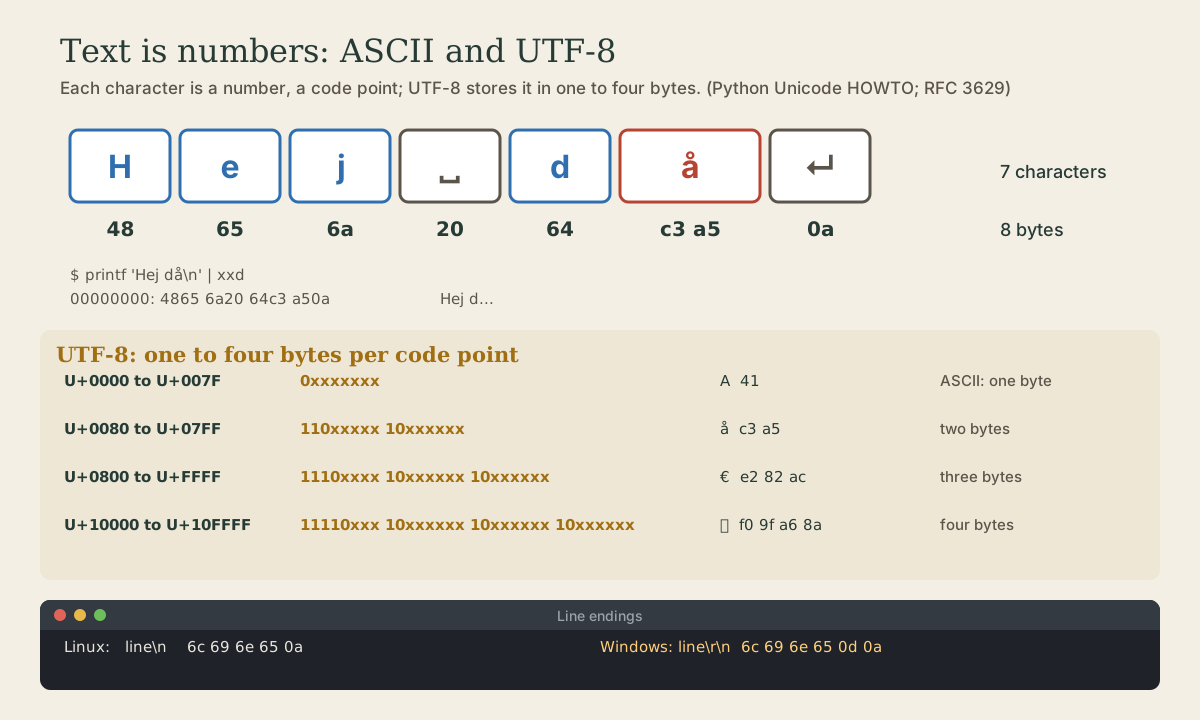
Text is stored as numbers too. ASCII's 128 characters, one byte each; Unicode's code points for every writing system, written U+00E5; and UTF-8, which stores ASCII as before and everything else in two to four bytes, following a bit pattern you can read. Seeing the bytes with xxd and Python's ord, chr, and encode; why a string's length in characters and in bytes differ; the garbled text that appears when bytes are read with the wrong encoding; and LF versus CRLF line endings.
- 6 min
- 9 steps
- 2 questions
- Lesson 64 of 80
In this lesson
- Characters are numbers
- ASCII
- Unicode
- UTF-8
- Characters versus bytes
- When the encoding is wrong
- Line endings
- Your turn
- So
Picking up where you left off.
Characters are numbers
A computer can’t store the letter A, only bits. So text is stored as numbers, one (or more) per character, by agreement about which number means which character: a character encoding. Getting that agreement right is why text usually just works, and getting it wrong is why it sometimes turns into Ã¥.
ASCII
ASCII, the American Standard Code for Information Interchange, is the original agreement still underneath everything: 128 codes, 0 to 127, which fit in seven bits 1. 95 are printable, the digits, upper- and lowercase English letters, and punctuation; 33 are control codes from the days of Teletypes, of which newline and tab are the ones you’ll meet 1. A is 65, a is 97, and the digit 0 is 48.
xxd shows the bytes in a file or a pipe, in hex, with the text alongside:
me@linuxbox:~$ printf 'A' | xxd
00000000: 41                                       A
me@linuxbox:~$ printf 'Hi!\n' | xxd
00000000: 4869 210a                                Hi!.
41 is 65 in hex; 0a is 10, the newline, shown as . in the text column because it isn’t printable. Python converts between characters and numbers with ord and chr 2:
me@linuxbox:~$ python3 -c 'print(ord("A"), chr(97))'
65 a
Quick check
printf 'A' | xxd shows 41. What is that?0x41 = 4×16 + 1 = 65. python3 -c 'print(ord("A"))' says the same.
Unicode
ASCII has no å, no ö, no €, no Japanese, no emoji. Unicode assigns every character in every writing system a number called a code point, from 0 up to 0x10FFFF, about 1.1 million possible values, written like U+00E5 for å 3. Its first 128 code points are exactly ASCII 1.
me@linuxbox:~$ python3 -c 'print(ord("€"), hex(ord("€")))'
8364 0x20ac
The euro sign is code point U+20AC. A code point is just a number, though; to store it, it has to be turned into bytes, and that’s what an encoding like UTF-8 does.
UTF-8
UTF-8 is one of the most commonly used encodings 3, and the one everything in this course’s Linux tools expects. Its rules 3 4:
- A code point below 128 (ASCII) is one byte, the same byte as in ASCII. So plain ASCII text is already valid UTF-8 3.
- Anything higher becomes two, three, or four bytes, each between 128 and 255 3.
The bytes follow a pattern you can read 4:
| Code points | Bytes |
|---|---|
| U+0000 to U+007F | 0xxxxxxx |
| U+0080 to U+07FF | 110xxxxx 10xxxxxx |
| U+0800 to U+FFFF | 1110xxxx 10xxxxxx 10xxxxxx |
| U+10000 to U+10FFFF | 11110xxx 10xxxxxx 10xxxxxx 10xxxxxx |
The x bits hold the code point; the first byte’s leading 1s say how many bytes follow, and continuation bytes start with 10. Here’s å, U+00E5, in bits:
me@linuxbox:~$ printf 'å' | xxd -b
00000000: 11000011 10100101                                      ..
110 then 00011, and 10 then 100101: put the x bits together, 00011100101, and that’s 0xE5. Three- and four-byte characters work the same way:
me@linuxbox:~$ printf '€' | xxd
00000000: e282 ac                                  ...
me@linuxbox:~$ printf '🦊' | xxd
00000000: f09f a68a                                ....
Because every byte of a multi-byte character is 128 or more, UTF-8 never confuses part of a character with an ASCII one, and if bytes are lost, a reader can find the start of the next character again 3.
Quick check
Hej då one byte longer than its number of characters?Plain ASCII characters stay one byte each; anything beyond takes two to four.
Characters versus bytes
So the length of text depends on how you count:
me@linuxbox:~$ printf 'Hej då\n' | xxd
00000000: 4865 6a20 64c3 a50a                      Hej d...
me@linuxbox:~$ python3 -c 'print(len("Hej då"), len("Hej då".encode("utf-8")))'
6 7
Six characters, seven bytes, because å takes two. .encode("utf-8") turns text into bytes 3:
me@linuxbox:~$ python3 -c 'print("å".encode("utf-8"))'
b'\xc3\xa5'
When the encoding is wrong
Bytes don’t say which encoding wrote them. Read UTF-8 bytes as if they were an older one-byte encoding, Latin-1, and each byte of å becomes its own character:
me@linuxbox:~$ python3 -c 'print("Hej då".encode("utf-8").decode("latin-1"))'
Hej då
That Ã¥ is the classic sign of UTF-8 text displayed with the wrong encoding, common in old emails and CSV files from older programs. The fix is to read the file as UTF-8, not to change the text. file guesses a file’s encoding 5:
me@linuxbox:~$ file utf8.txt
utf8.txt: Unicode text, UTF-8 text
Line endings
One more difference hides at the end of every line. Linux ends lines with a single LF, line feed, byte 0a, written \n. Windows ends them with CR LF, carriage return then line feed, 0d 0a, written \r\n:
me@linuxbox:~$ printf 'line\r\n' | xxd
00000000: 6c69 6e65 0d0a                           line..
me@linuxbox:~$ file crlf.txt
crlf.txt: ASCII text, with CRLF line terminators
A script saved on Windows with CRLF endings can fail on Linux with a confusing error, since the shell sees the invisible \r as part of each line. This is what git’s core.autocrlf setting and its line-ending warnings are about (Git course, module 1).
Your turn
Exercises
printf 'Hello\n' | xxd. Find each letter’s byte; which is the newline?python3 -c 'print([ord(c) for c in "Linux"])'. Check two of them againstxxd.printf 'ö' | xxd -b. Using the UTF-8 table, decode the bits back to the code point, and check withpython3 -c 'print(hex(ord("ö")))'.- How many bytes is
Smörgåsbordin UTF-8? Count first, then check withprintf 'Smörgåsbord' | wc -c. - Make a file with CRLF endings (
printf 'a\r\nb\r\n' > win.txt), check it withfile, then convert it withtr -d '\r' < win.txt > unix.txtand check again. python3 -c 'print("Smörgåsbord".encode("utf-8").decode("latin-1"))'. What does mis-decoded text look like?
Answers
48 65 6c 6c 6f 0a: H, e, l, l, o, and the newline0a.[76, 105, 110, 117, 120]; L is 76 = 0x4c.11000011 10110110: the x bits are00011and110110, together00011110110= 0xF6, so U+00F6.- 13 bytes: 11 characters, two of them (ö and å) two bytes each.
ASCII text, with CRLF line terminators, then plainASCII text.Smörgåsbord.
So
Text is numbers. ASCII gives 128 characters a byte each; Unicode gives every character a code point, up to U+10FFFF; UTF-8 stores ASCII as one byte and everything else in two to four, following a pattern of leading bits you can decode by hand. xxd shows the bytes, Python’s ord, chr, and .encode convert, and file guesses an encoding. Lengths differ in characters and bytes, Ã¥ means UTF-8 read the wrong way, and Linux ends lines with LF where Windows uses CR LF.
Lesson complete
Nice work.
Sources for this lesson
- 1ASCII. Wikipedia. verifiedAmerican Standard Code for Information Interchange: 128 code points, 0-127, storable in seven bits; 95 printable characters and 33 control codes originating with Teletypes; the letter i is 105; the first 128 Unicode code points are the same as ASCII.
- 2Built-in Functions (Python documentation). Python Software Foundation. verifiedbin(), hex(), oct() convert an integer to a prefixed string; int(text, base) parses one; ord() gives a character's Unicode code point and chr() the reverse (chr(97) is 'a', chr(8364) is the euro sign). sum(): since 3.12, summation of floats uses an algorithm with higher accuracy. id() is, in CPython, the address of the object in memory. open() buffers binary files in fixed-size chunks by default; print()'s output buffering is set by the file, and flush=True forces it out.
- 3Unicode HOWTO (Python documentation). Python Software Foundation. verifiedCode points are integers from 0 to 0x10FFFF, written U+265E; UTF-8 is one of the most commonly used encodings: code points below 128 are one byte, others two to four bytes each between 128 and 255; ASCII text is valid UTF-8; embedded zero bytes only for U+0000; a reader can resynchronize after lost bytes; str.encode and bytes.decode convert.
- 4F. Yergeau. RFC 3629: UTF-8, a transformation format of ISO 10646. IETF. 2003. verifiedUTF-8 byte patterns by code point range: 0000-007F 0xxxxxxx; 0080-07FF 110xxxxx 10xxxxxx; 0800-FFFF 1110xxxx 10xxxxxx 10xxxxxx; 10000-10FFFF 11110xxx 10xxxxxx 10xxxxxx 10xxxxxx; only one valid encoding per character.
- 5file(1) manual page. man7.org (Linux man-pages). verifiedfile determines file type by testing contents, including text encodings such as ASCII and UTF-8 and line terminators.