The Clock, Pipelines, and Cores
A clock keeps the CPU in step: each tick starts the next stage, and gigahertz means billions of ticks a second. Why clock speed alone doesn't tell you how fast a processor is; pipelining, which overlaps instructions so one finishes nearly every cycle, and the other tricks for running several instructions at once; why clocks stopped getting faster in the early 2000s and processors grew more cores instead; and what that means for whether a program runs faster. Checking your own CPU with lscpu and nproc.
- 5 min
- 7 steps
- 2 questions
- Lesson 70 of 80
In this lesson
- The clock
- Pipelining
- More than one at a time
- More cores
- Your own CPU
- Your turn
- So
Picking up where you left off.
The clock
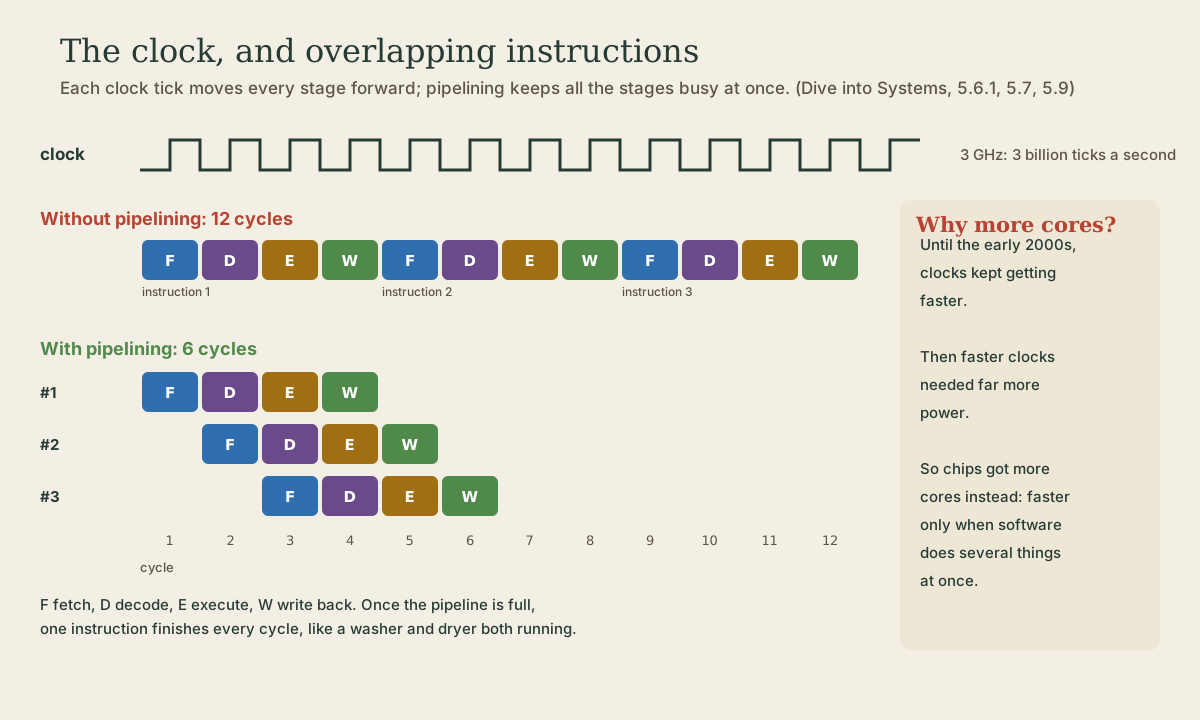
The four stages from last lesson have to happen in order, and every circuit has to finish before the next one uses its output. A clock coordinates this: a signal that ticks at a steady rate, and each tick starts the next stage 1. The clock rate is ticks per second: 1 GHz is a billion ticks a second, so at 3 GHz a tick lasts a third of a nanosecond 1.
In that time, light travels about 10 cm. That’s not a figure of speech: Grace Hopper famously handed out 11.8-inch lengths of wire, the distance a signal travels in a nanosecond, to show why computers have to be small to be fast 1.
Clock rate is a rough guide to speed, but not a good way to compare different processors: they differ in how much work an instruction does and how many cycles each takes 1.
Pipelining
On a simple CPU, each instruction takes four cycles, one per stage, and only then does the next start: three instructions, 12 cycles 1. But during those four cycles, the fetch circuitry sits idle for three of them. Pipelining fixes that: while instruction 1 is being decoded, instruction 2 is fetched; while 1 executes, 2 is decoded and 3 fetched 1. Each instruction still takes four cycles, but they overlap, and once the pipeline is full one instruction finishes every cycle: three take six cycles, and a long run takes barely more than one cycle each 1.
It’s a laundry line: you don’t wait for one load to finish drying before starting the next wash.
Pipelines stall when an instruction needs a result that isn’t ready yet, or when a jump means the next instructions fetched were the wrong ones 1. Processors work hard to avoid that, for example by guessing which way a jump will go.
Quick check
Each instruction still takes four cycles, but they overlap, so one completes every cycle.
More than one at a time
Pipelining is one example of instruction-level parallelism: ways a processor runs a program’s instructions in parallel without the programmer doing anything 1. Modern processors go further, with several execution units that can each finish an instruction in the same cycle 1. All of it is invisible: you write instructions one after another, and the hardware finds what can overlap.
More cores
For decades, processors got faster mostly by raising the clock rate and adding these tricks. In the early 2000s that stopped: going faster would have needed far more power, and more heat than a chip could get rid of 1. So designers used their ever-growing transistor budget differently: several complete processors, cores, on one chip 1.
The catch: more cores make a single program faster only if it’s written to do several things at once, in separate threads 1. Many things are naturally parallel: compressing a video, building software, serving web pages, or simply running several programs at once. Others, step-by-step calculations where each step needs the last, run no faster on 16 cores than on one.
Quick check
And a single program only benefits from extra cores if it’s written to do several things at once.
Your own CPU
On Linux, lscpu describes the processor: architecture, number of CPUs, threads per core, cores, the model name, clock speeds, and cache sizes 2. nproc prints how many processors are available to run on:
me@linuxbox:~$ nproc
16
That count includes hardware threads: many cores can run two threads at once, sharing the core’s circuits, so 8 cores may show as 16 1. lscpu’s “Thread(s) per core” line says which.
Your turn
Exercises
- At 3 GHz, how long is one clock tick? How many ticks happen while light crosses a 30 cm desk?
- Draw the pipeline for five instructions on a four-stage CPU. How many cycles do they take, with and without pipelining?
- Run
lscpuon your Linux machine. Find the model name, cores per socket, threads per core, and the L1, L2, and L3 cache sizes. nproc. Does it match cores × threads per core?- Name a task you do that would speed up with more cores, and one that wouldn’t.
Answers
- About 0.33 ns per tick; light takes about 1 ns to cross 30 cm, so about 3 ticks.
- Without: 5 × 4 = 20 cycles. With: 4 cycles for the first, then one more each: 8 cycles.
- Each appears on its own line; caches are listed as
L1d,L1i,L2, andL3. - It should, unless some processors are offline or reserved.
- For example, converting a batch of photos speeds up (each photo is independent); a single long calculation where each step needs the last doesn’t.
So
A clock ticks the CPU from stage to stage; gigahertz is billions of ticks a second, but clock rate alone doesn’t compare processors. Pipelining overlaps instructions so that, once full, one finishes per cycle, and other instruction-level parallelism goes further, invisibly. When faster clocks became too power-hungry in the early 2000s, processors gained cores instead, which help when work can be split into threads. lscpu and nproc describe your own processor.
Lesson complete
Nice work.
Sources for this lesson
- 1Suzanne J. Matthews, Tia Newhall, Kevin C. Webb. Dive into Systems. No Starch Press (free online edition). 2022. verifiedCh. 4 Binary and Data Representation: bits as two voltage states, bytes (8 bits, 256 values, smallest addressable unit), words of 32 or 64 bits, n bits give 2^n values; decimal and binary place value with 0b and 0x prefixes; hexadecimal as four bits per digit; fixed storage sizes and unsigned ranges; two's complement with a negative-weighted top bit, one zero, range -2^(n-1) to 2^(n-1)-1, all ones is -1, negation by flipping bits and adding one; subtraction as adding the negation, reusing negation and addition circuits; overflow and the odometer analogy.
- 2lscpu(1) manual page. man7.org (Linux man-pages). verifiedDisplays CPU architecture information gathered from sysfs and /proc/cpuinfo: architecture, number of CPUs, threads per core, cores per socket, model name, frequencies, and cache sizes.