Memory from Feedback
Gates compute, but they don't remember: their output depends only on their inputs now. Wiring two NAND gates so each feeds the other creates a loop that holds its own output, an RS latch, one bit of memory. Setting and resetting it, simulated step by step in Python; the gated D latch, which stores its data input only while write enable is on; a register built from 64 of them; and how this circuit-based static RAM differs from the capacitor-based dynamic RAM in your computer's memory sticks.
- 8 min
- 7 steps
- 2 questions
- Lesson 68 of 80
In this lesson
- Gates forget
- An RS latch
- Watching it work
- A D latch, then a register
- SRAM and DRAM
- Your turn
- So
Picking up where you left off.
Gates forget
Every circuit in the last two lessons was combinational: its output depends only on its inputs right now. Change the inputs and the old answer is gone. A computer also needs to remember: the number it’s adding to, the next instruction, the contents of memory. For that, a circuit needs a feedback loop, so that what it’s storing becomes part of its own input 1.
An RS latch
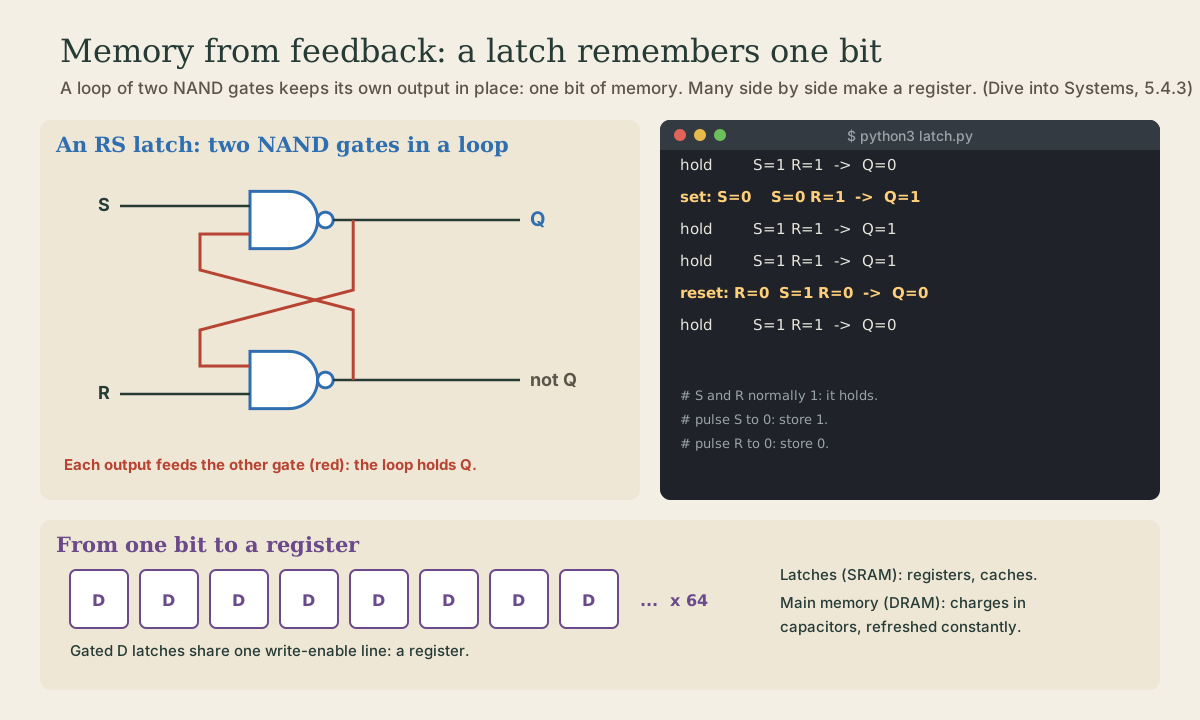
The simplest memory circuit is two NAND gates, each one’s output wired into the other’s input. It’s a reset-set latch, or RS latch, and it has two inputs, S (set) and R (reset), and an output Q, the stored bit 1.
How it holds: with S and R both 1, the loop is stable. Say Q is 1. Then the bottom gate gets 1 (from Q) and 1 (R), so it outputs 0; that 0 goes into the top gate along with S’s 1, so the top gate outputs 1, which is Q, unchanged. The loop keeps reinforcing itself 1.
How it changes: briefly set exactly one input to 0 1.
- S to 0 stores 1: the top gate now has a 0 input, so it outputs 1 whatever else is happening.
- R to 0 stores 0, through the bottom gate in the same way.
Then the input goes back to 1, and the latch holds the new value. S and R are never both 0 at once; the circuitry around the latch prevents it 1.
Quick check
With S and R both 1, the loop’s outputs reinforce each other, so Q stays as it is.
Watching it work
This program models the two gates and recomputes them until their outputs stop changing, which is what the real circuit does in a fraction of a nanosecond. Save it as latch.py:
# latch.py: one bit of memory from two NAND gates feeding each other.

def nand(a, b):
    return 0 if (a and b) else 1

class RSLatch:
    """S and R are normally 1. Pulse S to 0 to store 1; pulse R to 0 to store 0."""
    def __init__(self):
        self.q, self.not_q = 0, 1

    def settle(self, s, r):
        # Each gate's output feeds the other's input; repeat until nothing changes.
        while True:
            q = nand(s, self.not_q)
            not_q = nand(r, q)
            if (q, not_q) == (self.q, self.not_q):
                return self.q
            self.q, self.not_q = q, not_q

class DLatch:
    """Stores D when write enable (we) is 1; ignores D when we is 0."""
    def __init__(self):
        self.rs = RSLatch()

    def update(self, d, we):
        s = nand(d, we)
        r = nand(nand(d, d), we)
        return self.rs.settle(s, r)

if __name__ == "__main__":
    latch = RSLatch()
    steps = [("hold", 1, 1), ("set: S=0", 0, 1), ("hold", 1, 1), ("hold", 1, 1), ("reset: R=0", 1, 0), ("hold", 1, 1)]
    for label, s, r in steps:
        print(f"{label:<11} S={s} R={r}  ->  Q={latch.settle(s, r)}")
    print()
    d = DLatch()
    for dv, we in [(1, 1), (0, 0), (0, 0), (0, 1), (1, 0)]:
        print(f"D={dv} WE={we}  ->  Q={d.update(dv, we)}")
A class groups some stored values (here q and not_q) with the functions that use them; self.q is the latch’s own stored bit, which lasts between calls, just as the circuit’s does. Run it:
me@linuxbox:~$ python3 latch.py
hold        S=1 R=1  ->  Q=0
set: S=0    S=0 R=1  ->  Q=1
hold        S=1 R=1  ->  Q=1
hold        S=1 R=1  ->  Q=1
reset: R=0  S=1 R=0  ->  Q=0
hold        S=1 R=1  ->  Q=0

D=1 WE=1  ->  Q=1
D=0 WE=0  ->  Q=1
D=0 WE=0  ->  Q=1
D=0 WE=1  ->  Q=0
D=1 WE=0  ->  Q=0
The first block is the RS latch: after the set pulse, Q stays 1 through two holds with nothing pushing it, until the reset pulse. That’s memory.
A D latch, then a register
Driving S and R directly is fiddly, and both 0 at once must never happen. A gated D latch adds two more NAND gates in front: a data input D, the bit to store, and a write enable WE. While WE is 0, D is ignored and the latch holds; while WE is 1, whatever is on D is stored 1. The second block of output shows it: D=0 does nothing while WE is 0, and is stored as soon as WE is 1.
Put many D latches side by side, each storing one bit of a number, all sharing one write-enable line, and you have a register: 64 of them make a 64-bit register, the processor’s fastest storage 1. Real processors also add a clock so that all their registers update in step, once per tick; that’s next module.
SRAM and DRAM
Memory built from circuits like this is static RAM, SRAM: it holds its bits as long as it has power, with no refreshing 1. It’s fast and expensive, so it’s used where speed matters most: the processor’s registers and its on-chip caches 1.
Your computer’s main memory, the gigabytes on its memory sticks, is dynamic RAM, DRAM. It stores each bit as a charge in a tiny capacitor, which is cheaper and much denser, but the charge leaks, so DRAM must be refreshed constantly, hence “dynamic” 1. Both kinds forget everything when the power goes off, which is why there’s also storage, SSDs and disks, and why the Linux course cared so much about writing data out before unplugging.
Quick check
Fast, expensive SRAM sits at the top of the memory hierarchy; DRAM gives gigabytes affordably.
Your turn
Exercises
- Trace the RS latch by hand: start with Q = 0, set S to 0, work out both gate outputs, then set S back to 1. Does Q stay 1?
- What would happen if S and R were both 0? (Work out both outputs.)
- Run
latch.py. Then change the D latch inputs to store 1, hold it, store 0, and hold again. - How many D latches make the 16 general-purpose 64-bit registers of a typical x86-64 processor?
- Find your computer’s memory size with
free -h. Is that SRAM or DRAM?
Answers
- With S = 0, the top gate outputs 1 (any 0 input gives NAND 1), so Q = 1; the bottom gate gets R = 1 and Q = 1, so outputs 0. When S returns to 1, the top gate gets 1 and 0, still outputting 1: Q stays 1.
- Both gates would output 1, so Q and “not Q” would both be 1, which makes no sense as a stored bit; that’s why the circuit around a latch never allows it.
- 16 × 64 = 1,024; x86-64 has sixteen general-purpose registers 1.
- DRAM: the gigabytes of main memory.
So
Combinational circuits forget; memory needs feedback. Two NAND gates feeding each other make an RS latch that holds one bit while S and R are 1, stores 1 when S is pulsed to 0, and stores 0 when R is. A gated D latch stores its data input only while write enable is 1, and 64 of them in a row make a 64-bit register. Circuit-based SRAM is fast and used for registers and caches; capacitor-based DRAM is dense and cheap, needs constant refreshing, and makes up main memory.
Lesson complete
Nice work.
Sources for this lesson
- 1Suzanne J. Matthews, Tia Newhall, Kevin C. Webb. Dive into Systems. No Starch Press (free online edition). 2022. verifiedCh. 4 Binary and Data Representation: bits as two voltage states, bytes (8 bits, 256 values, smallest addressable unit), words of 32 or 64 bits, n bits give 2^n values; decimal and binary place value with 0b and 0x prefixes; hexadecimal as four bits per digit; fixed storage sizes and unsigned ranges; two's complement with a negative-weighted top bit, one zero, range -2^(n-1) to 2^(n-1)-1, all ones is -1, negation by flipping bits and adding one; subtraction as adding the negation, reusing negation and addition circuits; overflow and the odometer analogy.