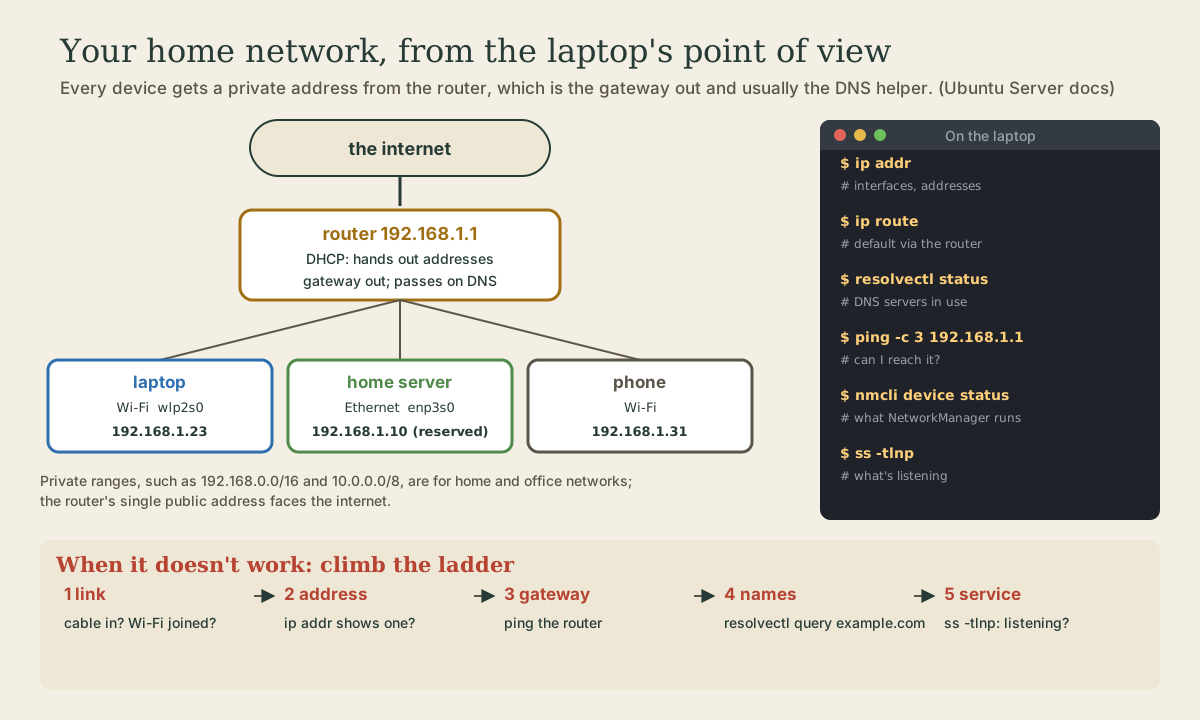
How Your Machine Is Connected
The pieces of a home network as Linux sees them: IP addresses, private ranges, and netmasks; network interfaces with predictable names; the router as DHCP server, gateway, and DNS helper; and names, through systemd-resolved, /etc/hosts, and .local names. The commands that show each piece, ip addr, ip route, resolvectl, nmcli, ping, and ss, a fixed address for a home server, and a five-step ladder for finding what's broken.
- 7 min
- 10 steps
- 2 questions
- Lesson 56 of 80
In this lesson
- Addresses
- Interfaces
- Routes and the gateway
- Names
- NetworkManager
- Testing a connection
- A fixed address for a server
- When something doesn’t work
- Your turn
- So
Picking up where you left off.
Addresses
Every device on a network has an IP address. An IPv4 address is four numbers from 0 to 255 separated by dots, like 192.168.1.23, 32 bits in all; an IPv6 address is eight groups of four hex digits separated by colons, 128 bits 1. Most home networks use both; IPv4 is the one you’ll type.
An address comes with a netmask, usually written as a slash and a number. In 192.168.1.23/24, the first 24 bits (192.168.1) name the network and the last 8 name the device on it, so everything from 192.168.1.0 to 192.168.1.255 is the same local network 1.
Home networks use private ranges, set aside for networks that don’t face the internet directly: 10.0.0.0/8, 172.16.0.0/12, and 192.168.0.0/16 2. Your router has one public address on the internet side and shares it among all your devices.
Interfaces
Each network connection is an interface. Ubuntu names wired ones predictably, from where the hardware sits, like eno1 or enp0s25; Wi-Fi interfaces start with wl, like wlp2s0; and lo, the loopback, is the machine talking to itself at 127.0.0.1 3. ip addr shows them all, from Ubuntu’s documentation 3 4:
$ ip addr
1: lo: <LOOPBACK,UP,LOWER_UP> mtu 65536 qdisc noqueue state UNKNOWN group default qlen 1000
    link/loopback 00:00:00:00:00:00 brd 00:00:00:00:00:00
    inet 127.0.0.1/8 scope host lo
       valid_lft forever preferred_lft forever
    inet6 ::1/128 scope host
       valid_lft forever preferred_lft forever
2: enp0s25: <BROADCAST,MULTICAST,UP,LOWER_UP> mtu 1500 qdisc noqueue state UP group default qlen 1000
    link/ether 00:16:3e:e2:52:42 brd ff:ff:ff:ff:ff:ff link-netnsid 0
    inet 10.102.66.200/24 brd 10.102.66.255 scope global dynamic eth0
       valid_lft 3257sec preferred_lft 3257sec
    inet6 fe80::216:3eff:fee2:5242/64 scope link
       valid_lft forever preferred_lft forever
For each interface: its state (UP), its hardware MAC address (link/ether), its IPv4 address with netmask (inet 10.102.66.200/24), and IPv6 addresses (inet6). dynamic means it was handed out by DHCP, and valid_lft is how long until it must be renewed. ip -br addr gives a one-line-per-interface summary.
Routes and the gateway
Anything for the local network goes straight there. Everything else goes to the gateway, normally your router, which passes it on toward the internet 1. ip route shows the routing table 5; the line that matters is the default route. On a typical home network:
default via 192.168.1.1 dev wlp2s0 proto dhcp metric 600
192.168.1.0/24 dev wlp2s0 proto kernel scope link src 192.168.1.23 metric 600
The first line sends everything not otherwise matched to 192.168.1.1 through the Wi-Fi interface; the second says the 192.168.1.0/24 network is reachable directly. If the default route is missing, local things work and the internet doesn’t.
The router usually does three jobs: hands out addresses by DHCP, acts as the gateway, and answers or passes on DNS questions 1.
Quick check
default via 192.168.1.1 dev wlp2s0?The default route says: anything not on the local network, send to this address.
Names
People use names; packets use addresses. DNS turns one into the other 1. On Ubuntu, a local service, systemd-resolved, handles lookups for every program, with a stub listener at 127.0.0.53 6. resolvectl asks it questions 7:
me@garden-laptop:~$ resolvectl status
me@garden-laptop:~$ resolvectl query example.com
status shows which DNS servers each interface is using, usually your router; query looks a name up and shows the address 7.
Two more sources of names:
/etc/hostsmaps names to addresses by hand, one line per host 8. Names listed there work even when DNS doesn’t know them, handy for a machine on your own network..localnames. Avahi lets machines on the same network find each other by name, ashostname.local, with no DNS server involved 9. If it’s running on both, the server namedgarden-serveris reachable asgarden-server.local.
NetworkManager
On Ubuntu Desktop, NetworkManager runs the connections, behind the network menu at the top right, and nmcli is its command-line side 10:
me@garden-laptop:~$ nmcli device status
me@garden-laptop:~$ nmcli device wifi list
me@garden-laptop:~$ nmcli --ask device wifi connect "Garden Wi-Fi"
device status lists interfaces and their connections; wifi list shows networks in range; wifi connect joins one; --ask makes nmcli prompt for the password, so it doesn’t land in your shell history 10. Ubuntu Server uses Netplan files in /etc/netplan/ instead 1.
Testing a connection
me@garden-laptop:~$ ping -c 3 192.168.1.1
me@garden-laptop:~$ ss -tlnp
ping sends small echo requests and reports the replies and round-trip times; -c 3 stops after three 11. Some devices ignore pings, so silence isn’t always failure.
ss lists network sockets 12. With -t (TCP), -l (listening only), -n (numbers, not names), and -p (which program, needing sudo for others’ programs), it shows what’s waiting for connections on this machine: port 22 for an SSH server, 631 for printing, and so on 12.
A fixed address for a server
DHCP addresses can change. For a machine others connect to, like the home server this course ends with, give it a fixed address. The simplest way is in your router’s settings: a “DHCP reservation” (sometimes “address reservation” or “static lease”) ties an address to the machine’s MAC address from ip addr. Every router’s admin page is different; the name of the setting is what to look for. With .local names working, you may not even need it.
When something doesn’t work
Climb the ladder from the bottom, and stop at the first rung that fails:
- Link. Is the cable plugged in, or Wi-Fi joined?
nmcli device statussaysconnectedor not. - Address. Does
ip addrshow aninetaddress on that interface? If there’s none, or it’s in169.254.0.0/16, the range a device gives itself when it can’t get one by DHCP, DHCP didn’t work 2. - Gateway. Does
ping -c 3to the router’s address (fromip route) get replies? - Names. Does
resolvectl query example.comreturn an address? If pinging an address works but names fail, it’s DNS. - Service. On the machine you’re connecting to, is the program listening?
ss -tlnp. Is a firewall in the way (module 6)?
Check the journal too: journalctl -b -u NetworkManager.
Quick check
Reaching the router proves link, address, and gateway. Failing to look up a name points at DNS.
Your turn
Exercises
ip -br addrandip addr. What’s your address, netmask, and MAC address? Is the address from DHCP?ip route. What’s your gateway? Ping it.resolvectl status: which DNS servers are you using?resolvectl querya few names.cat /etc/hosts. What’s in it already?nmcli device statusandnmcli device wifi list(on a laptop).sudo ss -tlnp. What’s listening on your machine, and which programs?- From another computer on the network, try
ping yourhostname.local(find your host name withhostname).
Answers
- An
inetline like192.168.1.23/24withdynamic; the MAC is thelink/ethervalue. - The address after
default via, usually ending.1or.254. - At least
127.0.0.1 localhost, a line for your own host name, and some IPv6 entries. - Typically systemd-resolved on port 53 (bound to 127.0.0.53), CUPS on 631 (127.0.0.1), and anything else you’ve installed. Programs listening only on
127.0.0.1can’t be reached from other machines. - If it fails, Avahi may not be running on one of the machines; using the IP address works regardless.
So
Each interface (lo, enp..., wlp...) has an address and netmask, usually from DHCP; home networks use private ranges like 192.168.0.0/16. ip addr shows addresses, ip route the default route to the gateway (your router), resolvectl the DNS in use through systemd-resolved, nmcli NetworkManager’s connections, ping whether something answers, and ss -tlnp what’s listening. /etc/hosts and .local names add names without DNS. Give a server a fixed address with a reservation in the router. When it breaks, check link, address, gateway, names, then service.
Lesson complete
Nice work.
Sources for this lesson
- 1Networking key concepts (Ubuntu Server documentation). Canonical. verifiedTCP/IP; IPv4 addresses as four numbers 0-255 (32 bits) and IPv6 as eight groups of four hex digits (128 bits); netmasks in CIDR form such as /24; network and broadcast addresses; the gateway, usually a router, for reaching other networks; nameservers resolve hostnames to addresses; on Ubuntu Server, addresses, routes, and nameservers are set in Netplan files in /etc/netplan/; TCP vs UDP.
- 2Private network. Wikipedia. verifiedPrivate IPv4 ranges: 10.0.0.0/8, 172.16.0.0/12, 192.168.0.0/16. Link-local 169.254.0.0/16 is used when a host can't get an address via DHCP.
- 3Configuring networks (Ubuntu Server documentation). Canonical. verifiedPredictable interface names such as eno1 or enp0s25; example ip addr output showing lo with 127.0.0.1/8 and an Ethernet interface with a dynamic (DHCP) address, MAC address, and IPv6 link address; netplan status; temporary configuration with ip addr add and ip link set.
- 4ip-address(8) manual page. man7.org (Linux man-pages). verifiedip address show: protocol addresses on each device, with state, link-layer address, and inet/inet6 addresses.
- 5ip-route(8) manual page. man7.org (Linux man-pages). verifiedRouting table management; ip route show lists routes, including the default route via a gateway.
- 6systemd-resolved.service(8) manual page. man7.org (Linux man-pages). verifiedNetwork name resolution service; provides a local DNS stub listener on 127.0.0.53 and 127.0.0.54.
- 7resolvectl(1) manual page. man7.org (Linux man-pages). verifiedquery resolves host names and addresses via systemd-resolved; status (the default) shows global and per-link DNS settings in effect.
- 8hosts(5) manual page. man7.org (Linux man-pages). verified/etc/hosts: a static table associating IP addresses with host names, one line per host.
- 9Avahi. ArchWiki. verifiedZero-configuration networking; Avahi provides local hostname resolution using a hostname.local naming scheme (with nss-mdns and avahi-daemon).
- 10nmcli (NetworkManager Reference Manual). NetworkManager project. verifiedCommand-line tool for controlling NetworkManager: device status (default), device show, device wifi list (rescans if older than 30 seconds), device wifi connect SSID [password ...]; -a/--ask prompts for missing arguments such as a password.
- 11ping(8) manual page. man7.org (Linux man-pages). verifiedSends ICMP ECHO_REQUEST to network hosts; -c count stops after sending count requests.
- 12ss(8) manual page. man7.org (Linux man-pages). verifiedInvestigate sockets: -t TCP, -u UDP, -l listening only, -p processes using sockets, -n numeric (don't resolve service names).