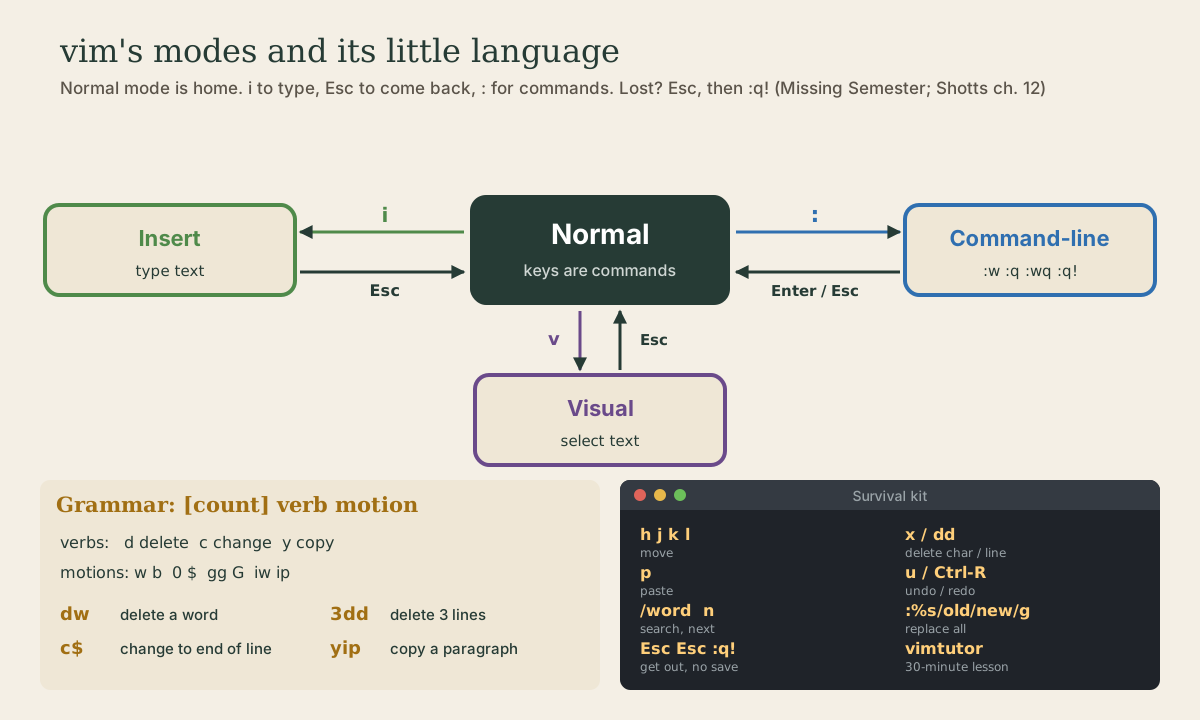
vim Essentials
Why learn vi: it's on every Unix system, required by POSIX, and you'll land in it sooner or later. vim's modes (Normal, Insert, Visual, Command-line), how to get out (Esc, :q!), and how to save. Moving, deleting, copying, and pasting; undo and redo; search and search-and-replace. The verb-plus-motion grammar that makes vim fast, vimtutor for practice, and a minimal ~/.vimrc.
- 5 min
- 9 steps
- 2 questions
- Lesson 20 of 80
In this lesson
- Why bother with vi
- Modes
- Getting in and out
- Moving around
- Changing text
- The language of Normal mode
- Practice and a .vimrc
- Your turn
- So
Picking up where you left off.
Why bother with vi
You can do everything in this course with nano. So why learn vi too? Because it’s always there. The POSIX standard for Unix systems requires vi, so it’s on every server, rescue system, and minimal container, including ones without nano 1. Sooner or later some program (git, crontab -e, visudo) will drop you into it, and you need to know at least how to save and get out. And once learned, vim is very fast: you edit without leaving the home row of the keyboard 1 2.
vi was written by Bill Joy in 1976. Linux systems ship vim, “vi improved,” usually under both names 1.
Modes
vim is a modal editor: the same key does different things in different modes 2:
- Normal mode, where you start: keys are commands (move, delete, copy). Typing
xdeletes a character. - Insert mode: keys type text, like any editor.
- Visual mode: select text, then act on it.
- Command-line mode: type a command after
:, like:wto save.
Esc always takes you back to Normal mode 2. When in doubt, press Esc.
Getting in and out
me@linuxbox:~$ vim notes.txt
| Keys | Does |
|---|---|
i |
Insert before the cursor (start typing) |
a, A |
Insert after the cursor, at the end of the line |
o, O |
Open a new line below, above, and insert |
| Esc | Back to Normal mode |
:w |
Save (“write”) |
:wq or :x |
Save and quit |
:q |
Quit (refuses if there are unsaved changes) |
:q! |
Quit and throw away changes |
Lost and want out without saving: Esc, Esc, :q!, Enter.
Quick check
Esc puts you back in Normal mode; :q! quits and throws away changes. :wq would save the junk.
Changing text
The main editing commands, all in Normal mode 1 2:
| Keys | Does |
|---|---|
x |
delete the character under the cursor |
dd |
delete (cut) the line |
yy |
yank (copy) the line |
p, P |
paste after, before |
u |
undo |
| Ctrl-R | redo |
. |
repeat the last change |
J |
join this line and the next |
Search with /word and Enter; n finds the next match, N the previous 1. Replace with a command 1:
:%s/oldword/newword/g      every match in the file (% = all lines, g = every match on a line)
:%s/oldword/newword/gc     the same, asking about each one
The language of Normal mode
What makes vim fast is that its commands combine. Many Normal-mode commands are a verb followed by a motion, optionally with a count 2:
- Verbs:
ddelete,cchange (delete and go into Insert mode),yyank (copy). - Motions: anything that moves, like
w,b,$,0,G, plus “text objects” likeiw(inner word),i"(inside quotes), andip(inner paragraph).
So dw deletes a word, d$ deletes to the end of the line, 3dd deletes three lines, ci" changes the text inside quotes, and yip copies a paragraph. Learn a few verbs and a few motions and you know dozens of commands 2.
Quick check
d2w do?Verb d (delete), count 2, motion w (word). 2dd would delete two lines.
Practice and a .vimrc
Run vimtutor. It’s a lesson that comes installed with vim, takes about half an hour, and is the best way to get the keys into your fingers 2. Then do your next few small edits in vim instead of nano.
A small ~/.vimrc makes it friendlier:
syntax on
set number
set relativenumber
set expandtab shiftwidth=4 tabstop=4
set ignorecase smartcase
set incsearch hlsearch
Your turn
Exercises
- Run
vimtutorand work through at least lessons 1 and 2. - Open
~/shell-course/shopping.txtin vim, add a line at the bottom withGtheno, save and quit with:wq. - Open it again, delete the first line with
dd, then undo withu. Leave without saving. - Replace every
oat milkwithwhole milk, confirming each one. - Make vim your editor for one command only:
EDITOR=vim sudoedit /etc/hostname, then quit without saving.
Answers
vim ~/shell-course/shopping.txt,G,o, type the item, Esc,:wq.gg,dd,u, then:q!(or just:q, since undoing restored the file to its saved state).:%s/oat milk/whole milk/gc, thenyfor each match.- sudoedit opens vim on a copy of the file;
:q!leaves it unchanged.EDITOR=vimbefore a command sets the variable just for that command.
So
vi is on every Unix system, so learn at least the way out: Esc, then :q! to quit without saving or :wq to save. vim starts in Normal mode, where keys are commands; i to type, Esc to come back. Its commands combine as verb plus motion (dw, 3dd, ci"), and vimtutor teaches the rest in half an hour.
Lesson complete
Nice work.
Sources for this lesson
- 1William Shotts. The Linux Command Line, Seventh Internet Edition (25.12A). LinuxCommand.org (print edition by No Starch Press). 2026. verifiedFree CC BY-NC-ND 3.0 book, release 25.12A of July 18, 2026. Part 1, Learning the Shell: the shell and terminal emulators, prompts ($ vs. # for the superuser), command history (most distributions keep the last 1,000 commands), Shift-Ctrl-C/V for copy and paste; navigation and the directory tree; exploring the system (ls options and the long listing, file, less, the guided tour of /, symbolic links); manipulating files (wildcards and character classes, mkdir, cp, mv, rm, ln; no undelete, test wildcards with ls first); working with commands (four kinds of commands, type, which, help, --help, man and its sections, apropos, whatis, info, alias); redirection; expansion and quoting; Readline keyboard tricks, completion, history search; permissions; processes. Later parts cover the environment, vi, packages, storage, networking, find, archiving, regular expressions, text processing, and shell scripting.
- 2Anish Athalye, Jon Gjengset, Jose Javier Gonzalez Ortiz. Editors (Vim) (The Missing Semester of Your CS Education, 2020). MIT CSAIL. 2020. verifiedCC BY-NC-SA. Vim is the most popular command-line editor and a modal editor: Normal (move and edit), Insert, Replace, Visual (plain, line, block), and Command-line modes; Esc returns to Normal. :w, :q, :wq, :e, :help. Vim's interface is a programming language: movements are nouns (hjkl, w b e, 0 ^ $, gg G, search /), edits are verbs (d delete, c change, y yank, p paste, u undo, Ctrl-R redo, x, ., o/O), counts multiply, and text objects (i( a( i") select. vimtutor comes installed with Vim.