Changing Permissions and Ownership
chmod in octal (644, 755, 600, 700, and why r=4, w=2, x=1) and in symbolic form (u, g, o, a with +, -, =). Make a script runnable with chmod +x. umask sets what new files start with. chown and chgrp change owners. The three special bits: setuid (how passwd works), setgid on shared folders, and the sticky bit on /tmp. A worked shared-folder example.
- 7 min
- 9 steps
- 3 questions
- Lesson 8 of 80
In this lesson
- Octal modes
- Symbolic modes
- Making a script runnable
- umask: what new files start with
- Changing owners
- The special bits
- A shared folder, start to finish
- Your turn
- So
Picking up where you left off.
Octal modes
chmod (change mode) sets permissions. Only a file’s owner, or root, can change them 1.
The fast way is three digits, one each for owner, group, and others. Each digit adds up the permissions it grants 1:
| Digit | Binary | Means |
|---|---|---|
| 7 | 111 | rwx |
| 6 | 110 | rw- |
| 5 | 101 | r-x |
| 4 | 100 | r-- |
| 0 | 000 | --- |
Read = 4, write = 2, execute = 1; add them. That’s why these numbers are octal: each digit holds exactly three bits 1.
me@linuxbox:~$ chmod 600 secrets.txt      # rw-------  private file
me@linuxbox:~$ chmod 644 notes.txt        # rw-r--r--  normal file
me@linuxbox:~$ chmod 755 tools            # rwxr-xr-x  normal folder or program
me@linuxbox:~$ chmod 700 private          # rwx------  private folder
Those four, plus 664 and 775 for shared group work, cover nearly everything you’ll ever set 1.
Quick check
6 = 4+2 (rw-), 4 = r–, 0 = —.
Symbolic modes
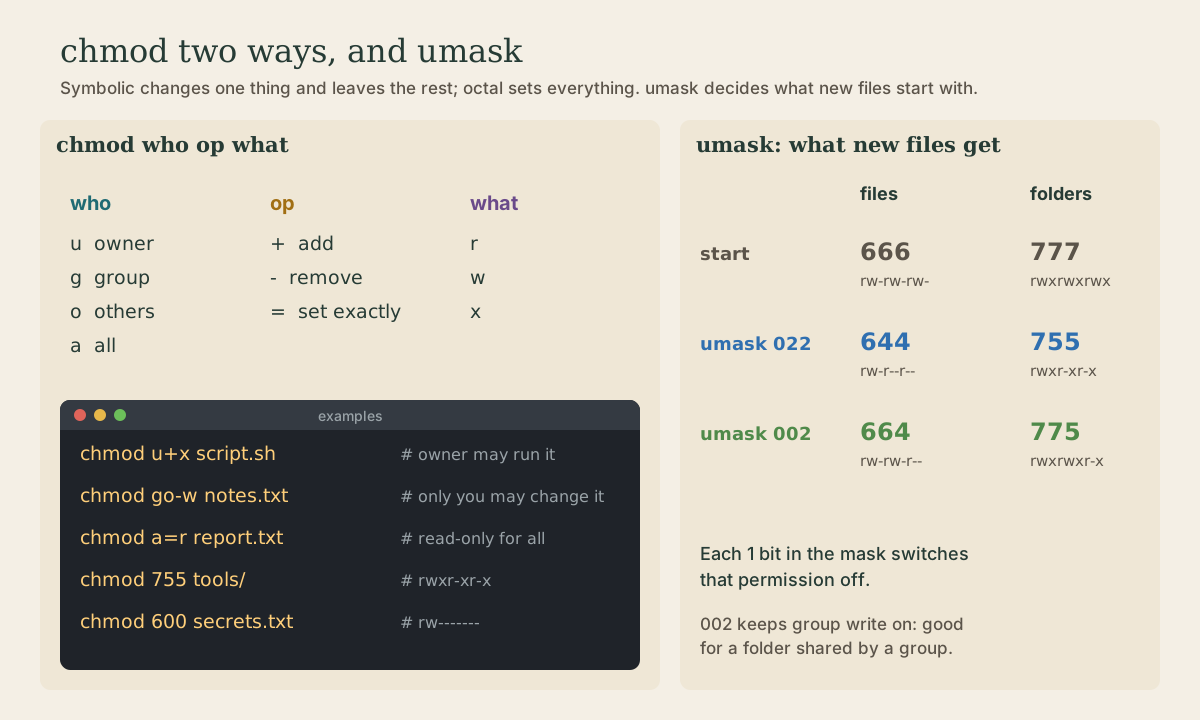
The other form names who, an operation, and which permissions 1:
- Who: u (user, the owner), g (group), o (others), a (all three). Leave it out and it means all.
- Operation: + add, - remove, = set exactly (and clear the rest).
- Which: r, w, x.
me@linuxbox:~$ chmod u+x backup.sh          # owner may run it
me@linuxbox:~$ chmod go-w notes.txt         # take write away from group and others
me@linuxbox:~$ chmod a=r report.txt         # read-only for everyone
me@linuxbox:~$ chmod u+x,go=rx tool         # several changes, comma-separated
The advantage: symbolic changes one thing and leaves everything else alone 1. Use octal when you know the whole mode you want, symbolic when you’re adjusting.
chmod -R changes a whole tree, but it applies the same mode to files and folders, which you rarely want 1. A trick worth knowing: capital X adds execute only to directories (and to files that already have it), so chmod -R u=rwX,go=rX folder gives folders 755 and files 644 in one pass.
Making a script runnable
A new file never has the execute bit, so a script you just wrote won’t run by name 2:
me@linuxbox:~$ ./hello.sh
bash: ./hello.sh: Permission denied
me@linuxbox:~$ chmod +x hello.sh
me@linuxbox:~$ ./hello.sh
Hello!
You’ll do this for every script you write. (The ./ means “the file in this directory”; module 5 explains why you need it.)
Quick check
A new file has no execute bit. Running it with sudo would fail the same way, and as root besides.
umask: what new files start with
When a program creates a file, it asks for rw-rw-rw- (666), and a directory rwxrwxrwx (777). The umask then switches some bits off: every 1 bit in the mask removes that permission 1.
me@linuxbox:~$ umask
0002
- 022 (a common default): new files 644, new folders 755. Only you can change them.
- 002 (common on desktop systems that give each user a private group): new files 664, folders 775. Your private group can write too, which is safe because only you are in it, and handy in shared folders 1.
Check yours with umask; under WSL it’s often 0022. You rarely need to change it. If you do, umask 022 lasts until the shell closes; put it in ~/.bashrc to keep it (module 5).
Changing owners
chown changes the owner and group; it needs root 1:
| Command | Result |
|---|---|
sudo chown bob file |
owner becomes bob |
sudo chown bob:users file |
owner bob, group users |
sudo chown :family file |
group only |
sudo chown bob: file |
owner bob, group bob’s login group |
chgrp family file changes just the group, and you can do it without root if you own the file and belong to the new group. Add -R to either for a whole tree.
The common case: you copied something with sudo cp, and the copy is owned by root. sudo chown me: thefile gives it back 1.
The special bits
Three more bits sit in front of the usual nine, as a fourth octal digit 1:
- setuid (4000, shows as
sin the owner’s x place): a program runs with its owner’s powers, not yours./usr/bin/passwdis-rwsr-xr-xand owned by root; that’s how you can change your own password in/etc/shadow, a file only root can write. Setuid programs are kept to a bare minimum for security. - setgid (2000,
sin the group’s x place): on a directory, new files inside get the directory’s group instead of the creator’s. That’s what makes shared folders work. - sticky (1000,
tin the others’ x place): on a directory, people can delete or rename only their own files./tmpisdrwxrwxrwt: everyone can write there, nobody can delete anyone else’s files.
Quick check
Without the sticky bit, write permission on the folder would let anyone delete anything in it.
A shared folder, start to finish
Two people, alex and sam, want a folder for household paperwork that both can edit 1:
alex@linuxbox:~$ sudo groupadd household
alex@linuxbox:~$ sudo usermod -aG household alex
alex@linuxbox:~$ sudo usermod -aG household sam
alex@linuxbox:~$ sudo mkdir /srv/household
alex@linuxbox:~$ sudo chown :household /srv/household
alex@linuxbox:~$ sudo chmod 2775 /srv/household
alex@linuxbox:~$ ls -ld /srv/household
drwxrwsr-x 2 root household 4096 Oct  5 08:30 /srv/household
groupaddmakes the group;usermod -aGappends each person to it. (Leave out the-aand you’d replace all their other groups.)- The folder belongs to group
householdwith mode 2775: group members can create files, others can look, and the setgid bit (thes) makes every new file belong tohousehold. - New group memberships take effect at your next login: log out and back in, or close WSL and reopen it, then check with
id. - With a umask of 002, files each of you creates there stay group-writable, so the other can edit them. With 022, set
umask 002in each person’s~/.bashrc1.
On Ubuntu, sudo adduser sam household does the same as usermod -aG 3.
Your turn
Exercises
- Create
test.txtand give it each of these modes in turn, checking withls -l: 600, 644, 664, 400. Then try to write to it (echo hi >> test.txt) at 400. What happens? - Translate to octal:
rwxr-x---,rw-rw-r--,r--------. - Use symbolic chmod to take away all permissions from others on your home directory without touching the owner or group bits.
- What umask would make new files 640 and new folders 750?
- Find three setuid programs on your system with
ls -l /usr/bin | grep rws.
Answers
- At 400 (
r--------), appending fails with “Permission denied,” even though you own it. You can stillchmodit back, because owners can always change modes. - 750, 664, 400.
chmod o= ~(orchmod o-rwx ~).- 027: it removes write from group (2) and everything from others (7). 666 minus those bits is 640; 777 is 750.
- Usually
passwd,sudo,su,mount,umount,chsh,newgrp,gpasswd. Each needs root’s power for one narrow job.
So
Set permissions with chmod: three octal digits (r=4, w=2, x=1) for a full mode, or u/g/o/a with + - = to adjust one thing. chmod +x makes a script runnable, umask decides how new files start, and chown changes owners. The setuid, setgid, and sticky bits explain passwd, shared folders, and /tmp.
Lesson complete
Nice work.
Sources for this lesson
- 1William Shotts. The Linux Command Line, Seventh Internet Edition (25.12A). LinuxCommand.org (print edition by No Starch Press). 2026. verifiedFree CC BY-NC-ND 3.0 book, release 25.12A of July 18, 2026. Part 1, Learning the Shell: the shell and terminal emulators, prompts ($ vs. # for the superuser), command history (most distributions keep the last 1,000 commands), Shift-Ctrl-C/V for copy and paste; navigation and the directory tree; exploring the system (ls options and the long listing, file, less, the guided tour of /, symbolic links); manipulating files (wildcards and character classes, mkdir, cp, mv, rm, ln; no undelete, test wildcards with ls first); working with commands (four kinds of commands, type, which, help, --help, man and its sections, apropos, whatis, info, alias); redirection; expansion and quoting; Readline keyboard tricks, completion, history search; permissions; processes. Later parts cover the environment, vi, packages, storage, networking, find, archiving, regular expressions, text processing, and shell scripting.
- 2Anish Athalye, Jon Gjengset, Jose Javier Gonzalez Ortiz. Course Overview + Introduction to the Shell (The Missing Semester of Your CS Education, 2026). MIT CSAIL. 2026. verifiedCC BY-NC-SA lecture notes. The shell is a textual interface for running programs and wiring them together; a terminal is the visual interface to it. Bash is the most widely used shell (zsh and fish are popular alternatives); on Windows use WSL or a Linux VM. The shell splits a command at whitespace: first word the program, the rest arguments; quote or backslash-escape spaces. man and --help, plus tldr for examples; cd is a shell builtin; Tab completion; pwd and $PWD; absolute vs. relative paths, . and ..; $PATH lists the directories searched for programs, which shows the one found. Basic tools cat, sort, uniq, head, tail, grep.
- 3User management (Ubuntu Server documentation). Canonical. verifiedUbuntu disables the root account by giving it a password hash that matches nothing; sudo lets an authorized user elevate privileges with their own password, providing accountability. From Ubuntu 25.10 sudo is provided by sudo-rs (Rust), with the original sudo kept as sudo.ws through 26.04 LTS; most use is unchanged. sudo passwd enables root, sudo passwd -l root disables it. The installer's first user is in group sudo, which /etc/sudoers authorizes; add others to that group for full sudo. Local users in /etc/passwd and groups in /etc/group; UID 0-99 preinstalled system users, 100-999 dynamic system users, 1000 and up regular users. adduser, deluser (home folder kept), passwd -l/-u, addgroup, adduser user group.