Arguments and Functions
Positional parameters: $0, $1 to $9, ${10}, $#, "$@" versus "$*", and shift. Defaults and required arguments with ${1:-...} and ${1:?...}, usage messages, and options with getopts. Functions with arguments, local variables, return statuses, and output captured with $( ). Arrays for lists that may contain spaces. Temporary files with mktemp, cleanup with trap, and the main "$@" layout.
- 8 min
- 9 steps
- 3 questions
- Lesson 23 of 80
In this lesson
- Positional parameters
- Defaults and required arguments
- Options with getopts
- Functions
- Arrays
- Temporary files and cleanup
- The main “$@” layout
- Your turn
- So
Picking up where you left off.
Positional parameters
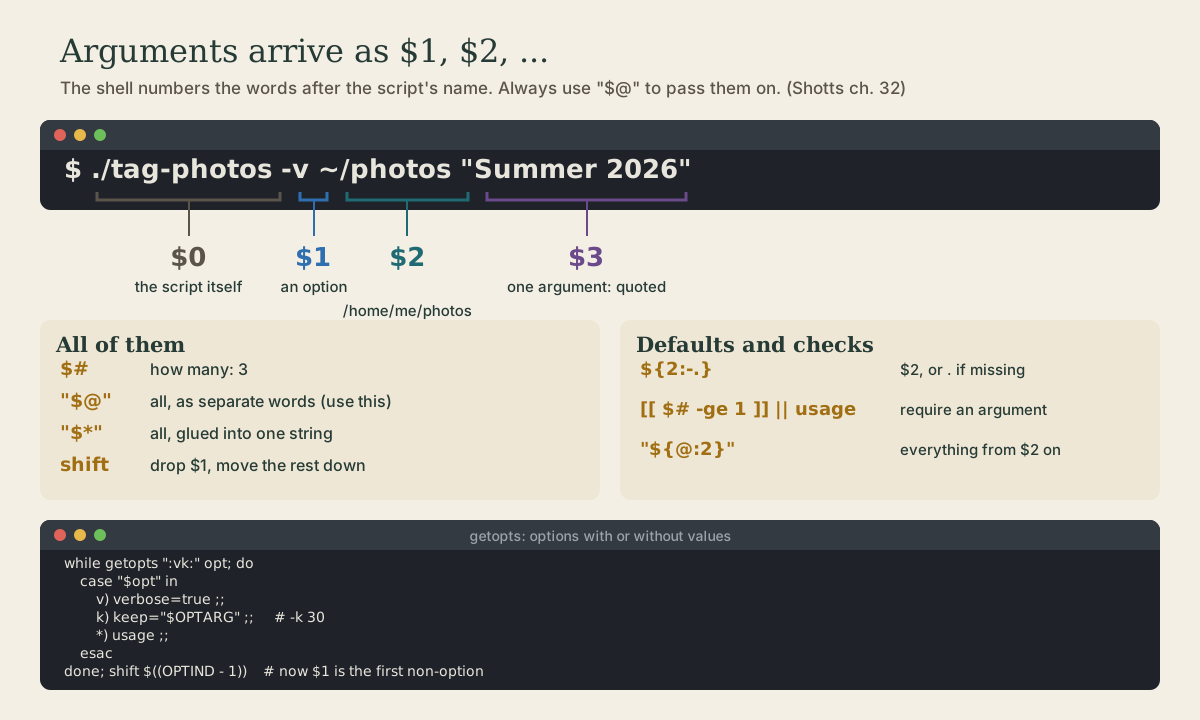
When you run a script with arguments, the shell numbers them 1:
me@linuxbox:~$ ./tag-photos -v ~/photos "Summer 2026"
| Parameter | Holds |
|---|---|
$0 |
the script’s name as typed: ./tag-photos |
$1, $2, … $9 |
the arguments: -v, /home/me/photos, Summer 2026 |
${10} |
the tenth and later need braces |
$# |
how many arguments: 3 |
"$@" |
all of them, each as a separate word |
"$*" |
all of them joined into one string |
By the time your script sees them, the shell has already expanded ~ and wildcards and removed the quotes, which is why "Summer 2026" arrives as one argument 1.
"$@" is the one to use for passing arguments on, to a loop or another command. It keeps each argument intact, spaces and all; unquoted $@ or $* would split them 1 2:
for f in "$@"; do
    echo "processing $f"
done
shift drops $1 and moves everything down one: $2 becomes $1, and $# goes down by one. It’s how you peel arguments off the front 1.
Quick check
./backup.sh "My Documents" photos. What is $#?The quotes make My Documents one argument, so there are two: $1 and $2.
Defaults and required arguments
Bash’s parameter expansions handle missing arguments in one line 3:
dir="${1:-.}"                                  # $1, or . if it's missing or empty
name="${2:?usage: greet DIR NAME}"             # stop with this message if $2 is missing
For more than a quick check, write a usage function, print it to stderr, and exit with status 2, the convention for “used wrongly”:
usage() {
    echo "Usage: $(basename "$0") [-v] DIR..." >&2
    exit 2
}
[[ $# -ge 1 ]] || usage
Options with getopts
getopts handles single-letter options like -v and -k 30, in any order and combined like -vk 30 3 2:
verbose=false
keep=14
while getopts ":vk:" opt; do
    case "$opt" in
        v) verbose=true ;;
        k) keep="$OPTARG" ;;
        *) usage ;;
    esac
done
shift $((OPTIND - 1))     # remove the options; now $1 is the first real argument
The option string ":vk:" lists the letters; a colon after a letter (k:) means it takes a value, delivered in $OPTARG. The leading colon lets your *) branch handle bad options quietly. After the loop, shift $((OPTIND - 1)) discards the options so the remaining arguments start at $1.
Functions
A function is a named block of commands, written before it’s used 1 2:
log() {
    echo "$(date '+%F %T') $*"
}

human_size() {
    local path="$1"
    du -sh -- "$path" | cut -f1
}

log "starting"
size=$(human_size ~/photos)
log "photos take up $size"
Inside a function, $1, $2, and "$@" are the function’s arguments, not the script’s 3.
localmakes a variable belong to the function. Without it, every variable in bash is global, and a function can silently overwrite a variable the rest of the script uses 2.- A function’s exit status is that of its last command, or set it with
return 0,return 1. That makes functions usable inifand&&1. - To get a value out, have the function print it and capture it with
$( ), as withsize=$(human_size ...)above.
Quick check
local?Without local, every variable in bash is global to the script.
Arrays
When you need a list whose items may contain spaces, use an array, not a space-separated string 1 3:
sources=("$HOME/Documents" "$HOME/photos" "$HOME/My Projects")
sources+=("$HOME/shell-course")            # add one

echo "${#sources[@]} folders"               # how many: 4
for src in "${sources[@]}"; do               # each item, intact
    echo "will back up: $src"
done
rsync -a "${sources[@]}" /media/me/backup/   # all items as separate arguments
"${array[@]}" works exactly like "$@": each item becomes one word. Arrays are also the clean way to build up a command’s options a piece at a time, as the project in the next lesson does.
Temporary files and cleanup
Scripts often need a scratch file. mktemp creates one with a unique name, so two runs can’t collide. trap runs a command when the script exits, whether it finishes, fails, or is stopped with Ctrl-C 4 3:
tmp=$(mktemp)
trap 'rm -f "$tmp"' EXIT

sort "$1" | uniq -c > "$tmp"
sort -rn "$tmp" | head
The temporary file is removed no matter how the script ends.
Quick check
trap cleanup EXIT do?It’s the standard way to remove temporary files no matter how the script ends.
The main “$@” layout
Google’s style guide recommends that any script with functions put its top-level code in a function called main, called on the last line with all the arguments 2:
#!/bin/bash
# tidy: one-line description
set -euo pipefail

usage() { ...; }
log()   { ...; }

main() {
    local verbose=false
    # parse options, check arguments, do the work
}

main "$@"
Everything reads top to bottom: settings, helpers, the main logic, and one line that starts it. Variables in main can be local too.
Your turn
Exercises
- Write
argsthat prints how many arguments it got and then each one on its own line in brackets. Try./args one "two words" '*'. - Write
mkprojthat takes a project name (required, with a usage message) and an optional base folder (default~/projects), and createsbase/name/{notes,files,photos}. - Add a
-qoption tomkprojwith getopts that suppresses its “created …” message. - Write a function
count_files DIRthat prints the number of files under DIR, and use it in a loop over several folders given as arguments. - Write
topwords FILEthat uses a temp file and a trap to print the ten most common words in a text file.
Answers
-
For example:
#!/bin/bash
echo "$# arguments"
for a in "$@"; do echo "[$a]"; done
It prints
3 arguments, then[one],[two words],[*]; the quotes kept*from expanding. -
For example:
#!/bin/bash set -euo pipefail name="${1:?usage: mkproj NAME [BASE]}" base="${2:-$HOME/projects}" mkdir -p "$base/$name"/{notes,files,photos} echo "created $base/$name" -
Add
quiet=false; while getopts ":q" opt; do case "$opt" in q) quiet=true ;; *) echo "usage: mkproj [-q] NAME [BASE]" >&2; exit 2 ;; esac; done; shift $((OPTIND - 1))before reading$1, and print only if[[ "$quiet" == false ]]. -
For example:
count_files() { find "$1" -type f | wc -l } for d in "$@"; do echo "$d: $(count_files "$d")" done -
For example:
#!/bin/bash
set -euo pipefail
tmp=$(mktemp)
trap 'rm -f "$tmp"' EXIT
tr -cs '[:alpha:]' '\n' < "${1:?usage: topwords FILE}" | tr '[:upper:]' '[:lower:]' > "$tmp"
sort "$tmp" | uniq -c | sort -rn | head -10
So
Arguments arrive as $1, $2, …, counted by $#; pass them on with "$@", peel them off with shift, default them with ${1:-...}, and parse options with getopts. Functions take arguments the same way, keep their variables local, report success with their exit status, and return values by printing. Use arrays for lists, mktemp and trap ... EXIT for temporary files, and main "$@" to organize it all.
Lesson complete
Nice work.
Sources for this lesson
- 1William Shotts. The Linux Command Line, Seventh Internet Edition (25.12A). LinuxCommand.org (print edition by No Starch Press). 2026. verifiedFree CC BY-NC-ND 3.0 book, release 25.12A of July 18, 2026. Part 1, Learning the Shell: the shell and terminal emulators, prompts ($ vs. # for the superuser), command history (most distributions keep the last 1,000 commands), Shift-Ctrl-C/V for copy and paste; navigation and the directory tree; exploring the system (ls options and the long listing, file, less, the guided tour of /, symbolic links); manipulating files (wildcards and character classes, mkdir, cp, mv, rm, ln; no undelete, test wildcards with ls first); working with commands (four kinds of commands, type, which, help, --help, man and its sections, apropos, whatis, info, alias); redirection; expansion and quoting; Readline keyboard tricks, completion, history search; permissions; processes. Later parts cover the environment, vi, packages, storage, networking, find, archiving, regular expressions, text processing, and shell scripting.
- 2Shell Style Guide. Google. verifiedBash is the only shell allowed for executables, which start with #!/bin/bash; executables on PATH need no extension, libraries take .sh and aren't executable. Every file starts with a comment describing it; functions get header comments. Error messages go to STDERR. Quote variables and prefer "${var}"; use "$@" for arguments; prefer [[ ]] over [ ] and $( ) over backticks; use local in functions; constants readonly and capitalized; put the program in a main function called last with main "$@". Scripts over about 100 lines, or with non-straightforward control flow, should be rewritten in a more structured language.
- 3Chet Ramey, Brian Fox. Bash Reference Manual, Edition 5.3. GNU Project, Free Software Foundation. 2025. verifiedThe reference for Bash 5.3 (May 18, 2025). Redirections (3.6) are processed left to right and order matters: ls > dirlist 2>&1 sends both streams to dirlist, while ls 2>&1 > dirlist sends only standard output there. With set -o noclobber, > fails on an existing regular file and >| overrides it. &> word is equivalent to > word 2>&1 and &>> word to >> word 2>&1. Here documents (<<word, with <<- stripping leading tabs; quoting word disables expansion) and here strings (<<<). Expansions (3.5) happen in a fixed order: brace; tilde, parameter, arithmetic, and command substitution left to right; word splitting; filename expansion; quote removal last. Startup files (6.2): an interactive login shell reads /etc/profile then the first of ~/.bash_profile, ~/.bash_login, ~/.profile; an interactive non-login shell reads ~/.bashrc. HISTCONTROL (ignorespace, ignoredups, ignoreboth), HISTSIZE, HISTFILESIZE; set -x traces expanded commands; shell functions and variables, export.
- 4Anish Athalye, Jon Gjengset, Jose Javier Gonzalez Ortiz. Command-line Environment (The Missing Semester of Your CS Education, 2026). MIT CSAIL. 2026. verifiedCC BY-NC-SA. How shell programs communicate: arguments, streams, environment variables, return codes, and signals; scripts with #!/usr/bin/env bash, $1 and [[ -f $1 ]], exit codes, errors to >&2; trap with a cleanup function to remove temporary files on exit; signals, job control with Ctrl-Z, bg, fg, and nohup; terminal multiplexers and SSH.